Designing Database Models
Introduction: The Role of Models in Our Cooking App
Welcome back! In the last lesson, you learned how to set up a basic Express application and connect it to a SQLite database using Prisma. You also organized your code using a clear project structure. Now, we are ready to take the next step: designing the models that will represent our recipes, ingredients, and reviews in the database.
Models are blueprints for your data. They define what kind of information your app will store and how different pieces of data relate to each other. In our cooking app, models will help us keep track of recipes, the ingredients they use, and the reviews users leave.
By the end of this lesson, you will understand how to design these models and how to represent their relationships in code using Prisma.
From Real-World Concepts to ER Diagrams
Let’s start by thinking about the real-world things our app needs to keep track of:
- Recipes (like "Spaghetti Carbonara")
- Ingredients (like "eggs," "bacon," "spaghetti")
- Reviews (users rating and commenting on recipes)
To organize these, we use something called an Entity-Relationship (ER) diagram. This is a simple way to draw out how different types of data relate to each other.
Here’s a basic version for our app:
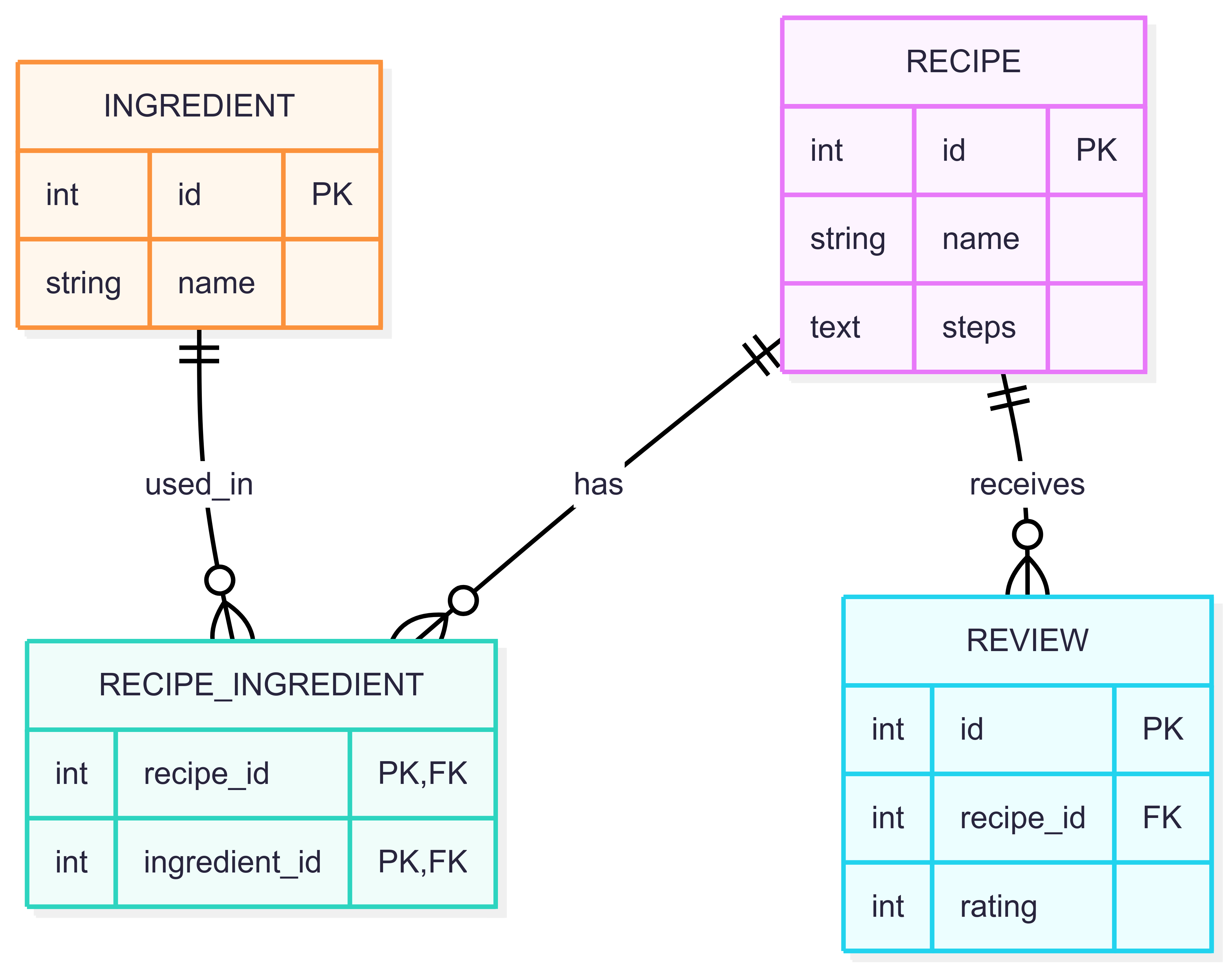
- A Recipe can have many Ingredients (and an ingredient can be used in many recipes).
- A Recipe can have many Reviews (but each review belongs to one recipe).
This diagram helps us plan how to structure our database tables and how they connect.
Understanding Primary Keys and Foreign Keys
Before we move on, let’s clarify two important concepts you’ll see in our models: primary keys and foreign keys.
What is a Primary Key?
A primary key is a unique identifier for each row in a database table. It makes sure that every record can be found and referenced easily. In Prisma, we define a primary key using the @id attribute.
For example, in our Prisma schema:
This means every recipe, ingredient, or review will have its own unique id.
What is a Foreign Key?
A foreign key is a field in one table that links to the primary key of another table. It creates a relationship between two tables.
For example, in the Review model:
Here, recipeId is a foreign key. It points to the id of a recipe, showing which recipe the review belongs to.
Foreign keys help keep data connected and consistent. For instance, a review must always be linked to a valid recipe.
Why Are They Important?
- Primary keys guarantee that each record is unique and can be referenced.
- Foreign keys connect related data across tables, enforcing relationships and data integrity.
Understanding these keys is essential for designing reliable databases and building relationships between your models.
Building Prisma Models from the ER Diagram
Now, let’s turn our ER diagram into actual code using Prisma. We’ll do this step by step.
All of our models will be defined in the prisma/schema.prisma file.
1. Setting Up the Prisma Schema
First, we need to set up the generator and datasource blocks in our Prisma schema:
This tells Prisma to use SQLite as our database and to generate a TypeScript client for us.
2. Creating the Many-to-Many Relationship Table
Recipes and ingredients have a many-to-many relationship. This means a recipe can have many ingredients, and an ingredient can be used in many recipes. In Prisma, we use an explicit join table for this relationship.
RecipeIngredientis a table that links recipes and ingredients.- Each row connects one recipe to one ingredient.
- The combination of
recipeIdandingredientIdis the primary key.
3. Defining the Ingredient Model
Now, let’s define the Ingredient model.
idis a unique number for each ingredient.nameis the ingredient’s name.recipesis a list ofRecipeIngredientrecords that link this ingredient to recipes.
4. Defining the Recipe Model
Next, let’s define the Recipe model.
idis a unique number for each recipe.nameis the recipe’s name.stepswill store the instructions for making the recipe.ingredientsis a list ofRecipeIngredientrecords that link this recipe to ingredients.reviewsis a list of reviews for this recipe.
5. Defining the Review Model
Finally, let’s define the Review model.
idis a unique number for each review.recipeIdlinks the review to a specific recipe, and if the recipe is deleted, the review will be deleted as well (onDelete: Cascade).ratingis the score given to the recipe.
Full Example: schema.prisma
Here is the complete Prisma schema for our cooking app:
Storing Recipe Steps: A Practical Approach
You might wonder how to store the steps for making a recipe. In some databases, you can store arrays or lists directly, but with SQLite (and many relational databases), this is not easy.
So, we use a simple trick: store all the steps as one long string, with each step separated by a newline character ("\n").
For example, if a recipe has these steps:
- Boil water.
- Add pasta.
- Cook for 10 minutes.
We store it like this in the steps field:
This way, we can save all the steps in one text field. Later, when we need to show the steps in our TypeScript code, we can split the string by "\n" to get each step back.
Summary And What’s Next
In this lesson, you learned how to:
- Plan your data using an ER diagram.
- Turn that plan into
Prismamodels for recipes, ingredients, and reviews. - Handle many-to-many and one-to-many relationships in your models.
- Store recipe steps as a single string separated by newlines.
You now have the foundation to build and use these models in your cooking app using Express, Prisma, and TypeScript. In the next practice exercises, you’ll get hands-on experience creating and working with these models in your project. This will help you get comfortable with designing and using database models in TypeScript.
