Welcome back! In the previous lesson, you learned how to set up the foundation of your project using a modern web framework. You organized your project files, configured the database connection, and prepared your app to serve static files and handle routes. Now, it's time to design the models that will represent recipes, ingredients, and reviews in your database.
Models are templates for your data. They define what kind of information your app will store and how different pieces of data relate to each other. In our cooking app, models will help us keep track of recipes, the ingredients they use, and the reviews users leave.
By the end of this lesson, you will understand how to design these models and how to represent their relationships in code using SQLAlchemy.
Before we dive in, let’s quickly remind ourselves of what we did in the previous lesson:
- We created a project structure for our app.
- We set up a database connection using SQLAlchemy.
- We prepared the app to serve static files and organized our routes.
This means our app is ready to store and manage data. Now, we need to decide what data to store and how to organize it. That’s where models come in.
Let’s start by thinking about the real-world things our app needs to keep track of:
- Recipes (like "Spaghetti Carbonara")
- Ingredients (like "eggs," "bacon," "spaghetti")
- Reviews (users rating and commenting on recipes)
To organize these, we use something called an Entity-Relationship (ER) diagram. This is a simple way to draw out how different types of data relate to each other.
Here’s a basic version for our app:
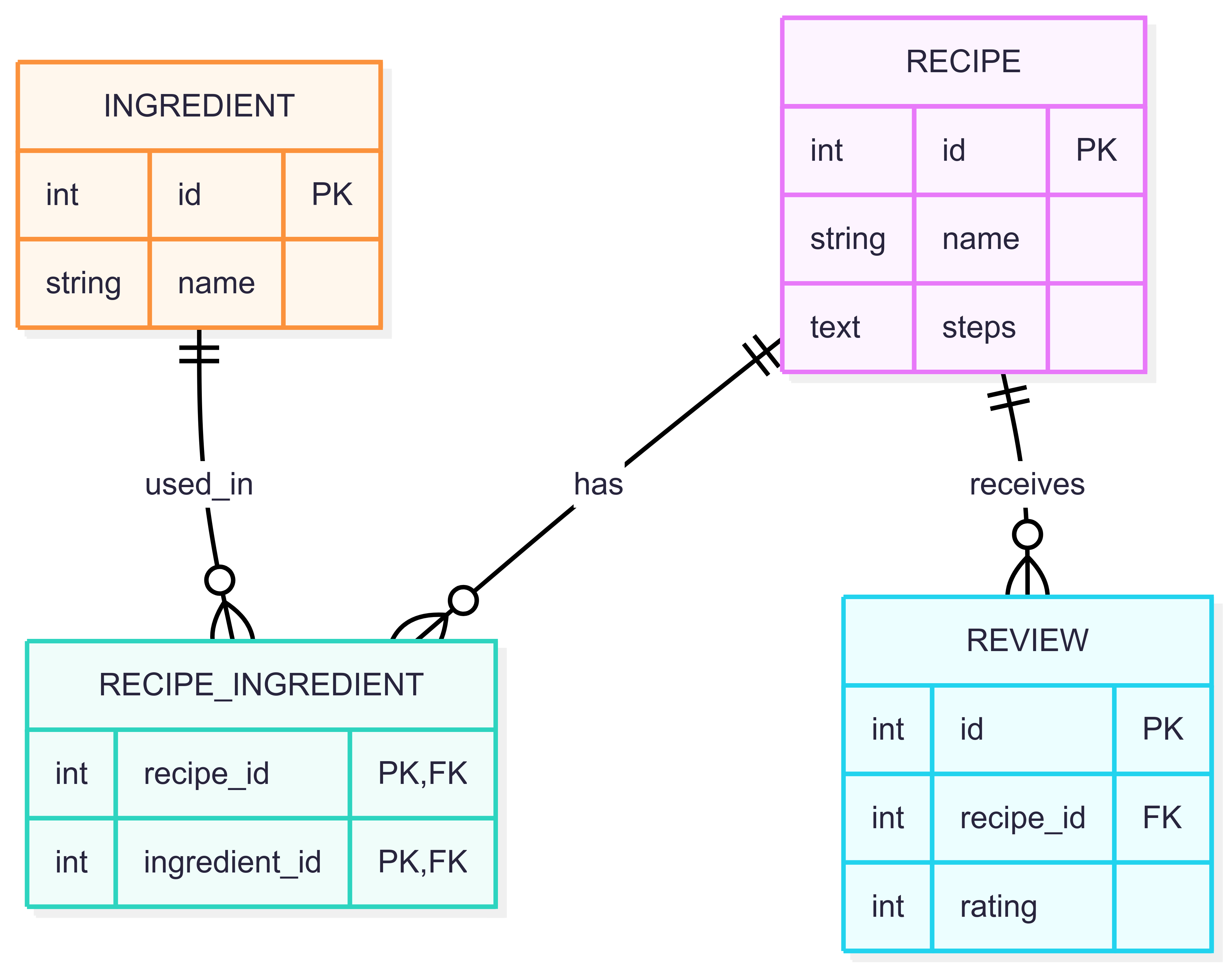
- A Recipe can have many Ingredients (and an ingredient can be used in many recipes).
- A Recipe can have many Reviews (but each review belongs to one recipe).
This diagram helps us plan how to structure our database tables and how they connect.
Before we move on, let’s clarify two important concepts you’ll see in our models: primary keys and foreign keys.
A primary key is a unique identifier for each row in a database table. It makes sure that every record can be found and referenced easily. In our models, the id field is the primary key for each table.
For example:
This means every recipe, ingredient, or review will have its own unique id.
A foreign key is a field in one table that links to the primary key of another table. It creates a relationship between two tables.
For example, in the Review model:
Here, recipe_id is a foreign key. It points to the id of a recipe, showing which recipe the review belongs to.
Foreign keys help keep data connected and consistent. For instance, a review must always be linked to a valid recipe.
- Primary keys guarantee that each record is unique and can be referenced.
- Foreign keys connect related data across tables, enforcing relationships and data integrity.
Understanding these keys is essential for designing reliable databases and building relationships between your models.
Now, let’s turn our ER diagram into actual code using SQLAlchemy. We’ll do this step by step.
Remember, we set up the base class for our models and the database session in the last unit. This is how we define models and interact with the database.
Baseis the base class for all our models.engineis the connection to our database.SessionLocalis used to create sessions for interacting with the database.
Recipes and ingredients have a many-to-many relationship. This means a recipe can have many ingredients, and an ingredient can be used in many recipes. In SQLAlchemy, we use a helper table for this.
recipe_ingredientis a table that links recipes and ingredients.- Each row connects one recipe to one ingredient.
Now, let’s define the Ingredient model.
idis a unique number for each ingredient.nameis the ingredient’s name.recipesis a list of recipes that use this ingredient. Theback_populatesargument links this relationship to theingredientsrelationship in theRecipemodel, so changes on one side are reflected on the other.
Next, let’s define the Recipe model.
idis a unique number for each recipe.nameis the recipe’s name.stepswill store the instructions for making the recipe.ingredientsis a list of ingredients used in the recipe.reviewsis a list of reviews for this recipe.
Finally, let’s define the Review model.
idis a unique number for each review.recipe_idlinks the review to a specific recipe, and if the recipe is deleted, the review will be deleted as well (ondelete="CASCADE").ratingis the score given to the recipe.
You might wonder how to store the steps for making a recipe. In some databases, you can store arrays or lists directly, but with SQLite (and many relational databases), this is not easy.
So, we use a simple trick: store all the steps as one long string, with each step separated by a newline character ("\n").
For example, if a recipe has these steps:
- Boil water.
- Add pasta.
- Cook for 10 minutes.
We store it like this:
This way, we can save all the steps in one text field. Later, when we need to show the steps, we can split the string by "\n" to get each step back.
This approach is simple and works well for our needs.
While SQLite is a great choice for small projects and prototyping, it has some important limitations to keep in mind:
- No Native JSON Type: Unlike some other databases (like PostgreSQL), SQLite does not have a native JSON column type. You can store JSON as plain text, but you won’t get advanced querying or indexing features for JSON data.
- Limited Support for Concurrent Writes: SQLite allows multiple processes to read from the database at the same time, but only one process can write to the database at any given moment. This can become a bottleneck if your app needs to handle many simultaneous writes.
- Different Indexing Behavior: SQLite’s indexing features are more limited compared to larger database systems. For example, it doesn’t support some advanced index types, and its query planner may behave differently, which can affect performance for complex queries.
These limitations are usually not a problem for small apps or learning projects, but it’s good to be aware of them as your app grows or if you plan to switch to a more robust database in the future.
In this lesson, you learned how to:
- Plan your data using an ER diagram.
- Turn that plan into SQLAlchemy models for recipes, ingredients, and reviews.
- Handle many-to-many and one-to-many relationships in your models.
- Store recipe steps as a single string separated by newlines.
You now have the foundation to build and use these models in your cooking app. In the next practice exercises, you’ll get hands-on experience creating and working with these models. This will help you get comfortable with designing and using database models in your project.
