Designing Database Models
Introduction: The Role of Models in Our Cooking App
Welcome back! In the previous lesson, you learned how to set up the foundation of your project. You organized your project files, configured essential settings, and prepared your environment to handle database migrations. Now, it is time to design the models that will represent recipes, ingredients, and reviews in your database.
Models are templates for your data. They define what kind of information your app will store and how different pieces of data relate to one another. In our cooking app, models will help us keep track of recipes, the ingredients they use, and the reviews users leave.
By the end of this lesson, you will understand how to design these models and how to represent their relationships in code using the framework's built-in model system.
Quick Recall: Project Initialization and Configuration
Before we dive in, let us quickly remind ourselves of what we did in the previous lesson:
- We created a structured project with specialized apps.
- We configured
settings.py, includingmiddlewareandCORSsettings, to allow communication with other services. - We learned to use management commands to prepare our database and start the development server.
This means our app is ready to store and manage data. Now, we must decide what data to store and how to organize it. That is where models come in.
From Real-World Concepts to ER Diagrams
Let us begin by thinking about the real-world entities our app needs to track:
- Recipes (like "Spaghetti Carbonara")
- Ingredients (like "eggs," "bacon," "spaghetti")
- Reviews (users rating and commenting on recipes)
To organize these, we use something called an Entity-Relationship (ER) diagram. This is a simple way to draw out how different types of data relate to one another.
Here is a basic version for our app:
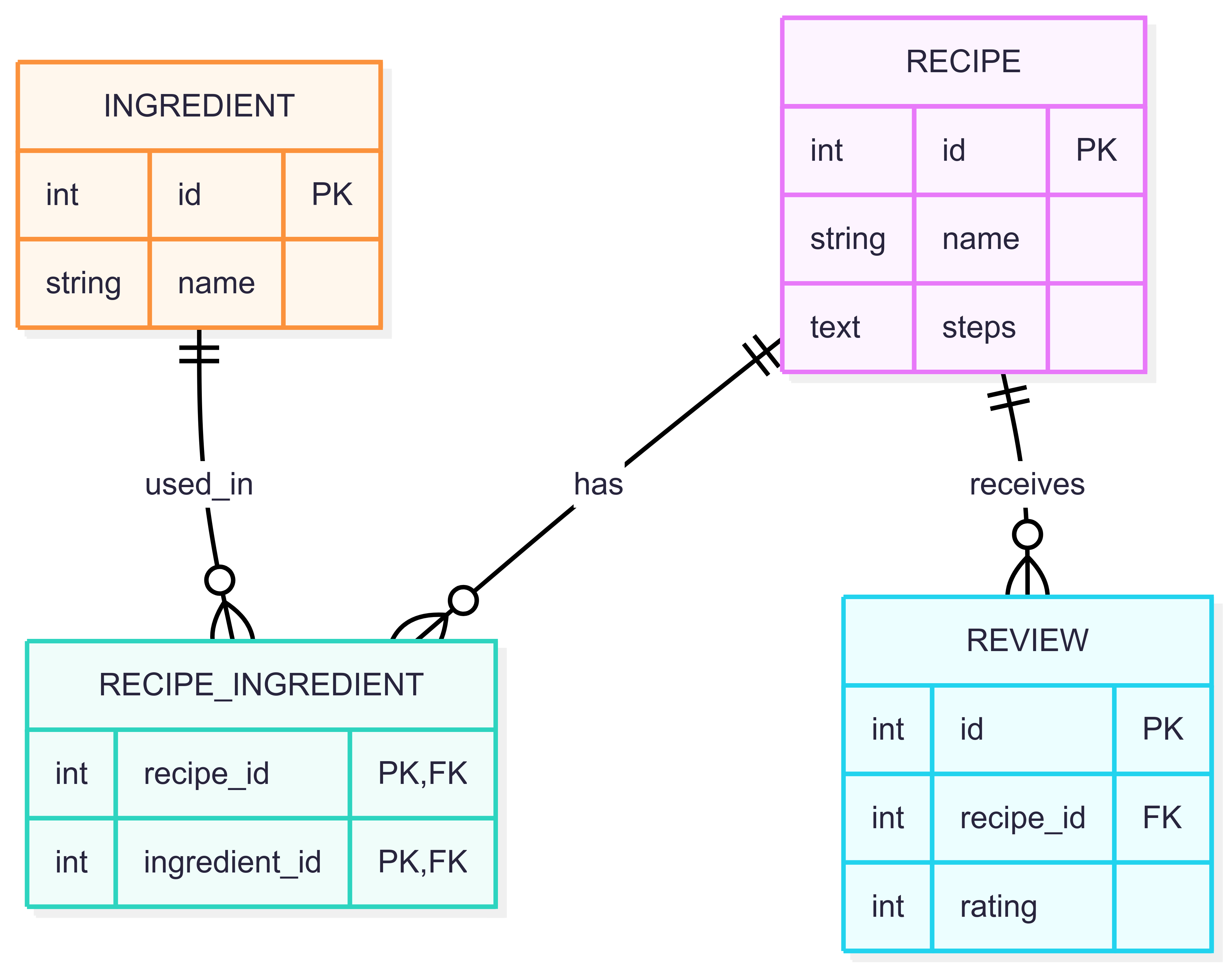
- A recipe can have many ingredients (and an ingredient can be used in many recipes).
- A recipe can have many reviews (but each review belongs to one recipe).
This diagram helps us plan how to structure our database tables and how they connect.
Understanding Primary Keys and Foreign Keys
Before we move on, let us clarify two important concepts you will encounter in our models: primary keys and foreign keys.
What is a Primary Key?
A primary key is a unique identifier for each row in a database table. It ensures that every record can be located and referenced easily. By default, the framework automatically handles a field named id as the primary key for each model.
Every recipe, ingredient, or review will have its own unique id automatically assigned when it is saved.
What is a Foreign Key?
A foreign key is a field in one table that links to the primary key of another table. It creates a relationship between two tables.
For example, in the Review model:
Here, recipe is a foreign key. It points to a specific Recipe, indicating the recipe to which the review belongs. The on_delete=models.CASCADE part ensures that if a recipe is deleted, all reviews associated with it are also deleted automatically.
Foreign keys help keep data connected and consistent. For instance, a review must always be linked to a valid recipe.
Why Are They Important?
- Primary keys guarantee that each record is unique and can be referenced.
- Foreign keys connect related data across tables, enforcing relationships and data integrity.
Understanding these keys is essential for designing reliable databases and building relationships between your models.
Building Models from the ER Diagram
Now, let us transform our ER diagram into actual code. We define models by creating classes that inherit from models.Model.
1. Defining the Ingredient Model
First, let us define the Ingredient model. This model represents a single ingredient that can be used in many recipes.
nameis aCharFieldthat stores the ingredient's name.- The
Metaclass withdb_tableallows us to specify the exact name of the table in the database. - The
__str__method ensures that when we look at an ingredient object (for example, in the management interface), we see its name instead of a generic ID.
2. Defining the Recipe Model and Many-to-Many Relationships
Recipes and ingredients have a many-to-many relationship. A recipe can have many ingredients, and an ingredient can be used in many recipes. To handle this, we use a ManyToManyField and a "through" table.
stepsuses aTextFieldto store long-form instructions.ingredientsestablishes the relationship. Thethrough="RecipeIngredient"tells the framework to use a specific intermediate table to track the connections.related_name="recipes"allows us to find all recipes that use a specific ingredient easily.
3. The Through Model: RecipeIngredient
The "through" model explicitly defines the link between recipes and ingredients.
unique_togetherensures that we do not accidentally add the same ingredient to the same recipe more than once.
4. Defining the Review Model
Finally, let us define the Review model. This represents a one-to-many relationship, as one recipe can have many reviews.
ratingis anIntegerFieldto store the score.- Using
related_name="reviews"on therecipeforeign key allows us to access a recipe's reviews usingrecipe_instance.reviews.all().
Making Models Accessible: The Admin Interface
One of the most powerful features of our framework is the built-in management interface. To use it, we must register our models in the admin.py file of our app.
By registering these models, you can log in to the administrative panel of your site to create, view, and update recipes and ingredients through a user-friendly interface.
Storing Recipe Steps: A Practical Approach
You might wonder how to store the steps for making a recipe. While we could create a separate table for every single step, a simple and effective approach for many apps is to use a models.TextField.
We store all the steps as one long string, with each step separated by a newline character ("\n").
For example, if a recipe has these steps:
- Boil water.
- Add pasta.
- Cook for 10 minutes.
We store it in the steps field like this:
"Boil water.\nAdd pasta.\nCook for 10 minutes."
Later, when displaying the recipe, we can split this text by the newline character ("\n") to recreate the list of steps.
Other Limitations of SQLite
While SQLite is a great choice for development and prototyping, it has some important limitations to keep in mind:
- No Native JSON Type: Unlike more advanced database systems, SQLite does not offer a native
JSONcolumn type with built-in querying capabilities.JSONis usually stored as plain text. - Limited Support for Concurrent Writes: SQLite handles multiple simultaneous reads well, but only one process can write to the database at a time. This can cause delays in high-traffic production environments.
- Different Indexing Behavior: The indexing features of SQLite are more streamlined, which may lead to different performance characteristics for very complex queries compared to enterprise-grade databases.
These limitations are rarely an issue for learning projects, but they are important to remember as your application scales.
Summary and What’s Next
In this lesson, you learned how to:
- Plan your data structure using an ER diagram.
- Create database models by inheriting from
models.Model. - Define table names using the
Metaclass anddb_table. - Establish one-to-many relationships using
ForeignKeyand many-to-many relationships usingManyToManyFieldwith a through table. - Register your models in the Admin interface for easy data management.
You now have a solid data layer for your cooking app. In the next exercises, you will practice creating these models and learn how to generate the migrations needed to update your database schema.
