Understanding Models and Access Routes
Introduction
Across the last three courses, you ran every evaluation with the model locked in place. A small dropdown sat in the corner of the Prompt Evaluation Simulator showing strings like deepseek-ai/DeepSeek-V4-Flash, anthropic/claude-haiku-4-5-20251001, openai/gpt-5.6-luna, or google/gemini-3.6-flash, and it was easy to treat it as background noise. That habit quietly builds a misconception: that "the model" is one interchangeable black box, and swapping it is cosmetic rather than a decision with real consequences for cost, capability, and behavior.
Fixing the model was necessary for fair prompt comparison — one steady variable so results could be attributed to the prompt. Now the model itself becomes the variable. You'll leave with a vocabulary to tell a model apart from its family, its provider, and the way you access it; a way to match a workload's defining trait to a model specialization; and the habit of reading a model catalog critically instead of trusting a benchmark ranking or a flattering label like "flagship."
Decoding a Model Identifier — Model, Family, and Provider
Three terms tend to collapse into one fuzzy category — "the AI" — and they need to be pulled apart first.
- Model — a single, finished version of an AI, trained once and then frozen at a release point. It doesn't change on its own; a new model means a newly trained version.
- Model family — a named group of related models released by a developer under the same product lineage, often with different versions, sizes, capability tiers, or specializations (Claude, Gemini, GPT, DeepSeek).
- Provider/developer — the organization that trained and owns the family, such as Anthropic, Google, OpenAI, or DeepSeek AI.
A model is not its family, and a family is not its provider — one is a specific version, one is a lineage, one is an organization.
The strings in the simulator's selector are dense with this information once you know how to read them:
deepseek-ai/DeepSeek-V4-Flash→ provider:deepseek-ai; family: DeepSeek; version: V4; tier: Flashanthropic/claude-haiku-4-5-20251001→ provider:anthropic; family: Claude; tier: Haiku; version: 4.5; snapshot date:20251001openai/gpt-5.6-luna→ provider:openai; family: GPT; version: 5.6; tier: Lunagoogle/gemini-3.6-flash→ provider:google; family: Gemini; version: 3.6; tier: Flash
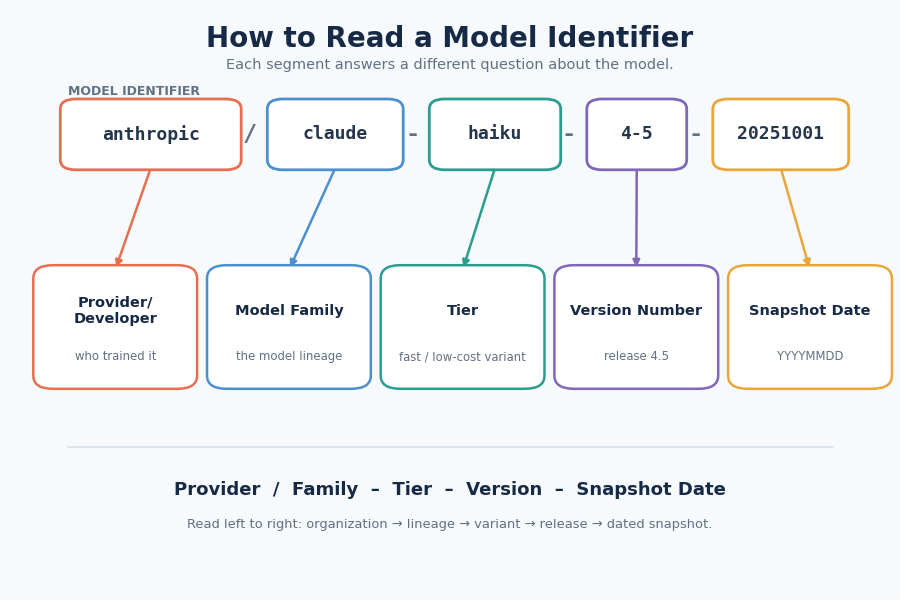
Notice the distinction between version (the generation or release cycle, such as V4, 4.5, or 3.6) and tier (the capability and cost profile, such as Flash, Haiku, or Luna). Tier keywords like "flash" and "haiku" already hint at a fast, lower-cost variant within a larger family — a thread that resurfaces when you start matching models to workloads.
Knowing who trained a model is only half the picture. How you reach it is a separate decision entirely.
Provider vs. Access — Managed, Hosted, and Self-Hosted
There are three distinct ways to reach a model:
- Managed API — the model developer runs the model, and you access it through their service.
- Hosted service — another company (not the developer) runs the model and gives you access through their service.
- Self-hosted — you run the model on computers or servers you control or rent.
An open-weight model is one whose internal settings (its learned "weights") are made publicly available. This allows multiple companies to offer hosted versions and makes self-hosting possible — provided your organization has the necessary compute infrastructure and the model's license permits your intended use.
A single model can exist under more than one access route at once; provider identity does not determine access.
A model identifier string names the developer and model version, not the infrastructure serving your request. For example, a developer calling anthropic/claude-haiku-4-5-20251001 might reach Anthropic's own managed API, or access the exact same model through a third-party hosted service like Amazon Bedrock or Google Cloud Vertex AI. Similarly, deepseek-ai/DeepSeek-V4-Flash can be reached through DeepSeek's managed API, accessed via a third-party hosted platform, or self-hosted on your own hardware because its weights are available. Same model, different possible routes to it.
Next question: what kind of work is the model actually built to do?
Matching Workloads to Model Types
Providers release variants tuned for different kinds of work. Five specializations come up often enough to recognize by the workload trait that signals each:
- Fast/low-cost — high volume, a simple task, and a need for speed (instant responses at large scale).
- Reasoning-specialized — multi-step analysis, planning, difficult problem solving, or decisions combining several constraints.
- Multimodal — input or output includes images, audio, or another non-text format alongside or instead of text.
- Code model — generating, reviewing, or cleaning up software code.
- Embedding model — you need a numerical representation used for search, similarity, or grouping — not a written answer at all.
General-purpose models can often handle several of these — reasoning, coding, sometimes multimodal. But some needs require a specific capability or model type; embeddings are a clear example. The goal is not to always choose the biggest model, but candidates whose capabilities match the work.
That mapping against concrete tasks:
- "Sort 50,000 support tickets a day, with responses in under a second" → volume and speed → fast/low-cost.
- "Analyze a multi-step contract-liability problem involving several interacting clauses" → multi-step analysis, interacting constraints → reasoning-specialized.
- "Extract totals and line items from a photographed receipt" → image input → multimodal.
- "Clean up and improve a section of software code" → source-code task → code model.
- "Group thousands of product reviews into similar-topic clusters" → finding similar items rather than writing an answer → embedding model.
Recognizing the right type is necessary, but a catalog presents candidates with marketing-flavored labels and benchmark scores.
Conclusion
Model choice deserves the same rigor you bring to prompts, and that rigor starts with vocabulary, not vibes. A model is not its family, a family is not its provider, and a provider is not a way of accessing a model. A catalog label or benchmark score describes reputation on someone else's test, not fit for your task.
Carry one pattern forward: Identify → Access → Fit → Verify. Identify the family and provider behind a model name, know how you're reaching it — managed, hosted, or self-hosted — match its type to your workload's defining trait, and never accept a benchmark rank as proof of fit without your own evidence.
The exercises that follow put each piece to work: matching identity and access terms to examples, mapping tasks to the model type they call for, and reading a catalog table. Next, you'll narrow a candidate list and test models against your own cases, with a final unit on turning that evidence into a choice.
