Creating Database Repositories
Introduction
Welcome to the third lesson of our course. In the first lesson, we focused on the data layer, successfully loading our movie dataset into a normalized PostgreSQL database. In the second lesson, we prepared our AI assistant by creating an AGENTS.md file to document our project structure and rules.
Now, we need to bridge the gap between that raw data and our Python application. Today, we will build the "plumbing" of our backend. We will use Codex to generate the code that handles database configuration, manages connections, and executes queries. By the end of this lesson, you will have a structured way to interact with your database, and you will learn how to control Codex to ensure it builds exactly what you need without breaking your existing work.
Recall: The Database Schema
Before we write any Python code, let's briefly recall the database structure we created in Lesson 1. We have a main table called shows that holds information like titles, release years, and ratings. We also have related tables like directors, actors, and genres, which are linked to shows through "junction tables" (e.g., show_directors).
Keeping this structure in mind is crucial. The Python classes we build today must map perfectly to these tables. If our Python code asks for a column that doesn't exist or tries to insert data in the wrong format, our application will crash. Our goal is to create a Python layer that mirrors this SQL structure.
Connecting to Postgres
To interact with the database, our application needs two things: a way to read configuration settings (like passwords and hostnames) and a way to manage connections efficiently.
Configuration
First, we need a class to handle configuration. We avoid hard-coding passwords in our code. Instead, we read them from environment variables.
Here, we define a DatabaseConfig data class. It holds the Data Source Name (dsn), which is a connection string containing the user, password, host, and database name. It also defines how many connections we want to keep open.
Next, we add a helper method to load these values from the environment:
This from_env method allows us to initialize our configuration automatically based on the server's environment.
Connection Management
Connecting to a database takes time. If we open a new connection for every single user request, our app will be slow. Instead, we use a Connection Pool. This keeps a few connections open and reuses them.
We use the psycopg2 library for this. Here is how we initialize a connection manager:
The __init__ method creates the pool using the configuration we defined earlier.
Finally, we need a way to borrow a connection from the pool, use it, and give it back. We use a Python context manager (the with statement) for this:
When we use with db.connection() as conn:, this code runs. It gets a connection, yields it to our code, and automatically commits changes if everything goes well. If there is an error, it rolls back the changes. Finally, it puts the connection back in the pool so others can use it.
The Repository Pattern
The Repository Pattern is a design pattern that provides a clean separation between the data access logic and the business logic of your application. Instead of scattering SQL queries throughout your codebase, you centralize all database interactions in dedicated classes called repositories. This makes your code easier to maintain, test, and extend.
What Problem Does the Repository Pattern Solve?
Imagine you have a web application with many endpoints, each needing to fetch or update data in your database. If you write SQL queries directly inside your route handlers or business logic, your code quickly becomes tangled and hard to manage. For example:
This approach has several problems:
- Duplication: If you need to fetch shows in multiple places, you repeat the same code.
- Testing: It's hard to test your business logic without hitting the real database.
- Maintenance: If your database schema changes, you have to update SQL everywhere.
The Repository Pattern solves these issues by creating a dedicated layer for all data access.
How Does the Repository Pattern Work?
A repository acts as a collection-like interface for accessing domain objects (like movies, directors, etc.). Your application code interacts with repositories, not with raw SQL or database connections.
Here's a high-level view of the pattern:
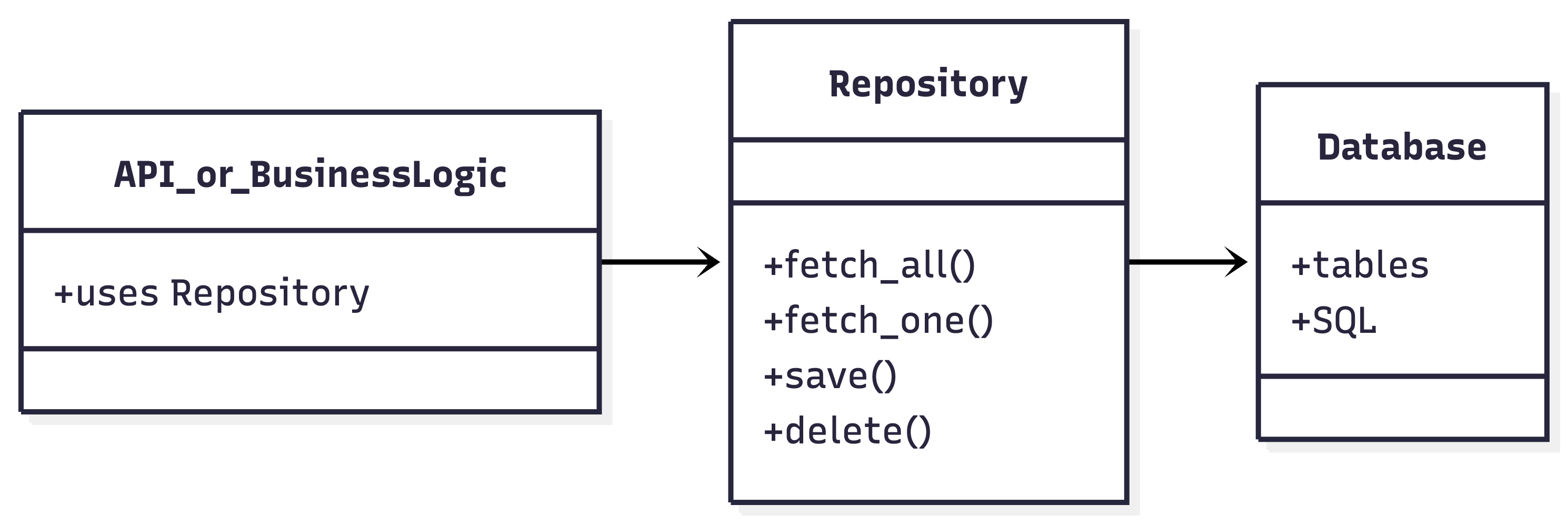
- API or Business Logic: Calls methods on the repository (e.g.,
list_recent()). - Repository: Contains all the SQL and data access logic.
- Database: The actual storage, only accessed by the repository.
Benefits of the Repository Pattern
- Separation of Concerns: Keeps your business logic and data access logic separate.
- Reusability: You can reuse repository methods in multiple places.
- Testability: You can mock repositories in tests, avoiding the need for a real database.
- Maintainability: Changes to the database schema only require updates in one place.
Structure in Our Project
In our backend, we implement the Repository Pattern as follows:
- BaseRepository: Provides generic methods for executing queries and fetching results.
- ShowRepository (and others): Inherit from
BaseRepositoryand implement domain-specific queries.
BaseRepositoryhandles the repetitive work of managing database cursors and executing queries.ShowRepositorydefines methods likelist_recent(year)that encapsulate the SQL needed to fetch recent shows.
Example: Using the Repository
Instead of writing SQL in your route, you use the repository:
This keeps your route handler clean and focused on business logic, while all the data access details are hidden inside the repository.
Summary & Next Steps
In this lesson, we designed the architecture for our database layer. We discussed:
- Configuration: Using
DatabaseConfigto read environment variables. - Connection: Using
PostgresConnectionManagerto pool connections efficiently. - Repositories: Using
BaseRepositoryandShowRepositoryto organize our SQL queries.
We are now ready to build. In the upcoming practice session, you will use Codex to generate these exact files inside the backend/ folder. You will configure the connection to the database we populated in Lesson 1 and prepare the system for our API endpoints.
