Exploring List Queries
Introduction: Asking Questions About a List
Welcome back to Building and Modifying Lists in Python. We have created lists, grown and shrank them, then rewrote and reordered their contents. This lesson takes a step back and asks questions instead.
Four questions, to be precise:
- Is this value here?
- How many times does it appear?
- Where is it?
- How do I put two lists together?
Our running example is a short list of colors, and the repeated "blue" is there on purpose: It is what will make counting and locating genuinely interesting. None of the tools ahead modify the list; they only look at it or produce something new from it.
Membership Testing with in and not in
The first question is the simplest: Is a value present? We already know the operator from earlier work with strings, and it works on lists too:
There is one important difference from strings. With text, in could match a piece of the string, so "re" in "red" was True. With a list, in compares against whole items, so "re" in colors is False even though "red" sits right there; the item must match completely. Both expressions evaluate to a Boolean (True or False), which is why we can print them directly. not in is Python’s direct membership form for absence and is equivalent to not (value in collection); the not in form usually reads more clearly.
Counting Occurrences with count()
A yes-or-no answer is often not enough. The count() method upgrades it to a number:
count() walks through the list and returns an integer: the number of items equal to the value we passed. Two details are worth holding onto:
- It counts exact matches only, following the same whole-item rule as
in. - A value that never appears returns
0, not an error, socolors.count("yellow")is a perfectly safe call.
Compare this with remove() from earlier, which also searches for a value: remove() edits the list and returns None, while count() leaves the list alone and hands back a value we can print or store.
Locating a Value with index()
Knowing that "blue" appears twice raises the next question: where? The index() method answers with a position:
Our list is ["red", "blue", "green", "blue"], so "blue" appears at indices 1 and 3. index() returns 1 and stops there: It always reports the first match and ignores every later one.
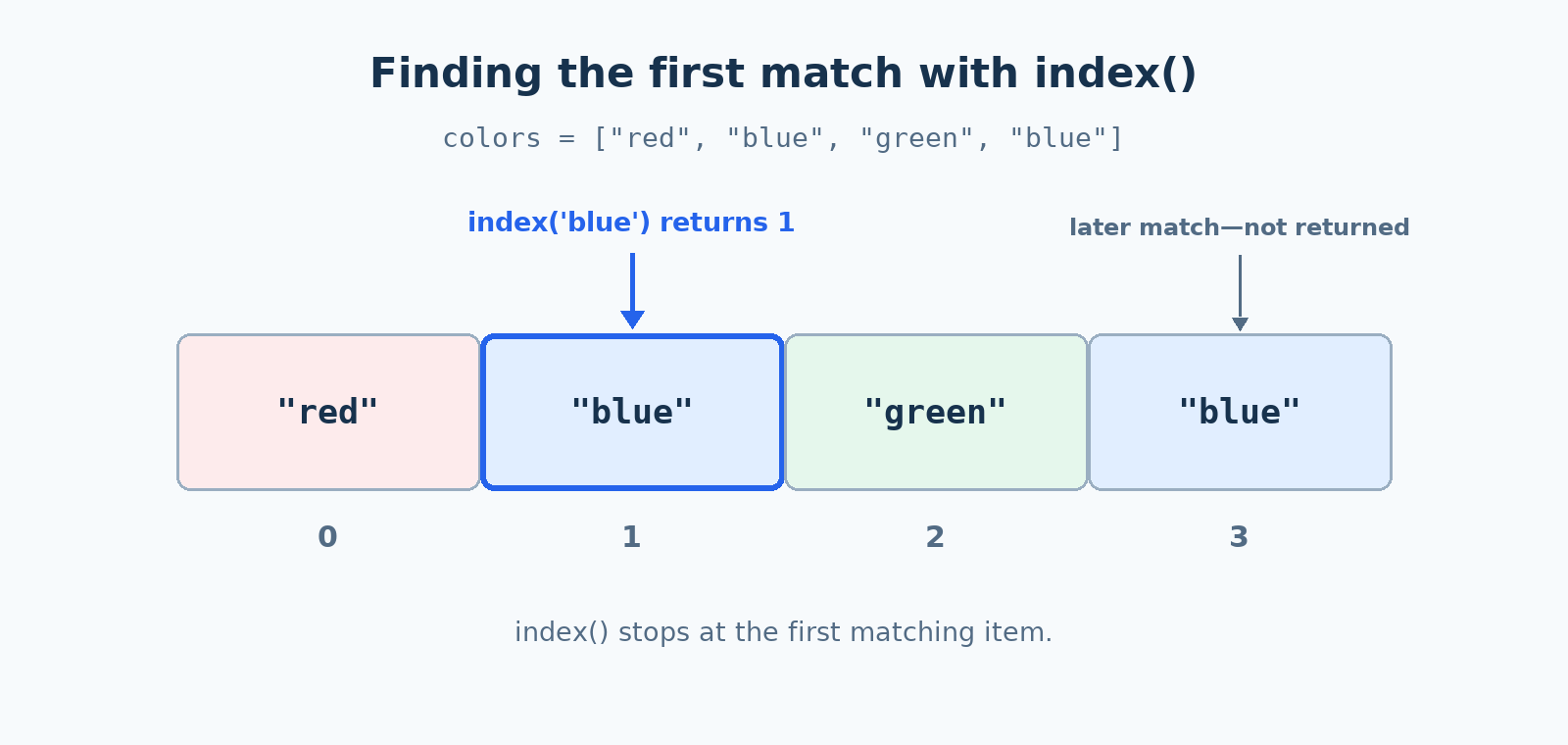
Now the catch, and it is a big one. When working with strings, find() returned -1 for text it could not locate. Lists have no such courtesy: colors.index("yellow") raises a ValueError and stops the program. That difference means missing values need to be handled deliberately, which is exactly what the next section is about.
Guarding index() with a Membership Check
Since a missing value crashes index(), a clear beginner-friendly pattern is to check first and search second:
The in test acts as a gate: colors.index(target) runs only on the branch where we already know the value exists, so the ValueError can never happen. Since "green" is in our list, the if branch runs and reports index 2. Change target to "yellow", and the program calmly prints the else message instead of crashing.
This approach may scan the list twice when the target is present: once for in and again for index(). After learning exception handling, another option is to call index() once inside a try block and handle ValueError with except. For now, the membership check is a clear way to keep the lookup safe.
Combining Lists with +
Our last question is about joining. Suppose we keep colors in two themed lists and want one list holding both:
The + operator builds a brand-new outer list: every item of the left list first, in order, followed by every item of the right list. This mirrors string concatenation from the earlier course, where "Hello" + " there" produced a new string. Because a new outer list is created, we must capture it in a variable; warm_colors + cool_colors on its own line would compute the result and throw it away. One restriction: Both sides must be lists, so ["a"] + "b" raises a TypeError.
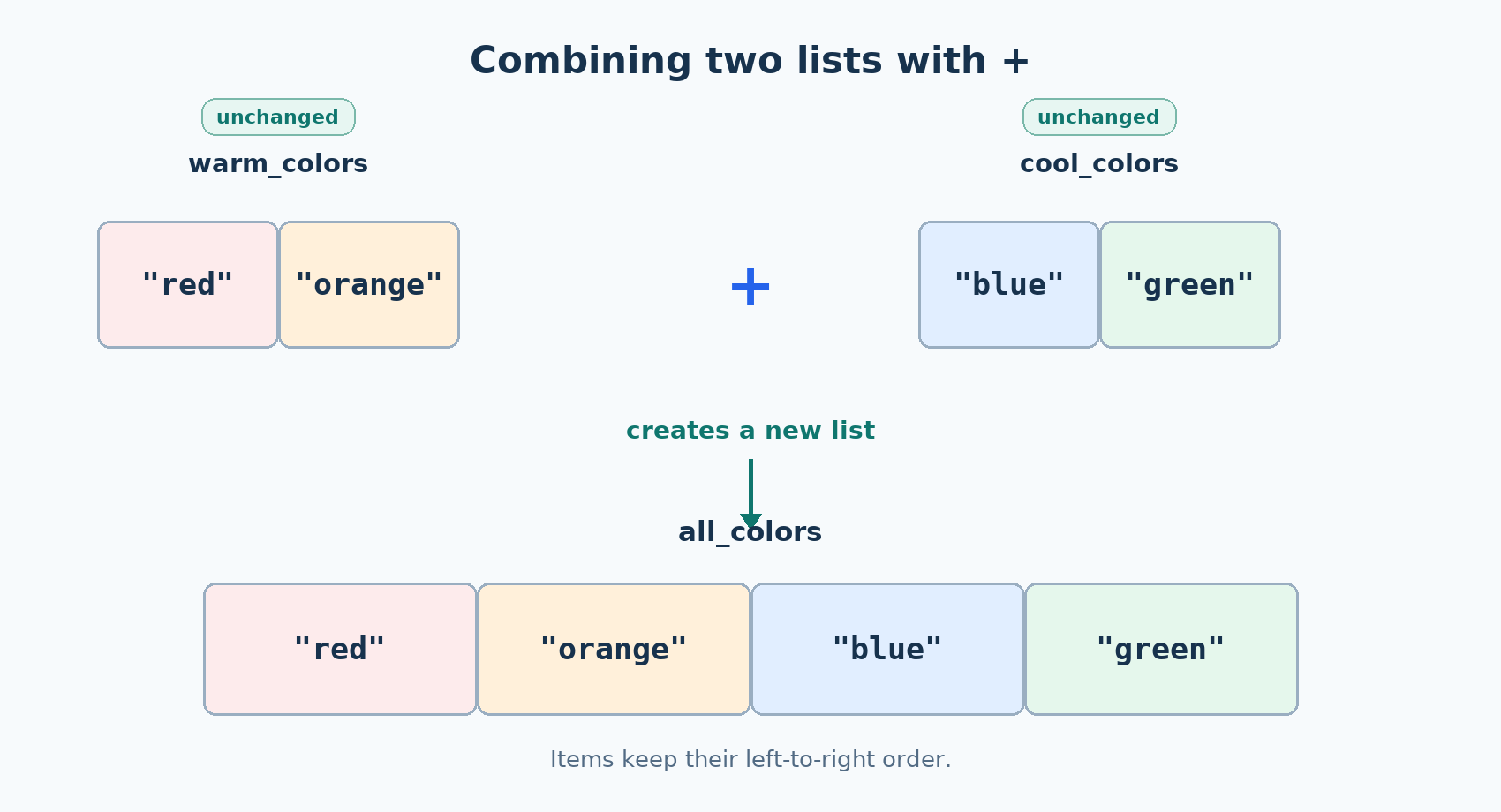
The newly combined list contains the warm colors first and the cool colors second, so it displays in this order:
+ Leaves the Originals Alone
That word "new" deserves proof, so let us print the two source lists after combining them:
Both still hold exactly two items each. all_colors is a separate outer list; joining did not pour one list into the other. If the source lists held mutable nested items such as inner lists, those inner items would still be shared with the combined list. Copying nested data independently is a later topic. This is different from extend() in Unit 2, which grows the list it is called on:
| Tool | Changes original? | Returns |
|---|---|---|
a + b | No, both untouched | A new combined list |
a.extend(b) | Yes, a grows | None |
This is the theme that has followed us throughout the course: in-place tools versus new-object tools. It determines one small thing on every line we write: whether we print the variable afterward or capture the returned value.
Bringing It Together
The complete script below uses the four list-query tools: membership testing, counting, guarded locating, and combining.
These results show both the questions answered by the tools and the fact that combining leaves its source lists unchanged:
Conclusion and Next Steps
In this lesson, you used membership tests to check whether values appear in a list, count() to measure repeated values, and index() with a membership guard to locate values safely. You also combined lists with + while keeping the original lists unchanged.
The most important distinction is between tools that inspect a list and tools that create or modify one. The membership operators, count(), and guarded index() inspect the existing list. The + operator creates a new combined list, while extend() from earlier changes an existing list.
Look at the arc we have completed: creating and accessing lists, adding and removing items, editing and ordering them, and now checking and combining them. That is a full working toolkit, and congratulations on reaching the end of Building and Modifying Lists in Python. These same habits also transfer naturally to dictionaries and key-value data.
