Broadcasting Across Array Shapes
Introduction
Welcome to Broadcasting Array Shapes in NumPy. We’re beginning the course by learning how NumPy combines a table with a single number or a row of values. You’ve already learned to build and inspect 2D arrays in earlier courses; now we’ll use their shapes to predict how calculations work across many cells at once. By the end of this lesson, you’ll be able to scale a whole table, apply a different adjustment to each column, and explain the shape of each result.
A Scalar Times a Table: One Number Reaches Every Cell
A scalar is a single value, such as 1.1. When we multiply a NumPy table by a scalar, NumPy applies that number to every cell. We don’t need to write a loop or select each row separately. Here, the table represents prices at three stores for four items, and multiplying by 1.1 raises every price by 10 percent.
The expression prices * 1.1 creates a new array with every price multiplied by the scalar. The original prices values remain unchanged, while raised holds the increased prices. This automatic extension of a smaller value across a larger array is called broadcasting.
Checking Shapes: Why Multiplying by 1.1 Leaves (3, 4) Unchanged
Broadcasting changes how NumPy applies an operation, not necessarily the dimensions of its result. Our table has three rows and four columns, so its shape is (3, 4). A scalar has no row or column structure to add. It simply applies to each existing cell, leaving the result with the same shape.
The output confirms that the scaled table still has three rows and four columns:
This is a useful prediction to make before running the code: scalar arithmetic on a table preserves the table’s shape. The parentheses ensure that we calculate prices * 1.1 first and then access the resulting array’s .shape.
A One-Dimensional Array Meets a Table: Lining Up with the Last Axis
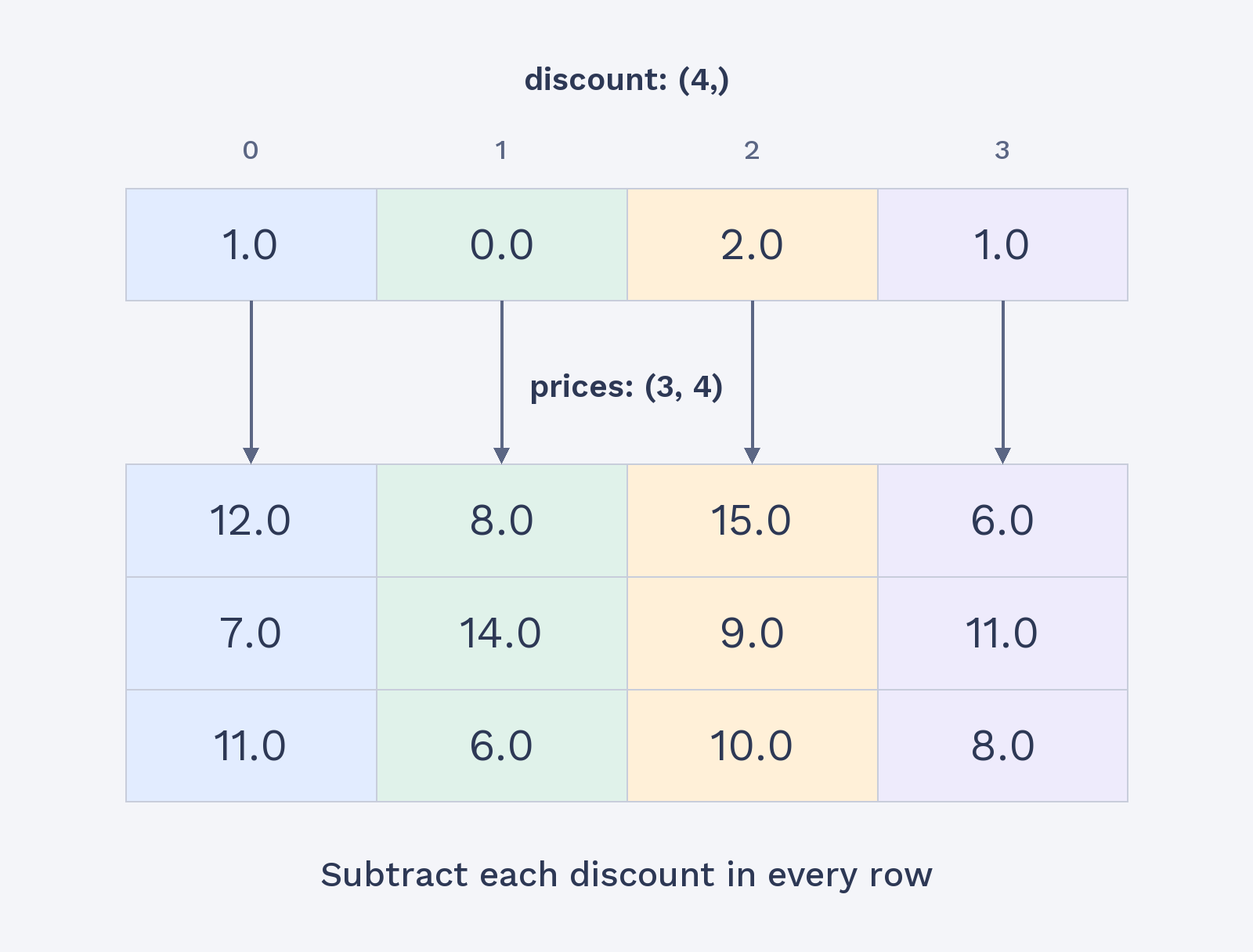
Now we’ll replace the single scalar with a 1D array of values. NumPy aligns a 1D array with the table’s last axis, which is its columns. To give each of the four columns its own discount, the 1D array needs four values, one per column. NumPy can then apply those values across the table’s rows. A length-one array would also broadcast, but it would apply the same discount to every cell, just like a scalar.
The four discount values line up with columns 0 through 3. Subtraction applies each discount to the matching column in every row. The discount array isn’t a separate discount for each store; it supplies one discount per item, reused for every store.