Karnaugh Maps Simplification
Introduction: Why Minimize Logic?
Welcome back! So far, you have learned how to represent logic circuits using truth tables, logic gates, and Boolean algebra. Now, let’s talk about why we want to make these circuits as simple as possible.
Minimizing logic means reducing the number of gates and connections in a circuit. This is important because simpler circuits are:
- Cheaper to build (fewer parts)
- Faster (less delay from fewer gates)
- More reliable (less chance of something going wrong)
In this lesson, you will learn a visual method called the Karnaugh Map (K-map) that helps you quickly find the simplest version of a logic expression. This will make your circuits easier to design and build.
What Is a Karnaugh Map (K-map)?
A Karnaugh Map, or K-map, is a visual tool that helps you simplify logic expressions. It is especially useful when you have more than two variables, and writing out all the Boolean algebra steps would be slow or confusing.
Think of a K-map as a special kind of table. Each cell in the table represents a possible combination of input values, just like a row in a truth table. However, the way the cells are arranged makes it easy to spot patterns that lead to simplification.
Reminder: In the last lesson, you learned how to use truth tables to show all possible input combinations and their outputs. A K-map takes this information and arranges it so you can easily group together outputs that are the same.
Filling Out a K-map From a Truth Table
Let’s see how to create a K-map from a truth table. We’ll start with a simple example using two variables, A and B.
Example:
Suppose you have this truth table:
| A | B | Output (F) |
|---|---|---|
| 0 | 0 | 0 |
| 0 | 1 | 1 |
| 1 | 0 | 1 |
| 1 | 1 | 1 |
To make a K-map, draw a 2x2 grid. Each cell matches one row from the truth table:
| B=0 | B=1 | |
|---|---|---|
| A=0 | 0 | 1 |
| A=1 | 1 | 1 |
- The top row is for
A=0, the bottom forA=1. - The left column is for
B=0, the right forB=1. - Fill in each cell with the output from the truth table.
Minimizing Logic With K-maps
Now, let’s use the K-map to simplify the logic expression.
Step 1: Grouping 1s
Look for groups of 1s that are next to each other. Groups can be 1, 2, or 4 cells (for a 2-variable K-map). The bigger the group, the simpler the expression.
In our example:
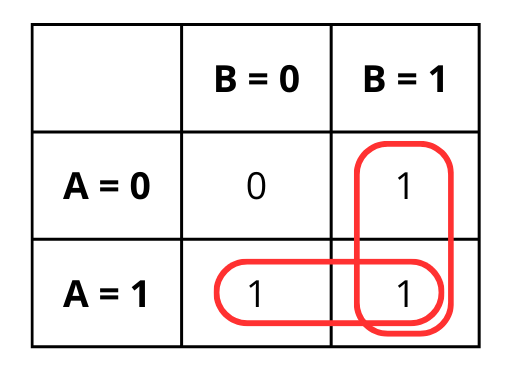
- There are three 1s. The two 1s in the right column (
B=1) can be grouped together. - The two 1s in the bottom row (
A=1) can also be grouped.
Step 2: Write the Simplified Expression
- The right column (
B=1) group means the output is 1 wheneverB=1, no matter whatAis. This gives us the termB. - The bottom row (
A=1) group means the output is 1 wheneverA=1, no matter whatBis. This gives us the termA.
So, the minimized expression is:
F = A + B
Explanation:
By grouping the 1s, you see that the output is 1 if either A or B is 1. This is much simpler than writing out every possible combination.
Handling More Variables (3 and 4 Inputs)
As the number of inputs increases, the K-map grid grows. A 3-variable map uses a 2x4 grid, and a 4-variable map uses a 4x4 grid.
The most important rule when expanding the map is the labeling order. To make sure adjacent cells only differ by one variable (a requirement for the grouping to work), we use Gray Code order: 00, 01, 11, 10.
Notice that 11 comes before 10. This ensures that every step you take (up, down, left, or right) only changes one bit at a time.
3-Variable Map Layout (A, B, C):
| A \ BC | 00 | 01 | 11 | 10 |
|---|---|---|---|---|
| 0 | ||||
| 1 |
Wrapping Around the Edges
One of the most powerful features of a K-map is that the edges "wrap around." Even though the map looks like a flat grid on paper, the logic actually connects at the boundaries.
How it works:
- The leftmost column is considered adjacent to the rightmost column.
- The top row is considered adjacent to the bottom row.
Think of the K-map as if it were wrapped around a cylinder. This means if you have a 1 on the far left and a 1 on the far right of the same row, you can circle them together as a single group.
Example:
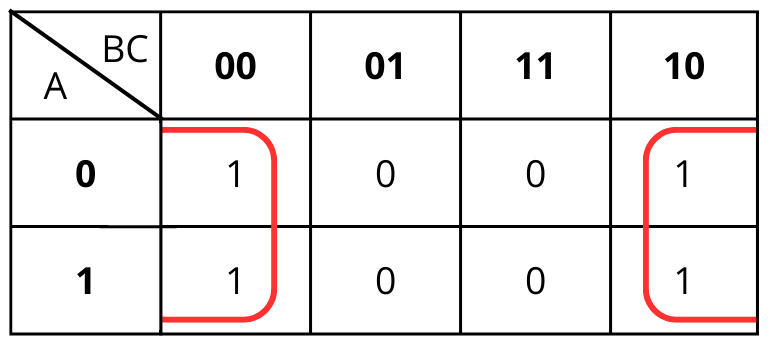
Imagine you have a 3-variable logic function where the outputs are 1 when . Let’s look at how those 1s are placed on the map:
| A \ BC | 00 | 01 | 11 | 10 |
|---|---|---|---|---|
| 0 | 1 | 0 | 0 | 1 |
| 1 | 1 | 0 | 0 | 1 |
Analyzing the Groups:
- At first glance, it looks like two separate columns of 1s.
- However, because the map wraps, the leftmost column (00) and the rightmost column (10) are actually touching.
- You can form one single group of four 1s.
Simplifying the Expression:
- Look at A: Inside the group, A changes from 0 to 1, so we ignore it.
- Look at B: Inside the group, B changes from 0 to 1, so we ignore it.
- Look at C: In both the
00and10columns, the second digit (C) is always 0.
Because the only constant is that is 0, the entire group simplifies to: F = C'
Without wrapping, you might have mistakenly thought the expression was much more complex!
Minimization Tricks and Special Cases
Sometimes, you will see “don’t care” conditions in a truth table. These are cases where the output can be either 0 or 1, and it won’t affect the final result. In a K-map, you can use these to make bigger groups and simplify the expression even more.
Example With “Don’t Care”:
Suppose you have this truth table for three variables (A, B, C):
| A | B | C | F |
|---|---|---|---|
| 0 | 0 | 0 | 0 |
| 0 | 0 | 1 | 1 |
| 0 | 1 | 0 | 1 |
| 0 | 1 | 1 | X |
| 1 | 0 | 0 | 1 |
| 1 | 0 | 1 | X |
| 1 | 1 | 0 | 1 |
| 1 | 1 | 1 | 1 |
When you fill out the K-map, put an X in the cells for the don’t care cases. You can include these Xs in your groups if it helps you make a bigger group.
| A \ BC | 00 | 01 | 11 | 10 |
|---|---|---|---|---|
| 0 | 0 | 1 | X | 1 |
| 1 | 1 | X | 1 | 1 |
In this case, we will draw the following groups:
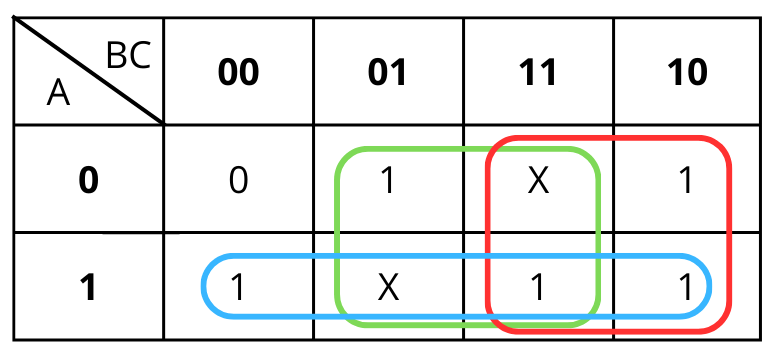
Which will result in the simplified equation: A + B + C
Tips:
- Always try to make the largest groups possible (groups of 2, 4, or 8).
- Use “don’t care” cells to your advantage.
Summary and What’s Next
In this lesson, you learned how to use Karnaugh Maps to simplify logic expressions. You saw how to:
- Fill out a
K-mapfrom a truth table - Group 1s to find the simplest logic expression
- Use “don’t care” conditions and other tricks to make your circuits even simpler
Now, you are ready to practice these skills. In the next exercises, you will use K-maps to minimize logic functions and see how much simpler your circuits can become. Take your time, look for the biggest groups, and remember that a simpler circuit is almost always a better circuit. Good luck!
