Welcome to AI Images for Workplace Communication. Images are everywhere in your work: shipment photos in a triage thread, screenshots in a project doc, hero visuals on a slide, headshots on the About page. Generative AI now lets you describe, create, and edit those images in seconds, which means the bottleneck has shifted from "can I make this?" to "should I ship this, and does it say what I think it says?" This course gives you the moves to handle both ends responsibly.
By the end of this lesson, you'll be able to:
- Request structured image descriptions from vision AI for specific workplace purposes like alt text, triage, or chart reading.
- Separate what an image actually shows from what AI (or you) is guessing about it.
- Turn a clean description into a usable workplace deliverable like alt text, inventory notes, or a stakeholder update.
Vision AI is the family of models that can "look at" an image you upload and describe it in words. The trap is treating it like a one-size tool. A generic prompt like "what's in this image?" gives you a generic answer: a wall of details, half of which you don't need, with no structure you can paste anywhere useful.
The fix is to name the purpose upfront. Different workplace jobs need different shapes of description:
- For alt text (the text description screen readers announce to people who can't see the image), you want a tight, neutral sentence focused on content.
- For meeting prep on a customer screenshot, you want labeled UI elements and visible data.
- For issue triage on a damaged-product photo, you want a structured list of visible defects with location and severity.
- For chart interpretation, you want axes, units, the trend line, and the highest/lowest values called out.
A reliable prompt pattern looks like this: Describe this image for [purpose]. Use [format]. Focus on [what matters]. Skip [what doesn't].
For a damaged shipment photo headed to operations, you might write: Describe this image for issue triage. Use a bulleted list of visible damage by location. Focus on physical condition of the carton and visible contents. Skip background and lighting. You've now turned a vague request into something you can act on.
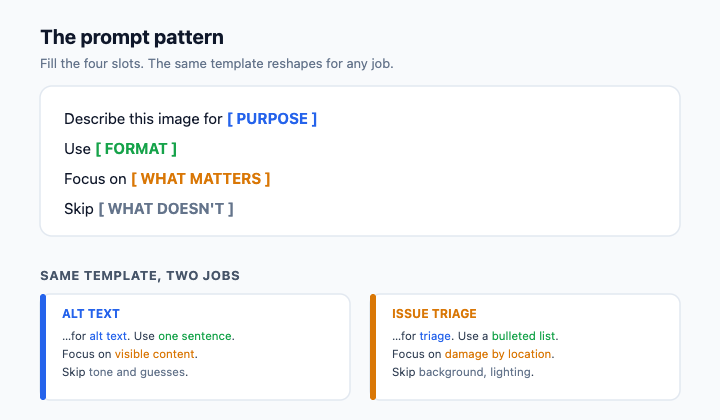
Here is the single most important habit in this unit: vision AI will hand you observations and interpretations mixed together, in the same confident tone, and it's your job to separate them before you act.
An observation is something visible in the pixels: "The carton's top seam is split along the right edge." An interpretation is a guess about cause or meaning: "The package was dropped." An inferred intent goes further: "The carrier was careless." Only the first kind belongs in an operational update. The other two are stories the model wrote based on patterns from its training data, not evidence from this specific image.
Watch for tell-tale verbs: "appears to," "looks like it was," "seems to have been," "suggests that." Those are interpretation flags, as is any sentence that names a cause, an actor, or a sequence of events the photo can't actually prove.
Here's how that filtering sounds in practice when a colleague catches it:
- Jake: The AI says the box "was clearly dropped during shipping." That's useful for the email, right?
- Dan: What does the photo actually show?
- Jake: A crushed corner and a split seam.
- Dan: Then write "crushed corner, split seam." The "was dropped" part is a story. The photo can't tell you when or how.
- Jake: Fair. I'll cut anything that sounds like a cause and just list what's visible.
Notice Dan isn't rejecting AI, he's rejecting AI-shaped fiction dressed up as fact. Your job is to be the human filter between the description and whatever happens next.
Once you've stripped a description down to observations, you can shape it into the deliverable you actually need. The same observation set can become several different artifacts: alt text for a wiki page, a stakeholder update for a PM, inventory notes for a tracking system, or accessibility documentation.
Alt text should be short (aim for under 125 characters), neutral, and focused on providing a concise summary of the visual information. Inventory notes are structured and consistent so they're searchable later. A stakeholder update names what's visible, explicitly names what isn't determinable from the image (cause, timing, responsible party), and recommends a next step that gathers the missing information rather than assuming it. The discipline is the same in every format: say what you can see, name the gaps out loud, and don't let a confident sentence sneak past you just because it sounds good.
The throughline of this unit is simple: vision AI gives you a draft, not a verdict, and the value you add is sorting signal from story before anything leaves your hands. With that in mind, the next step is a live conversation: you'll walk a peer reviewer through an AI description of a damaged shipment photo and defend, line by line, which sentences are observations you can act on and which are interpretations you need to strip.
This lesson teaches you how to use Vision AI to describe workplace images like shipment photos or charts. You will learn to request structured descriptions for specific tasks, tell the difference between objective visible facts and inferred guesses, and refine those outputs into professional deliverables like alt text or project updates.
