Reading Images with AI
Welcome to the Course 🚀
Welcome to AI Images for Workplace Communication. Images are everywhere in your pre-sales work: a screenshot a prospect shares on a discovery call, an architecture diagram in a proposal, a hero visual on a demo-deck slide, a diagram in the SE wiki. Generative AI now lets you describe, create, and edit those images in seconds, which means the bottleneck has shifted from "can I make this?" to "should I ship this, and does it say what I think it says?" This course gives you the moves to handle both ends responsibly.
By the end of this lesson, you'll be able to:
- Request structured image descriptions from vision AI for specific pre-sales purposes like alt text, discovery prep, or capturing a prospect's current-state screenshot.
- Separate what an image actually shows from what AI (or you) is guessing about it.
- Turn a clean description into a usable deliverable like alt text, an issue-triage note for the deal record, or a stakeholder follow-up.
Asking Vision AI for the Right Kind of Description 🔍
Vision AI is the family of models that can "look at" an image you upload and describe it in words. The trap is treating it like a one-size tool: a generic prompt like "what's in this image?" gives you a generic answer — a wall of details, half of which you don't need, with no structure you can paste anywhere useful.
One boundary throughout: you never run a real prospect's environment screenshot through a general AI tool — that confidential data stays inside approved systems under your security policy, so everything here uses a simulated, de-identified stand-in.
The fix is to name the purpose upfront. Different pre-sales jobs need different shapes of description:
- For alt text (the text description screen readers announce to people who can't see the image), you want a tight, neutral sentence focused on content.
- For discovery prep on a customer screenshot, you want labeled UI elements and visible data.
- For issue triage on a prospect's current-state architecture screenshot, you want a structured list of the visible boxes, labels, arrows, and comments — what was actually shown.
- For chart interpretation, you want axes, units, the trend line, and the highest/lowest values called out.
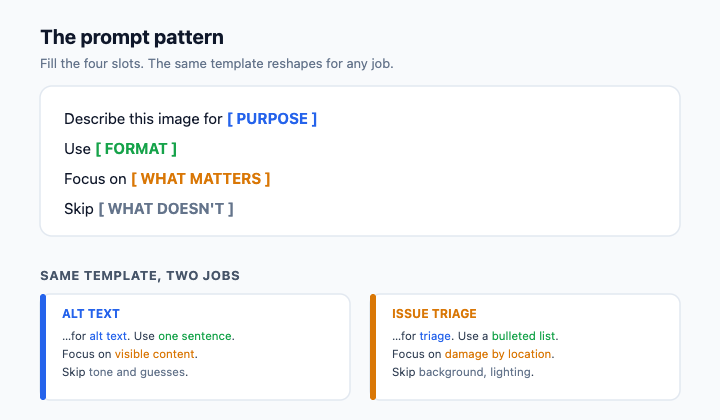
A reliable prompt pattern looks like this: Describe this image for [purpose]. Use [format]. Focus on [what matters]. Skip [what doesn't].
For an architecture screenshot headed to a deal-record triage note, you might write: Describe this image for issue triage. Use a bulleted list of the visible components. Focus on box labels, arrows, badges, and reviewer comments. Skip guesses about root cause or what the system does. You've now turned a vague request into something you can act on.
Telling Observation Apart from Interpretation ⚖️
Here is the single most important habit in this unit: vision AI will hand you observations and interpretations mixed together, in the same confident tone, and it's your job to separate them before you act.
An observation is something visible in the pixels: "A highlighted box is labeled 'Legacy Monolith (Java/Spring)' with Orders, Billing, and Users." An interpretation is a guess about cause or meaning: "Their architecture is fragile." An inferred intent goes further: "They're ready to rip-and-replace, and our connector would fix it." Only the first kind belongs in a follow-up or the deal record. The other two are stories the model wrote based on patterns from its training data, not evidence from this specific screenshot.
Watch for tell-tale verbs: "appears to," "looks like it was," "seems to have been," "suggests that." Those are interpretation flags, as is any sentence that names a cause, a capability, or a sequence of events the screenshot can't actually prove.
Here's how that filtering sounds in practice when a colleague catches it:
- Jake: The AI says the monolith is "clearly their main bottleneck." That's useful for the follow-up, right?
- Dan: What does the screenshot actually show?
- Jake: A highlighted monolith box and a red comment reading "single point of failure?"
- Dan: Then write "highlighted monolith box, reviewer comment flags it." The "main bottleneck" part is a story. The screenshot can't tell you that without testing it.
- Jake: Fair. I'll cut anything that sounds like a root cause and just list what's visible.
Notice Dan isn't rejecting AI, he's rejecting AI-shaped fiction dressed up as fact. Your job is to be the human filter between the description and whatever happens next.
Turning a Clean Description Into Something Useful 🛠️
Once you've stripped a description down to observations, you can shape it into the deliverable you actually need. The same observation set can become several different artifacts: alt text for a demo-deck slide, a stakeholder follow-up for an AE, a triage note for the deal record, or accessibility documentation for the SE wiki.
For simple images, alt text should be short (typically under 125 characters), neutral, and a concise summary of the visual information so screen reader users get the essentials quickly. However, complex visuals common in pre-sales—such as system architecture diagrams, workflow schematics, and dense data charts—cannot convey their essential information within a 125-character limit. Following W3C guidance for complex images, these require a two-part approach: a concise alt text that identifies the diagram and its purpose, paired with an accompanying detailed text description in the surrounding document, slide notes, or an adjacent structured section that walks through the components, data relationships, and key takeaways.
A deal-record triage note is structured and consistent so it's searchable later. A stakeholder follow-up names what's visible, names what isn't determinable from the image (root cause, their real configuration, whether your product fixes it), and recommends a next step that gathers the missing information rather than assuming it. The discipline is the same in every format: say what you can see, name the gaps out loud, and don't let a confident sentence sneak past you just because it sounds good.
The throughline of this unit is simple: vision AI gives you a draft, not a verdict, and the value you add is sorting signal from story before anything leaves your hands. Next is a live conversation: you'll walk a peer reviewer through an AI description of a prospect's current-state architecture screenshot and defend, line by line, which sentences are observations you can act on and which are interpretations to strip.
Summary
This lesson teaches you how to use Vision AI to describe pre-sales images like a prospect's architecture screenshot or a chart. You will learn to request structured descriptions for specific tasks, tell the difference between objective visible facts and inferred guesses, and refine those outputs into professional deliverables like alt text or a deal-record follow-up.
