Responsible Image Editing
Editing and Using Images Responsibly ✂️
Generating an image from scratch is one workflow. The other, often more common, is taking an image you already have and changing one specific thing about it. That's editing, and it's where AI tools save the most time in sales: a proposal cover with the wrong background, a deal-deck slide with a distracting object in the frame, a demo screenshot with a stray notification in the corner, a case-study one-pager that needs a private data field cleaned up. But editing also concentrates the risk. The closer an edited image looks to a real photograph or a real product screen, the more carefully you need to handle what it says, what it implies, and how you put it in front of a prospect.
Know the Edit Types AI Can Actually Do 🎨
Before you write any instruction, it helps to know what's on the menu, because the right vocabulary gets you a faster, cleaner result. Here's a table to help understand the different edit types AI can help with:
| Edit Type | What It Does | Watch Out For |
|---|---|---|
| Cropping | Trims the frame to a new aspect ratio or focal point | Cutting off something important at the new edge |
| Background change | Swaps what's behind the subject while keeping the subject intact | Mismatched lighting between subject and new background |
| Object removal | Erases something unwanted and fills the gap with a plausible patch | Ghosted edges where the object used to be |
| Inpainting | Masks a region and generates new content to appear there | Warped hands, regenerated faces, invented product details |
| Outpainting | Extends the image beyond its original edges to widen the canvas | Visible seams where the new canvas meets the original |
| Style adjustment | Shifts the overall look: color grade, illustration treatment, lighting feel | Drift away from your brand's visual system |
Most edits for prospect-facing assets are some combination of these. A "clean up the proposal cover" request is usually object removal plus a background change plus a light color match. Naming the edit type in your head first makes the instructions you write next much sharper, because each type has its own failure modes (warped hands in inpainting, ghosted edges in object removal, seams in outpainting) that you'll want to call out as things to avoid — and in a proposal, inpainting that invents a product feature or fakes a dashboard number you can't support is also an accuracy problem.
Write the Image Edit Brief ✍️
Free-form editing requests like "remove the old screenshot and update the background" are how good deal visuals get ruined. The model has no idea what you consider untouchable, so it'll happily redraw a product screen, shift a number, or invent a feature nobody approved. The fix is the Image Edit Brief, a four-part instruction:
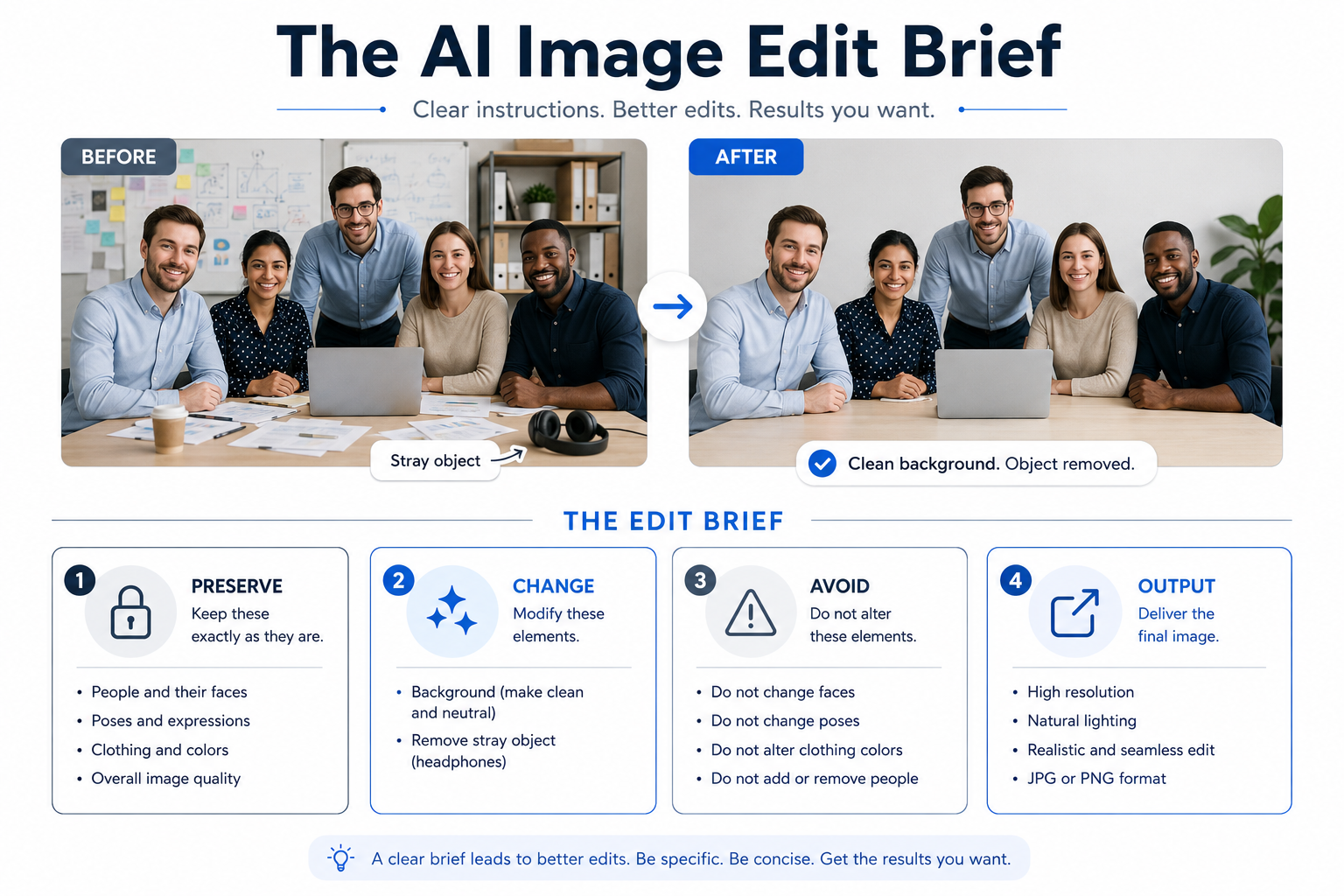
- Preserve: what must remain exactly as-is.
- Change: the specific edit, described concretely.
- Avoid: artifacts, drift, or unintended modifications.
- Output: final format, dimensions, and where it's going.
Preserve is the part people skip. You have to explicitly name the product UI, the metric values, the logo, the colors, the lighting direction, anything you're not willing to lose, especially anything that affects accuracy. Change should be one or two surgical edits, not a wish list. Avoid catches the predictable failure modes: warped objects, regenerated dashboard text, invented features, mismatched lighting. Output ties the edit to its real use: a 1200x630 LinkedIn deal post has different demands than a proposal cover or a printed one-pager.
Let's look at what a conversation about a deal visual might look like:
- Ryan: What's the edit?
- Jessica: Take the stray notification out of the demo screenshot and freshen up the background.
- Ryan: That'll come back with a dashboard that looks slightly different than what we actually ship. What are you preserving?
- Jessica: The product UI, the real metric values, the logo, the brand colors, the lighting direction. The screen stays pixel-for-pixel.
- Ryan: Good. And Avoid?
- Jessica: No regenerated numbers, no invented features, no seam where the notification was, no off-brand background color.
Notice Ryan's pressure: name what stays before you name what changes, and in a prospect-facing asset, "what stays" includes anything that keeps the product and the customer honest. That order is the whole brief.
Evaluate Before You Ship 🚦
A clean edit doesn't automatically mean a shippable asset. Before any AI-generated or AI-edited image reaches a prospect, run it through five checks:
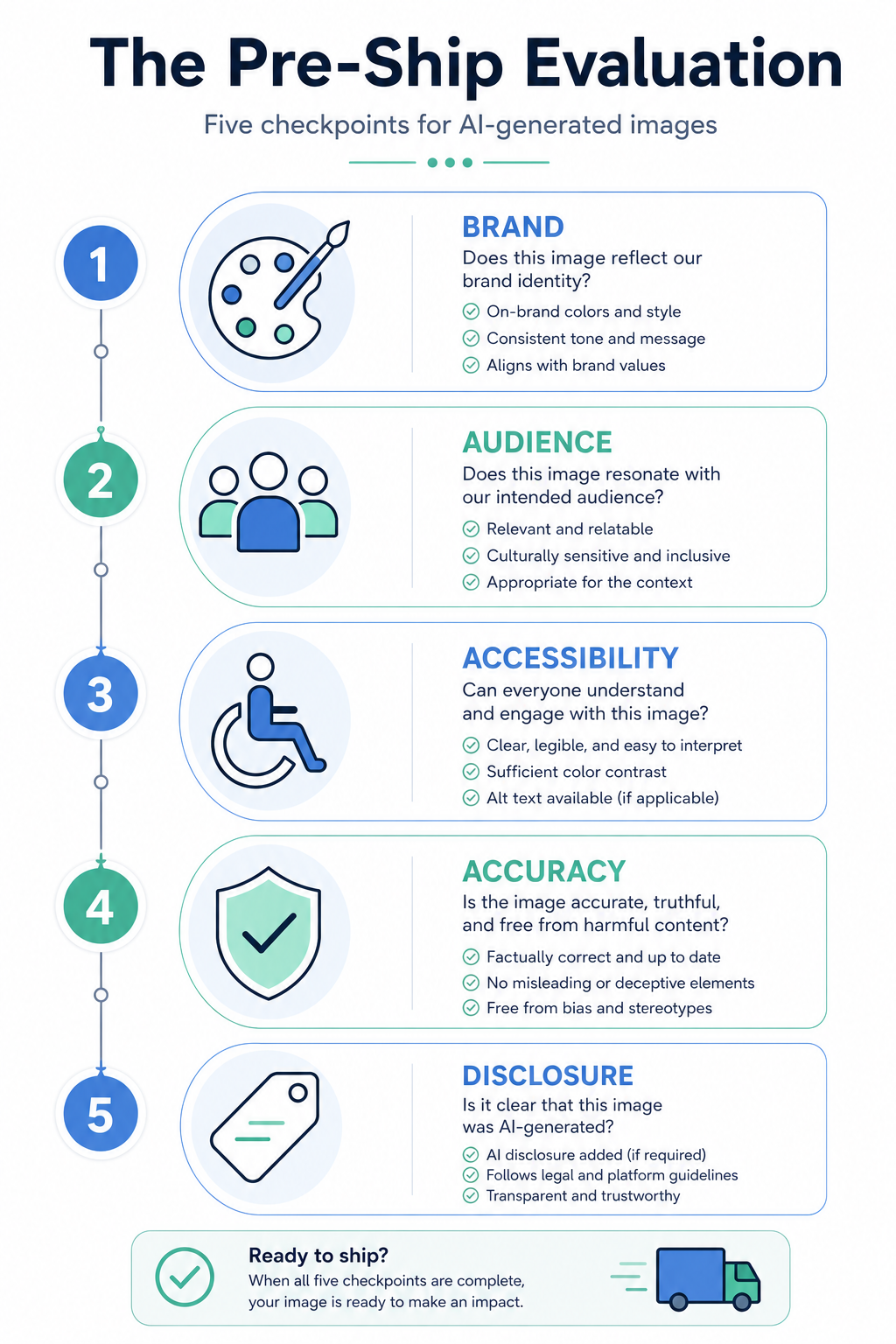
- Brand: does it match your company's visual system, or does it read as generic stock?
- Audience: will the prospect seeing it interpret it the way you intend?
- Accessibility: does it need alt text, and is the contrast high enough where text overlays it?
- Accuracy: does the image imply something that isn't true, like a real customer, a real result, or a product feature that doesn't exist?
- Disclosure: if the image is AI-generated or substantially AI-edited, do your platform's norms or your prospect's expectations call for labeling it as such?
The accuracy and disclosure checks are where most deals get burned. An AI image of "customers using our product" dropped into a proposal reads as a case study or testimonial, even if you never used that word. A retouched demo screenshot that quietly adds a feature or inflates a number becomes a false claim a prospect can hold you to. The move when a risk surfaces is not always to scrap the asset: sometimes you revise the prompt, sometimes you change the caption or placement, sometimes you add a disclosure line, sometimes you swap in a real, customer-approved screenshot or case study. The judgment call is yours, but it has to be a call, not a default.
The throughline of this unit: edits and AI images need a stated intent (the brief) and a stated standard (the five checks), or you'll send a prospect something nobody actually approved. Before this becomes real, you'll get on a call with a reviewer who wants to ship an AI image into a proposal tomorrow and isn't sure the risk is worth a delay. Your job in that conversation is to name the specific concerns, propose options, and land on a defensible call together: revise the prompt, change the usage plan, or kill the asset. Bring specifics. Vague risk talk loses to a deal deadline every time.
Summary
This lesson shows you how to turn existing images into polished, prospect-ready visuals with AI — without compromising brand standards, product accuracy, or trust. You learned to use the Image Edit Brief to define what must be preserved, what should change, what the edit must avoid, and how the final asset will be used. You also gained a five-part pre-ship checklist covering Brand, Audience, Accessibility, Accuracy, and Disclosure, so every image can be reviewed with confidence before it reaches a prospect. In the upcoming activities, you’ll apply these tools to real-world editing scenarios, assess potential risks, and decide whether to revise the prompt, change the usage plan, add disclosure, or retire the asset.
