Prompting Image Generation Clearly
From Reading Images to Making Them 🎯
Reading images is one half of the job. The other half is making them. When you ask AI to generate an image, the model is guessing at thousands of choices you didn't make: where the camera sits, who's in the shot, what time of day it is, what's on the screen in the background, whether it looks credible or like a generic stock photo. Leave those choices to chance and you get a vaguely-stock-photo result that doesn't fit the proposal cover, the QBR deck, or the pitch. This unit gives you a structure for making those choices on purpose.
Apply the Image Prompt Anatomy 🦴
The Image Prompt Anatomy is a five-part checklist for what to put into an image prompt: Subject, Style, Composition, Mood/Lighting, and Constraints. If any one is missing, the model fills the gap with whatever its training data suggests, which is usually a cliché that undercuts your credibility in front of a buyer.
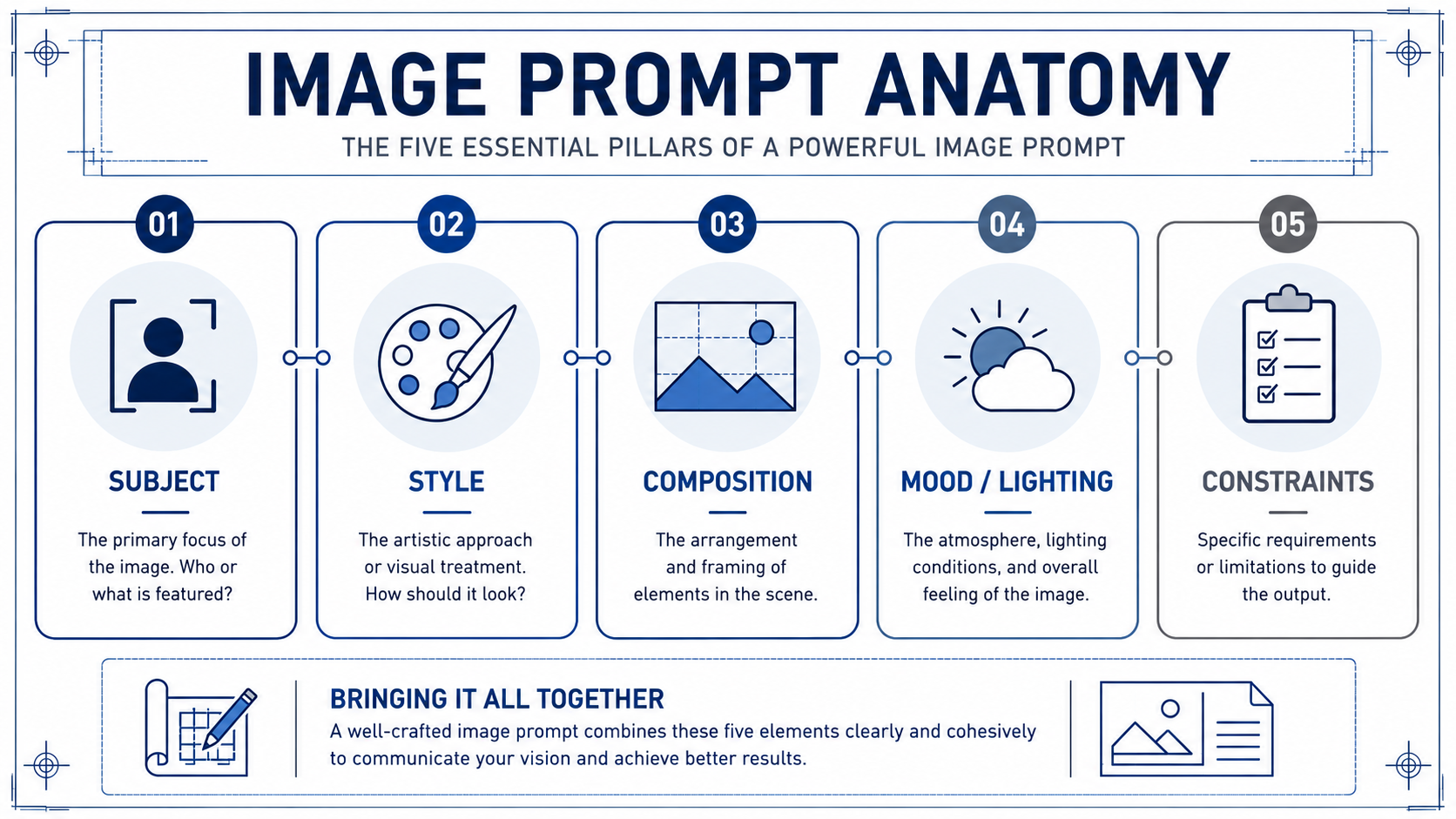
- Subject is what is literally shown: who or what is in the frame, doing what.
- Style is the visual treatment: photo, line illustration, 3D render, watercolor, or a reference to a known look. This is where a deck's credibility and tone live.
- Composition is how the shot is framed: close-up or wide, eye-level or overhead, centered or off-axis, and crucially where the negative space sits for your deck title, headline, or proposal cover text.
- Mood/Lighting sets atmosphere: warm afternoon light, cool overcast, bright and clean, calm and confident.
- Constraints are the guardrails: aspect ratio (16:9 for a slide, 4:3 for some deck templates, 1:1 for a one-pager thumbnail), exclusions (no readable text, no fake logos, no invented product UI), and any "must include" or "must avoid" notes.
Run through all five every time, even when one feels obvious. "Obvious" is exactly where models default to the average — and average is a handshake stock photo on your proposal cover.
Here's how the checklist works in practice. Milo is helping an account executive turn a vague deck-visual idea into a usable prompt before opening the image tool:
- Milo: What's the subject?
- Chris: A team collaborating around a laptop.
- Milo: That's a stock-photo prompt. Be specific. Where? Who's in the shot? What are they actually doing?
- Chris: Three people, side-by-side at a kitchen-style office counter, looking at one laptop, mid-conversation, hands gesturing, not posed.
- Milo: Better. Now: style, composition, lighting, constraints. Skip any of those and you'll get the cheesy-handshake version of your idea, which kills your credibility on a proposal cover.
Notice Milo's pressure isn't on creativity, it's on specificity. Vague subject equals vague, generic output.
Draft a Prompt from a Deal Goal 🥅
A prompt starts with the communication goal, not the image. Ask yourself: what does this image need to do for the reader, and where does it live? Anchor a proposal cover? Open a QBR deck section? Carry a concept on a pitch slide? The goal and the placement tell you the constraints before you touch subject or style.
Once you know the goal, translate the theme into a concrete scene. "Partnership" is a theme, not a subject; a model can't draw a theme. Push it into something you could photograph: two people reviewing a dashboard at a standing desk, a small team mid-conversation over a laptop, a single focused person on a video call. Pick one. Then layer the other four anatomy elements on top, tuned to feel credible to a buyer rather than canned.
Write the prompt as one block of clear sentences, not a list of tags. Something like: a wide-angle photograph of three colleagues at a standing desk reviewing a dashboard on a laptop, mid-conversation; warm afternoon light from a window on the left; muted earth tones; 16:9 with empty space on the upper right for the deck title; no readable on-screen text, no fake logos, no invented product UI, no clip-art-style handshake poses. That's all five elements, on purpose, credible, in one paragraph.
Refine by Tightening Specificity and Exclusions 🔧
Your first output will almost never be the one you ship to a prospect. Treat it as a diagnostic. Look at what's off and trace it back to an anatomy element. Faces look uncanny? Tighten Style ("documentary photo, natural skin texture") or add an exclusion ("no airbrushed faces"). Background a mess? Tighten Composition ("clean background, shallow depth of field"). Image feels generic? Subject is still too abstract. Deck title won't fit? You forgot a safe-area Constraint for the text.
The move is targeted edits, not rewrites. Change one or two elements, regenerate, compare. Keep a short, reusable exclusions list you add every time (no readable text, no warped hands, no stereotyped depictions, no fake brand logos, no invented product UI, no stock-looking handshake clichés), plus your standard aspect ratios per deck template.
The throughline of this unit: a usable deck or proposal image prompt is a deliberate set of five choices that feel credible to a buyer, not a wish. Vague in, generic out; specific and credible in, prospect-ready out.
The test of any of this is whether it holds up live, so the next step is a conversation with a design partner where you'll walk through each anatomy element for a real proposal hero before you ever open the tool. Bring a concept that's already concrete, and expect to leave the call with it sharper and more credible.
Summary
You can now turn a deal goal into a clear, credible image prompt using the five-part Image Prompt Anatomy: subject, style, composition, mood and lighting, and constraints. With targeted refinements, you can move beyond generic AI imagery and create visuals that are ready for proposals, pitches, and decks. In the upcoming activities, you’ll apply this framework to a real proposal hero, sharpen each prompt element with a design partner, and refine the result before opening an image-generation tool.
