Finding Extreme Positions
Introduction
Welcome back to Summarizing Data. We’re in lesson three, and we’ve already learned how to describe how cold or hot it was and how many values matched a condition. Now we’ll ask a different question: where did an extreme value occur? We’ll use NumPy to find the position of the coldest day, then use positions to look up temperatures and product names. By the end, we’ll know how to find an extreme and connect it to the information we want to report.
Finding the Position with np.argmin
In the first lesson, we used np.min to get the smallest value in an array. To find where that value is located, we use np.argmin. It returns an integer index, not the temperature itself. NumPy indexes start at 0, so an index of 5 points to the sixth element. We’ll store that position so we can use it in the next step.
Here, np.argmin(temps) finds the position of the smallest temperature. The printed result is 5, which identifies where the coldest value appears:
Reading the Value at the Position
Now that we have the position, we can use it to read the temperature stored there. This uses the same square-bracket indexing you may recall from previous courses. The important distinction is that coldest_day is an index, while temps[coldest_day] is the value at that index. Keeping those two roles clear helps us move from locating an extreme to reporting its measurement.
The aligned positions below show how index 5 leads to the value 17.
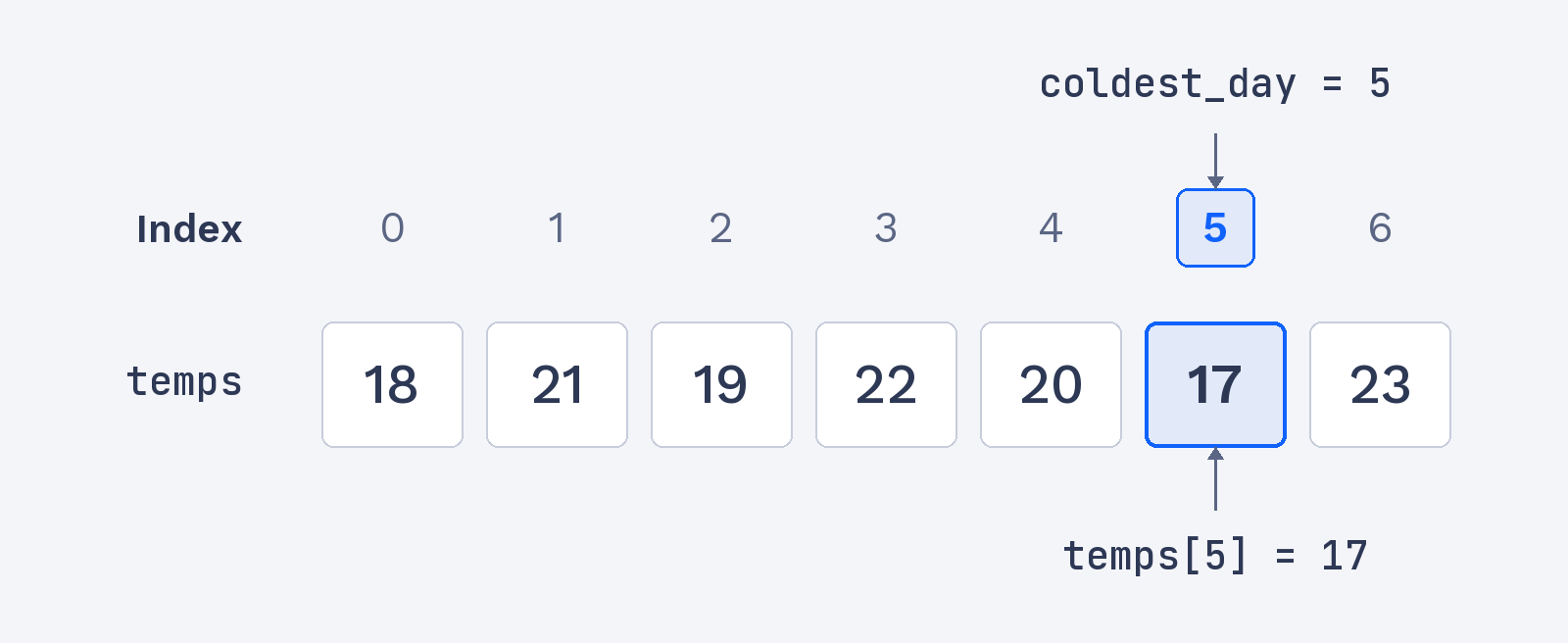
Use that index in square brackets to read the temperature:
Because coldest_day is 5, this reads the sixth element of temps. That element is the coldest temperature:
Finding the Maximum with np.argmax
To find the position of the largest value, we use np.argmax. It works like np.argmin, but looks for the maximum instead of the minimum. As with np.argmin, its result is an index, not the temperature. We can apply it to the same array to locate the hottest day. That position could then be used with temps, just as we used the coldest position.
The largest temperature, 23, is at index 6. So np.argmax prints the position 6:
