Sorting Tables by Axis
Introduction
Welcome to Sorting, Unique Values, and Table Analysis with NumPy. In this first lesson, we sort a small sales table where each row is a store and each column is a product, and we see why the choice of axis matters: one keeps each store’s values together, while the other can quietly mix them.
By the end of this lesson, you’ll be able to:
- Sort each row or each column of a table with
np.sort - Explain what each axis keeps and what it discards
- Choose the right axis for the question being asked
What Sorting Along an Axis Means
NumPy’s np.sort() sorts values along a chosen axis and returns a new sorted array. It leaves the original array unchanged. For a two-dimensional table, axis=1 sorts across each row, while axis=0 sorts down each column. Picture the axis as the direction in which the values travel while being sorted: across a store’s row or down a product’s column. The result may look tidy either way, but only one direction may preserve the meaning of each row.
Sorting Each Row with axis=1
Let’s start with three stores and three products. Sorting with axis=1 orders the values inside each store’s row:
This call sorts each row independently. For example, the first store’s values, [12, 8, 15], become [8, 12, 15]. The row still contains the same three values, so those values still belong to that store. The printed result is:
Row sorting has a cost, though. Before sorting, each column meant one product: 12 was the first product’s sales and 8 was the second’s. After sorting, the first column holds 8, which came from the second product. So axis=1 keeps each store’s collection of values together, but it discards which product each value belonged to, and a fixed column no longer stands for one product.
Sorting Each Column with axis=0
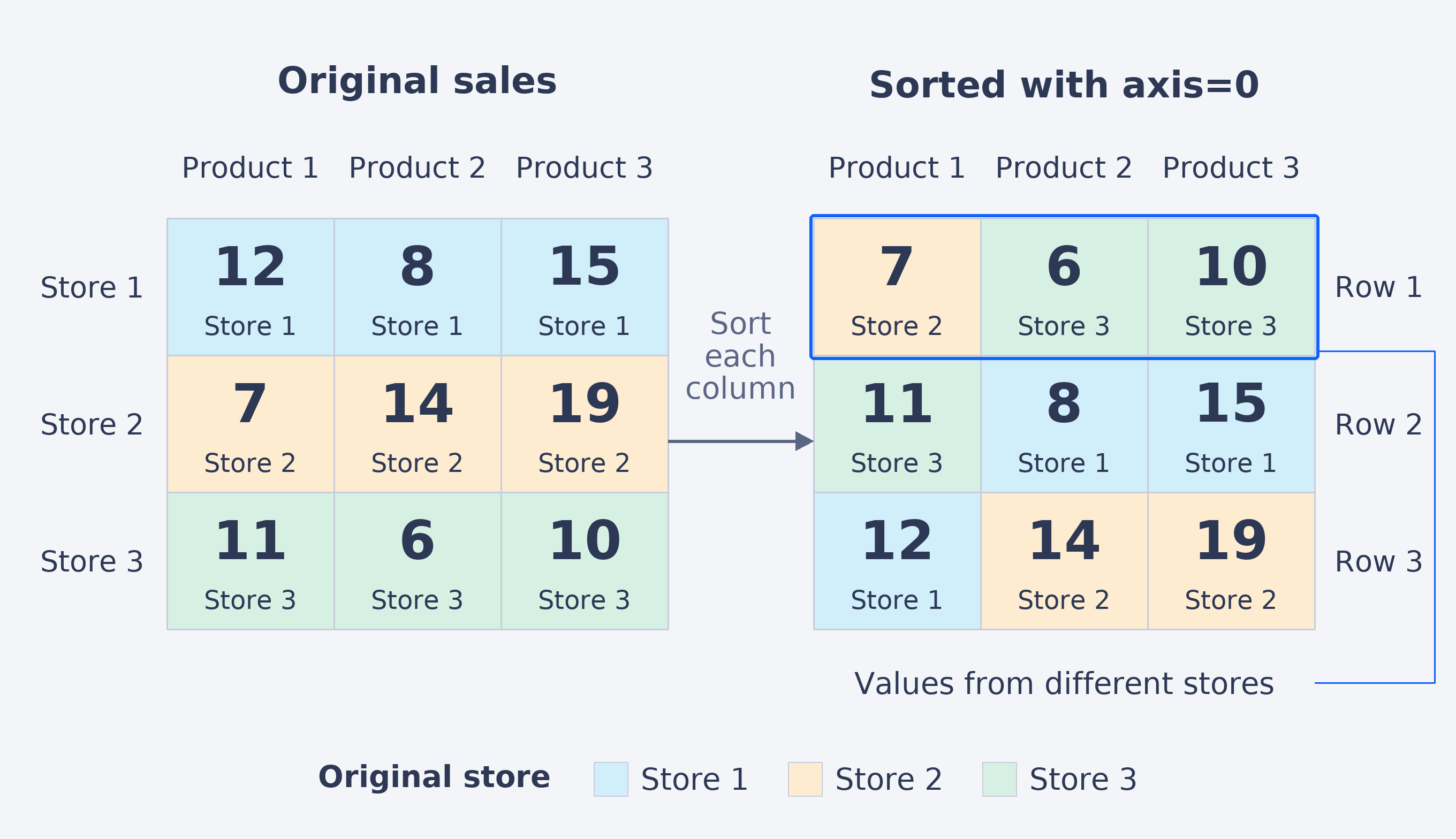
Now we’ll sort the same table down each column. Each column represents one product, so its values are ordered from the first store to the last:
Here, the first product’s values, [12, 7, 11], become [7, 11, 12]. The same sorting happens independently for the other two columns. The result is:
Each column is now in increasing order. However, because the columns were sorted separately, we should check whether each resulting row still represents a store.