Working With Grid Data
Introduction: Data That Lives in Rows and Columns
Welcome back to Solving Problems with Loop Patterns in Python! This is the fourth and final unit of the course. In Unit 3, we used nested loops to pair two separate lists, one held in sizes and one in colors. This time, both levels of the nesting come from a single structure.
That structure is two-dimensional data: values arranged in rows and columns. Spreadsheets, chessboards, seating charts, and monthly sales tables all share that shape, and in Python, we usually store them as a list of lists. Our goal in this lesson is to read, total, format, and summarize such a grid.
Here is the data we will work with, along with the output we are building toward:
The sample is a non-empty rectangular grid. Non-empty means that it contains at least one cell. Rectangular means that every row contains the same number of cells.
What a List of Lists Actually Is
There is nothing special about grid: it is an ordinary list, and its three elements simply happen to be lists themselves. That single fact is what makes nested loops the natural tool for the job.
Because this sample is rectangular, the number of cells in the first row is also the number of columns in the whole grid. If rows have different lengths, len(grid[0]) describes only the first row.
Three words will come up constantly, so let us define them now:
- A row is one inner list, such as
[4, 5, 6]. - A cell is one value inside a row, such as
5. - In a rectangular grid, a column is a shared position across rows: column 0 holds
1,4, and7.
![A labeled 3-by-3 grid showing rows, columns, grid[0], and grid[0][1]](https://k3-production-bucket.s3.us-east-1.amazonaws.com/uploads/EwFghZNrEAYM8YQMd_image_1.png)
Writing each row on its own line, with a trailing comma after the last one, is purely a readability choice; Python treats it exactly like a one-line list.
The Grid Traversal Skeleton: Rows Outside, Cells Inside
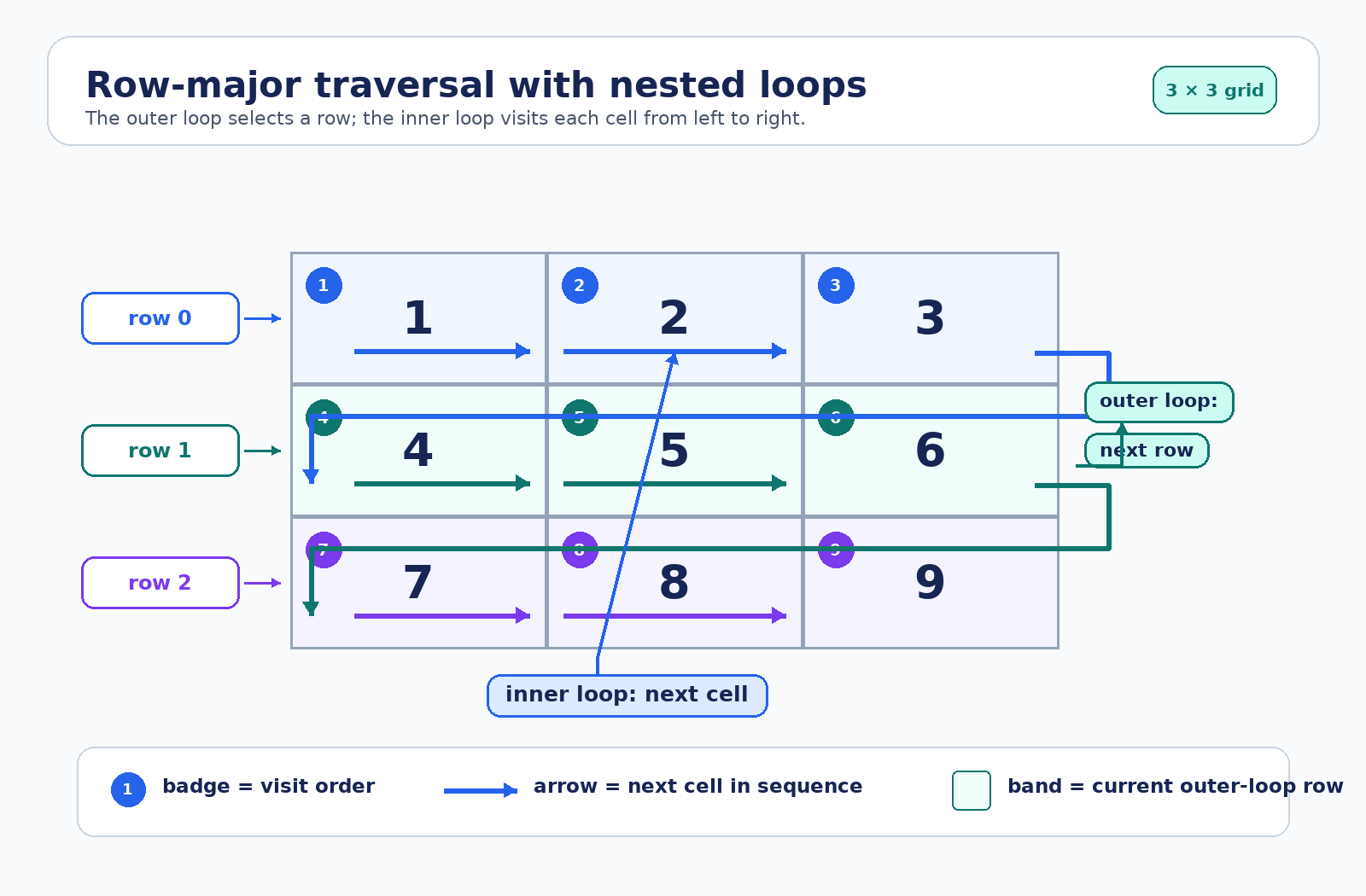
Nearly every grid task is built on the same two-level skeleton. The outer loop walks the rows; the inner loop walks the cells inside the current row.
The key detail is the difference between the two loop variables: row is a list, so it can be looped over again, while cell is a plain number ready for arithmetic. Because the inner loop iterates over row rather than over a separate list, each pass automatically covers exactly the cells belonging to the current row.
This reading order, left to right within a row before moving down, is called row-major order. For this rectangular 3-by-3 grid, the multiplication rule from Unit 3 gives 3 rows × 3 cells = 9 visits to the innermost body.
If rows have different lengths, the grid is sometimes called ragged. In that case, the multiplication rule does not apply using one fixed column count. Instead, the number of visits is the sum of the row lengths. The direct loops shown above still work because each inner loop follows the length of its current row.
Totaling Every Cell in the Grid
Our first real task is a grand total: the sum of all nine values. This is the accumulator pattern from earlier in the path, now dropped into the grid skeleton.
Placement is everything here. grand_total = 0 sits before both loops, so it is created once; putting it inside the outer loop would reset the total at the start of every row, leaving only the last row's sum. The += line sits at the deepest level, so it fires once per cell.
Following the running total makes the process concrete: it moves through 1, 3, 6 after the first row, then 10, 15, 21 after the second, and finally 28, 36, 45 once the last row is done.
Formatting a Grid as Aligned Text
Printing a grid so that its columns line up requires building one string per row and then printing it. That means working at two different levels.
Each piece has a deliberate home:
line = ""is inside the outer loop but outside the inner one, so every row starts from an empty string.str(cell)converts the number to text, and.rjust(3)right-justifies it in a field three characters wide, padding with spaces so the columns align.print(line)is at the outer level, running once per row rather than once per cell.
Repeated string concatenation is used here because it makes the loop levels and the growth of line easy to see. In larger programs, Python code often builds several string pieces and joins them afterward, but the beginner-friendly pattern above is appropriate for these small grids.
Per-Row Summaries: Work at the Outer Level
That formatting loop reveals a rule worth stating plainly: a statement at the outer level runs once per row, while a statement at the inner level runs once per cell. Any per-row summary follows the same shape, only with a number instead of a string.
Compare this with the grand-total loop from earlier. The statements are nearly identical; only the indentation of the initialization differs. Moving row_total = 0 out of both loops would give us one combined total of 45 again, while keeping it inside the outer loop gives us three separate answers.
Finding an Extreme Value Across the Whole Grid
The max-tracking pattern from Unit 1 transfers to grids with almost no changes: the only new part is that the comparison lives two levels deep.
Seeding largest with grid[0][0] rather than with 0 keeps the pattern correct even when a grid holds only negative numbers. The comparison sits inside the inner loop so that every cell gets a chance, and the print comes after both loops, once the whole grid has been examined.
This exact initializer assumes that the outer list is not empty and that its first row contains at least one cell. That is true for all grids used in this course. A general-purpose program would need to validate its data or locate the first available cell before using this pattern. For example, [] has no first row, and [[]] has a first row but no first cell.
If we also wanted to know where the maximum sits, we could loop over row and cell indices and store the two positions alongside the value.
Putting It Together and Avoiding Common Grid Mistakes
Here is the complete program, combining the traversal, the total, and the formatted output:
A handful of mistakes account for most grid bugs:
- Calling
printinside the inner loop, which prints one cell per line instead of one row per line. - Resetting an accumulator at the wrong level, mixing up per-row and grand totals.
- Forgetting
str()before.rjust(), since numbers have norjustmethod. - Assuming
len(grid[0])describes every row when the grid might not be rectangular. - Treating
rowas a number, for example, writinggrand_total += row, which raises an error. - Using
grid[0][0]without first knowing that the grid has a non-empty first row.
Before writing any line, ask how often it should run: once, once per row, or once per cell. The answer tells us exactly how deeply to indent it.
Conclusion and Next Steps
Grid work comes down to three placement levels: before both loops for anything that spans the whole grid, inside the outer loop for anything that belongs to a single row, and inside the inner loop for anything that touches a single cell. Master those three levels, and totals, formatting, per-row summaries, and extreme-value searches all become variations of one skeleton.
Congratulations on reaching the final lesson of Solving Problems with Loop Patterns in Python! Looking back, we started with search and aggregation patterns, moved on to building new lists with append(), learned how nesting pairs two sequences, and have now applied that nesting to two-dimensional data.
Your last set of practices is up next: summing every cell in a grid, printing aligned rows, computing per-row sums, and hunting down the largest value anywhere in the grid. Keep asking "which level does this line belong at?" and these grids will fall into place one row at a time!
