Understanding Function Scope
Introduction: The Function's Private Workspace
Welcome back to Returning Values and Understanding Scope in Python! In the first unit, we learned that return is how a value travels from inside a function back out to the code that called it. What we never asked is why these calculation functions hand results out through return at all. Why can't the caller simply look inside the function and read what it computed?
The answer is local scope: for the pure calculation functions in this course, each call gets its own private workspace for names. Parameters move values in and return explicitly provides the function's result. Python also supports side effects and more advanced scope mechanisms, which are outside this lesson. This lesson covers four ideas built on that fact:
- names created inside a function are local to it;
- reaching for them from outside raises a
NameError; - parameters are local too, not just variables assigned in the body;
- a name inside a function and a same-named name outside are two separate variables.
The program we will build together is small; its entire output is a single line:
Building compute_tax: A Local Variable in Action
Let's meet the function at the center of this lesson. It calculates a tax amount, holding the tax rate in a variable inside its own body:
This tiny function creates exactly two names:
amount, the parameter, which gets bound to a value when the call happens;rate, created by the ordinary assignment on the first body line.
Notice that there is nothing special about rate = 0.2. It is the same assignment syntax we would write at the top level; what makes it local is simply that it was written inside a function body. Also note that compute_tax never prints anything: it computes a number and hands it back, exactly the value-producing style from the previous unit.
Tracing the Call: What Exists, and When
Now let's call the function and watch the private workspace open and close:
Reading the first line step by step:
- the call starts, and a fresh workspace opens for it;
amountis bound to100inside that workspace;rateis created inside it and set to0.2;amount * rateevaluates to20.0;returnhands that number out, and the workspace is discarded;20.0replaces the call expression, sotaxreceives20.0.
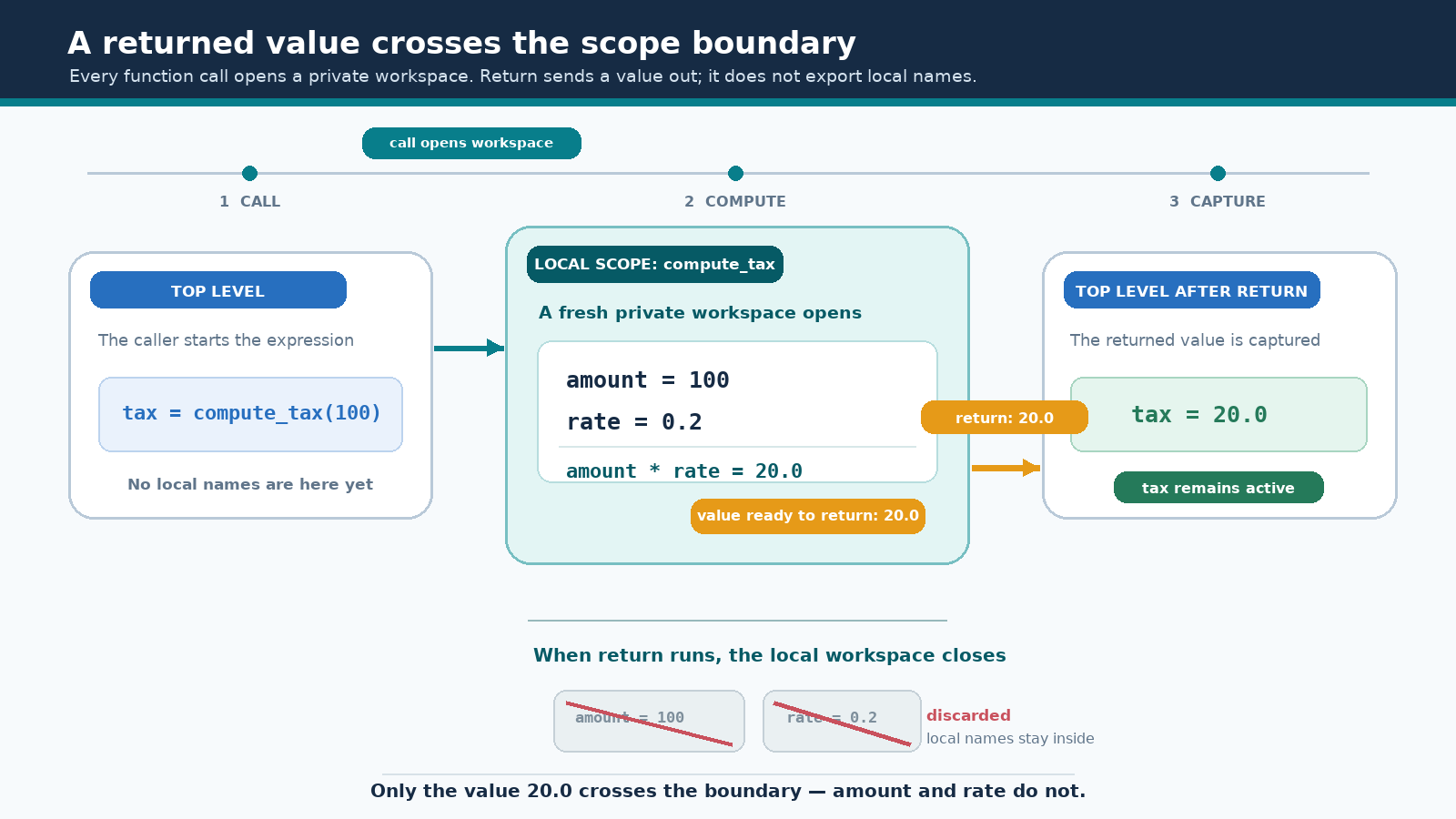
In this example, once the function finishes, the local names amount and rate disappear with that call's workspace. The number 20.0 survives only because it was returned and captured. (Later topics such as closures can keep local names alive longer; those are outside this lesson.) Notice that it is a float: multiplying an integer by 0.2 gives 20.0, not 20. The printed line below comes from the caller, since nothing inside the function prints.
Crossing the Boundary the Wrong Way: NameError
What if we ignore the workspace rule and reach for rate directly? Our finished program documents that temptation with two comment lines:
Uncommenting that line would crash the program with NameError: name 'rate' is not defined. This is not a typo or a misspelled variable; the name genuinely does not exist at the top level because it was born and buried inside the call. Here is a more painful-looking version of the same mistake:
The arithmetic is perfectly correct, yet the caller still gets nothing.
Fixing It the Right Way
The repair is the one we already know: hand the value out, then catch it at the call site.
The subtle part is the second doubled. It is not the function's variable somehow made visible; it is a completely new top-level name created by this assignment, which happens to hold the same number. Nothing forces the two names to match, either: writing captured = double_it(5) and print("Doubled:", captured) would produce identical output because the function's internal name was never visible to begin with.
Parameters Are Local Too
It is easy to assume that only variables assigned in the body are local. Parameters live in exactly the same private workspace; they are simply created by the call rather than by an assignment we wrote. Consider an alternate version of our function that receives the rate instead of storing it:
Even though rate clearly held 0.2 a moment earlier, that name does not exist at the top level once the call is over. Comparing this version with our original one is instructive: moving rate from a parameter into a body variable changes nothing about its visibility, but it does change the function's contract. In the final form, the caller supplies only the amount, and the rate stays encapsulated inside the function.
Same Name, Two Different Variables
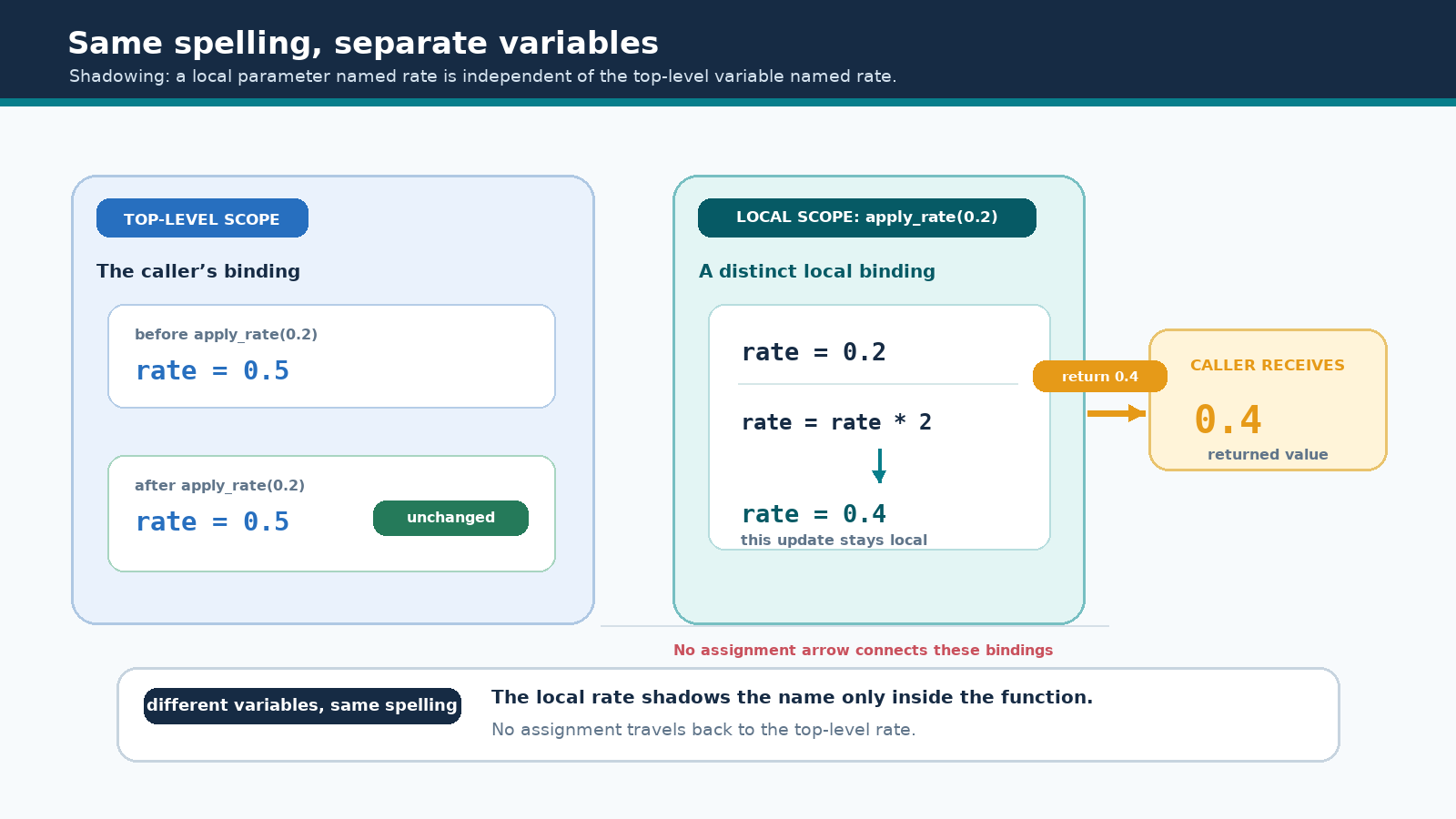
Since each function has its own workspace, a top-level name and a local name can share spelling while staying completely independent. This is called shadowing:
The call binds the local rate to 0.2, then rate = rate * 2 updates that local binding to 0.4, which is returned. The top-level rate is never touched because assignment creates or updates a local binding by default. Scope declarations such as global or nonlocal, and mutating an external object, can reach outside that workspace, but those mechanisms are outside this lesson. Shadowing is legal, but it can confuse readers, so distinct names are usually the kinder choice.
Local Intermediates Never Escape
Real functions often need scratch variables along the way. The rule does not change: no matter how many names a function invents, the caller receives exactly one thing.
Here tax_amount holds 20.0 while the function runs, then — in this example — disappears with the call; only the sum 120.0 is provided through return. This is quietly liberating: we can create as many helper names as a calculation needs without worrying about colliding with names used elsewhere in the program. That isolation is precisely what makes functions safe to reuse. For the pure calculation functions in this course, return is how each function explicitly provides its result.
The Complete Program
With every idea covered, here is the finished script in its final shape:
Every choice here is deliberate: the print(rate) line stays commented out so the program exits cleanly while still documenting the rule; there are no imports, no main() wrapper, and no __main__ guard, since this is a plain top-level script; and the def sits above the line that calls it, following the ordering rule from an earlier course. The result is one line of output, produced entirely by the caller.
Conclusion and Next Steps
In one sentence: for the pure calculation functions in this course, names created inside a function stay local to that call by default, and return explicitly provides the function's result. Around that idea sit four supporting rules: in these examples, locals disappear when the call ends; reading one from outside raises NameError; parameters are just as local as body variables; and same-named variables in different scopes do not touch each other through ordinary assignment. Python also supports side effects and more advanced scope mechanisms (global, nonlocal, closures, and similar), which are outside this lesson — so treat these rules as the beginner model for the calculations we write here, not as a claim about all of Python.
In the practices ahead, we will read the finished program closely, trigger a real NameError and repair it by returning, predict what a shadowed name does before running the code, build compute_tax in both its parameter and local-variable forms, and prove that a local intermediate never escapes these examples. After that, the next unit puts these returned values to work by feeding them straight into other functions to form calculation pipelines.
Let's head into the editor and see these private workspaces open and close for ourselves!
