Welcome to the next course in the path! You already have a PostgreSQL-backed read API that can list, filter, sort, summarize, and retrieve tickets. Now you’ll begin turning it into a complete REST API by creating new resources with POST.
In this lesson, you’ll define the data contract for ticket creation, validate the incoming JSON body, confirm that the supplied requester exists, and insert a new ticket into PostgreSQL. You’ll also use the API Simulator’s Body tab to send JSON and verify that the returned ticket was genuinely persisted.
Previously, the ticket API accepted only GET requests. The collection route could interpret query parameters, while the detail route used a path parameter to retrieve one record. The new creation flow introduces a request body and a database mutation while preserving all of that existing read behavior.
Following the Ticket Creation Flow
A successful creation request moves through several layers:
text
API Simulator ↓POST /api/tickets ↓Express JSON parsing ↓Route validation and normalization ↓Requester existence lookup ↓Ticket repository INSERT ↓PostgreSQL ↓201 Created + Location header + created ticket
Each layer has a focused responsibility:
src/app.ts parses the incoming JSON before the request reaches the router.
src/domain/ticket.ts defines the normalized data accepted by the repository.
src/repositories/user-repository.ts confirms that the requester exists.
src/routes/ticket-routes.ts validates untrusted body values and controls the HTTP response.
src/repositories/ticket-repository.ts generates the ticket ID and performs the parameterized INSERT.
This separation prevents the repository from needing to understand malformed HTTP input. By the time createTicket() runs, it receives a small, predictable object containing validated values.
Understanding POST Requests
A GET request asks the server to return existing information. A POST request sends information to the server so it can create a new resource.
The ticket creation endpoint is:
text
POST /api/tickets
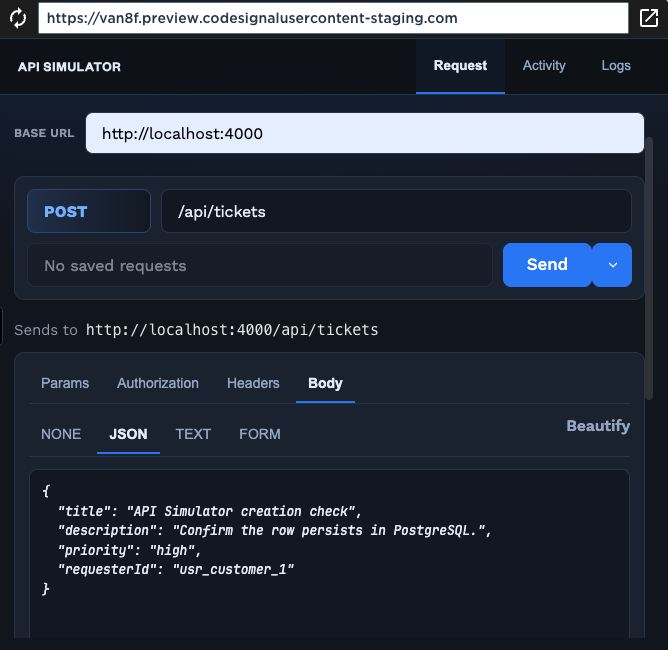
Unlike the earlier collection request, the creation request includes a JSON body:
JSON
{ "title": "API Simulator creation check", "description": "Confirm the row persists in PostgreSQL.", "priority": "high", "requesterId": "usr_customer_1"}
The client supplies the ticket’s editable creation fields. Other properties remain controlled by the server and database:
The server generates the ticket ID.
Every new ticket starts with the "open" status.
The ticket initially has no assignee.
PostgreSQL generates the creation and update timestamps.
The server returns the completed ticket after insertion.
Keeping these fields server-controlled prevents a client from choosing an existing ID, creating a ticket that starts as closed, or supplying misleading timestamps.
Join the 1M+ learners on CodeSignal
Be a part of our community of 1M+ users who develop and demonstrate their skills on CodeSignal
Parsing JSON in Express
Before a route can access a JSON request body, Express needs JSON-parsing middleware. The application already registers it in src/app.ts.
express.json() reads requests whose body contains JSON and converts the JSON text into a JavaScript value. The parsed value becomes available through request.body.
Middleware is registered before ticketRoutes, so a POST /api/tickets handler receives the parsed object rather than the original text stream.
express.urlencoded() handles URL-encoded form submissions. It is not needed for the JSON request in this lesson, but it prepares the application for other body formats.
The request should also use the Content-Type: application/json header. When you select JSON in the API Simulator, it prepares the request as JSON so Express can parse it correctly.
Defining the Creation Contract
The main Ticket interface represents a complete ticket returned by the API. Creation needs a smaller contract because clients do not supply every final ticket property.
That input contract lives in src/domain/ticket.ts.
title and description are normalized strings. The route trims them before passing the object to the repository.
priority uses the existing TicketPriority union rather than a broad string. It can therefore be only "low", "medium", or "high".
requesterId identifies the existing user who is opening the ticket. At this stage it comes from the request body, but that is temporary scaffolding until authentication determines the requester automatically.
Fields such as id, status, assigneeId, createdAt, and updatedAt are intentionally absent. They belong to the server-controlled creation process.
The difference between CreateTicketInput and Ticket reflects an important API design principle: the shape used to create a resource does not have to match the completed resource returned afterward.
Treating Request Bodies as Untrusted Input
TypeScript cannot guarantee that an external HTTP client sends the expected JSON. A client can omit properties, use incorrect types, or supply unsupported values.
The route therefore begins by treating the body as unknown data.
ticketRoutes.post("/", async (request, response) => {
  const body = request.body as Record<string, unknown>;
The local route path is "/", but the router is mounted at /api/tickets. The complete public endpoint is therefore POST /api/tickets.
Record<string, unknown> allows the route to read named properties while requiring runtime checks before using them as strings or domain values.
A TypeScript assertion does not validate the incoming JSON. It only gives the route a convenient structure for inspecting each value.
Validation must happen before the body is converted into CreateTicketInput.
Validating and Normalizing Text Fields
The route first validates the title, description, and temporary requester ID.
if (typeof body.title !== "string" || body.title.trim().length < 3) { response.status(400).json({ error: { code: "INVALID_BODY", message: "title must contain at least 3 characters.", }, }); return;}
The title must be a string because methods such as trim() are not safe on numbers, arrays, or objects.
Trimming before checking the length prevents whitespace-only titles such as " " from passing validation.
The title must contain at least three characters after normalization. Invalid input receives HTTP 400 Bad Request.
The immediate return stops the route after sending the error. Without it, the handler could continue and attempt to send another response.
The description is optional, but it must be a string when provided.
if ( body.description !== undefined && typeof body.description !== "string") { response.status(400).json({ error: { code: "INVALID_BODY", message: "description must be a string.", }, }); return;}
Omitting description is allowed. The route later normalizes a missing description to an empty string.
Values such as arrays, numbers, and objects are rejected rather than being silently converted into text.
The requester ID is required for this pre-authentication version of the endpoint.
The field must be a non-empty string after trimming.
This only validates the shape of the value. A later repository lookup determines whether that user actually exists.
Defaulting and Validating Priority
The request may omit priority. In that case, the route uses "medium".
const priority = body.priority ?? "medium";
The nullish coalescing operator uses the default only when body.priority is null or undefined.
An explicitly supplied value is still validated. The route does not accept arbitrary strings simply because the property exists.
The allowed values come from the shared domain constant.
if (!ticketPriorities.includes(priority as TicketPriority)) { response.status(400).json({ error: { code: "INVALID_BODY", message: "priority is not supported.", }, }); return;}
ticketPriorities remains the single source of truth for "low", "medium", and "high".
A request containing "priority": "urgent" receives HTTP 400 before it reaches PostgreSQL.
After this runtime check succeeds, the route can safely use the value as TicketPriority.
This combines a convenient client default with a strict domain boundary.
Confirming That the Requester Exists
The tickets.requester_id column refers to a user. Sending a nonexistent ID directly into the insert would eventually violate the database’s foreign-key constraint.
The repository in src/repositories/user-repository.ts performs a small existence check first.
interface UserIdRow extends QueryResultRow { id: string;}export async function userExists(id: string): Promise<boolean> { const result = await query<UserIdRow>( "SELECT id FROM users WHERE id = $1", [id], ); return result.rowCount === 1;}
The query selects only id because the route does not need the user’s name, role, token, or other fields. This keeps the lookup focused and avoids fetching unnecessary data.
$1 is a PostgreSQL parameter placeholder. The supplied ID is passed separately in [id], so request data is never inserted directly into the SQL text.
rowCount === 1 returns true only when one matching user exists. Because user IDs are unique, more than one matching row should not be possible.
The function exposes a simple boolean contract. The route does not need to understand PostgreSQL result objects.
Parameterized SQL should be used for every request-derived value, even for small lookups like this one.
Returning a Focused Requester Error
The route trims the requester ID and checks it before inserting the ticket.
const requesterId = body.requesterId.trim();if (!(await userExists(requesterId))) { response.status(400).json({ error: { code: "INVALID_REQUESTER", message: "requesterId does not reference an existing user.", }, }); return;}
Trimming happens before the lookup so accidental surrounding spaces do not change the intended identifier.
The route waits for userExists() because the result depends on PostgreSQL.
A missing user receives a focused INVALID_REQUESTER response rather than exposing a low-level foreign-key error.
The database constraint should still remain in place. The route provides a clearer client error, while PostgreSQL remains the final protection for referential integrity.
This lookup proves only that the referenced user exists. It does not prove that the person sending the request is that user.
Temporary Identity Scaffolding
Accepting requesterId from the body is useful while learning creation flows, but it is not a secure identity model.
Even when usr_customer_2 exists, the current route has no proof that the caller is allowed to create a ticket on that user’s behalf.
Later authentication work will identify the caller from trusted credentials, such as a token, and the server will derive the requester from the authenticated identity. For now, the existence check has a narrower purpose: it prevents invalid references and creates a controlled path toward the database insert.
Generating the Ticket Identifier
The mutation logic lives in src/repositories/ticket-repository.ts. The repository generates a new identifier before constructing the insert.
import { randomUUID } from "node:crypto";export async function createTicket( input: CreateTicketInput,): Promise<Ticket> { const id = `tkt_${randomUUID()}`;
randomUUID() generates a UUID using Node’s built-in cryptographic module.
Prefixing it with tkt_ keeps the identifier recognizable as a ticket ID, matching existing IDs such as tkt_1001.
The client does not provide this value. Server-side generation prevents clients from choosing duplicates or overwriting identity conventions.
The generated ID is included in the parameter array used by the PostgreSQL insert.
The new identifier might look similar to:
tkt_7a51e25e-b9c6-47f2-aac0-f6b9e2c12867
Inserting the Ticket into PostgreSQL
Returning the Inserted Row
The statement ends with RETURNING, which asks PostgreSQL to return the newly inserted record.
return mapTicketRow(result.rows[0]!);
RETURNING avoids issuing a separate SELECT after the insert. PostgreSQL inserts the row and immediately provides the final stored values.
The returned columns include every field required by mapTicketRow(), including the server-controlled status, nullable assignee, and database timestamps.
mapTicketRow() converts snake-case columns such as requester_id into camel-case properties such as requesterId.
It also converts PostgreSQL Date values into ISO strings through toISOString().
The repository therefore returns a complete Ticket, not merely the generated ID or the input object.
Passing Normalized Data into the Repository
After every body check and requester lookup succeeds, the route constructs the creation input.
The title is trimmed again when building the final input so the stored value matches the value that passed validation.
An omitted description becomes an empty string. A supplied string is trimmed before insertion.
The priority has already passed the runtime whitelist check, so it can now be treated as TicketPriority.
requesterId is the trimmed value that was confirmed through userExists().
The repository receives only the normalized CreateTicketInput contract. It does not need to repeat HTTP-specific checks for missing fields or invalid JSON types.
Returning a RESTful Creation Response
A successful resource creation returns HTTP 201 Created.
Open the Body section below the request controls, then select JSON. Paste the following body into the editor:
{ "title": "API Simulator creation check", "description": "Confirm the row persists in PostgreSQL.", "priority": "high", "requesterId": "usr_customer_1"}
If the JSON was pasted on one line, click Beautify in the upper-right corner of the body editor. The simulator will format the JSON with indentation and line breaks, making the request easier to inspect and edit.
After sending the request, inspect:
The HTTP status, which should be 201 Created.
The JSON response, which should contain the complete new ticket.
The response headers, especially Location.
The generated ticket ID, which begins with tkt_.
The initial "open" status and null assignee.
The ISO-formatted timestamps generated from PostgreSQL values.
Proving That the Ticket Was Persisted
Receiving a creation response does not by itself demonstrate where the data was stored. To prove persistence, copy the Location header or returned ID and send a second request.
For example:
GET /api/tickets/tkt_7a51e25e-b9c6-47f2-aac0-f6b9e2c12867
The existing detail route performs a fresh PostgreSQL lookup. If it returns the same ticket, the row was persisted in the database rather than held only in temporary application memory.
You can also search through the existing collection endpoint:
GET /api/tickets?q=Simulator&sortBy=createdAt&order=desc
The newly created ticket should appear in the results, and its insertion should not disrupt the filtering, sorting, statistics, or detail routes inherited from the previous course.
Exploring Validation Responses
Try a title that is too short:
{ "title": "Hi", "requesterId": "usr_customer_1"}
The route should return HTTP 400:
{ "error": { "code": "INVALID_BODY", "message": "title must contain at least 3 characters." }}
This should also return HTTP 400 with INVALID_BODY.
Finally, try a requester that does not exist:
{ "title": "Missing requester check", "description": "This row should not be inserted.", "priority": "medium", "requesterId": "usr_missing"}
The existence lookup should prevent the insert and return:
{ "error": { "code": "INVALID_REQUESTER", "message": "requesterId does not reference an existing user." }}
These checks stop invalid data before it reaches the mutation query.
Recap
You’ve now followed the first complete write flow in the support ticket API. Express parses the JSON body, the route validates and normalizes untrusted values, the user repository verifies the temporary requester reference, and the ticket repository performs a parameterized PostgreSQL insert.
The database controls the new ticket’s initial status, null assignee, and timestamps, while the server generates its identifier. A successful request returns 201 Created, the complete inserted ticket, and a Location header that points to the new resource.
You also used the API Simulator’s Body and JSON controls, formatted the payload with Beautify, and verified persistence through a later GET request. These foundations will support the update, assignment, workflow, validation, and authorization operations introduced throughout the rest of the course.
if (!ticketPriorities.includes(priority as TicketPriority)) { response.status(400).json({ error: { code: "INVALID_BODY", message: "priority is not supported.", }, }); return;}
TypeScript
interface UserIdRow extends QueryResultRow { id: string;}export async function userExists(id: string): Promise<boolean> { const result = await query<UserIdRow>( "SELECT id FROM users WHERE id = $1", [id], ); return result.rowCount === 1;}
TypeScript
const requesterId = body.requesterId.trim();if (!(await userExists(requesterId))) { response.status(400).json({ error: { code: "INVALID_REQUESTER", message: "requesterId does not reference an existing user.", }, }); return;}
The five variable values use numbered placeholders. $1 corresponds to id, $2 to title, $3 to description, $4 to priority, and $5 to requesterId.
The initial status is written directly as 'open'. It is an application-owned rule rather than client input.
assignee_id starts as NULL because a newly created ticket has not yet been assigned.
now() lets PostgreSQL generate both timestamps. The database becomes the authoritative clock for persisted records.
No body value is interpolated into the SQL text. The values array keeps data separate from SQL structure.
This is a mutation because it changes persistent database state. Unlike an in-memory array, the inserted row remains available across later requests and server restarts.