Controlling Output Token Costs
Introduction
Welcome back to Reducing LLM Work and Cost in Python. Earlier, we learned to measure conversation history and trim input context with a deliberate budget. Now we will control the other side of the request: the tokens the model generates.
Today, we will compare two answers to the same support ticket. The first request is open-ended and invites a detailed analysis. The second asks for a short summary with three named fields. We will measure real output usage, set a reasonable limit, validate the structured result, and see why a retry caused by a malformed or truncated answer can erase an expected saving. As before, every additional provider call has its own usage, so correctness is part of cost control.
Measure the Unbounded Output Baseline
The last lesson focused on input tokens. Output tokens are a separate cost driver because an open-ended instruction lets the model decide how much explanation to generate. A longer answer can be useful when readers need detailed reasoning, but it can waste tokens when the application only needs an issue, an urgency level, and a next action.
Our goal is not the shortest possible answer. Our goal is the shortest answer that remains useful and complete. We calculate the output cost with:
Output cost = provider-reported output tokens × output rate
We begin with an intentionally unrestricted request so that we have a fair baseline to compare against.
MODEL and OUTPUT_RATE keep the request configuration clear. The helper converts a token count into dollars using the configured rate of $6.00 per million output tokens. The open-ended prompt asks for possible causes and detailed next steps, even though the application may not need all of that information.
The value in verbose.usage.output_tokens is the provider-reported count, so it is the right value for the baseline. The Responses API includes output token usage in the response usage details, and this total already covers any reasoning tokens the model generated.
Define the Response Shape
The baseline request leaves the response shape and length almost entirely to the model. We can give the model a smaller target by describing exactly what the application needs.
TicketSummary defines three required text fields. The application can now work with summary.issue, summary.urgency, and summary.next_action instead of searching through a long paragraph.
This model does not ask for every possible detail. It leaves out the separate request for possible causes because that information is not part of the application's required result. Declaring the needed fields gives the model a focused task and prepares the response for validation. Structured output formats use a supplied schema to guide the response toward a known shape.
Combine Concise Instructions with an Output Limit
Now we make the optimized request. We use a short system instruction, pass the ticket as the user input, connect the response to TicketSummary, and set a maximum output budget.
The system message asks for extraction rather than a detailed analysis. The ticket remains unchanged, so the comparison focuses on controlling the response rather than changing the input.
text_format=TicketSummary tells the SDK to use the Pydantic model as the expected response shape. The responses.parse method then makes the parsed object available through structured.output_parsed.
The value 120 is a reasonable upper bound for three short fields. It is not a request to generate exactly 120 tokens. The model can finish earlier, as it does here. max_output_tokens acts as an upper bound for generated response work, including visible output and reasoning tokens.
Detect Truncation Before Validating
There are two different ways this request can fail us, and they need different diagnoses. The model may return a complete but unusable answer, or the response may have been cut off because it reached max_output_tokens. The second case has a precise signal, so we check it first.
When a response stops because it hit the limit, status is "incomplete" and incomplete_details.reason is "max_output_tokens". This is the concrete form of the risk described later in the lesson: a structured JSON object cut off mid-object cannot be parsed, so output_parsed will be None.
Distinguishing this case matters operationally. Truncation tells us the limit was too low, and the fix is to raise max_output_tokens or shorten the requested fields. A malformed-but-complete response tells us the instructions or schema need work. Retrying with an identical request would waste tokens in the first case, because the same limit would truncate the answer again.
Validate the Result and Interpret the Savings
Reducing output only helps when the application can use the result. We read output_parsed, reject a missing object, and confirm that all three fields contain nonempty text before treating the request as successful.
The or expression short-circuits safely. If summary is None, Python does not try to access its fields. If the object exists, each .strip() check confirms that the field contains more than whitespace.
The report uses provider-reported usage for both requests. The saved calculation subtracts the structured response cost from the verbose response cost. When all snippets run together, they produce this verified output:
The verbose response uses 1,310 output tokens, which costs $0.007860 at the configured rate. The structured response uses only 66 output tokens, which costs $0.000396. The difference is 1,244 output tokens and $0.007464.
The parsed object also confirms that all three fields are populated. Notice that 66 tokens is comfortably under the 120-token limit, which is why status was not "incomplete". Had we set the limit to 40, the JSON would have been cut mid-object, the truncation check would have fired, and the application would need a second request to regenerate the answer. The first request would still have consumed tokens, so the retry would add more cost on top. The displayed saving holds because the structured response stays within the limit and remains valid.
The two possible paths show why validation must happen before claiming a saving. The diagram below isolates that decision and shows how a valid response confirms the saving, while an invalid response leads to a billable retry.
Visual: Validation and Cost-Saving Paths
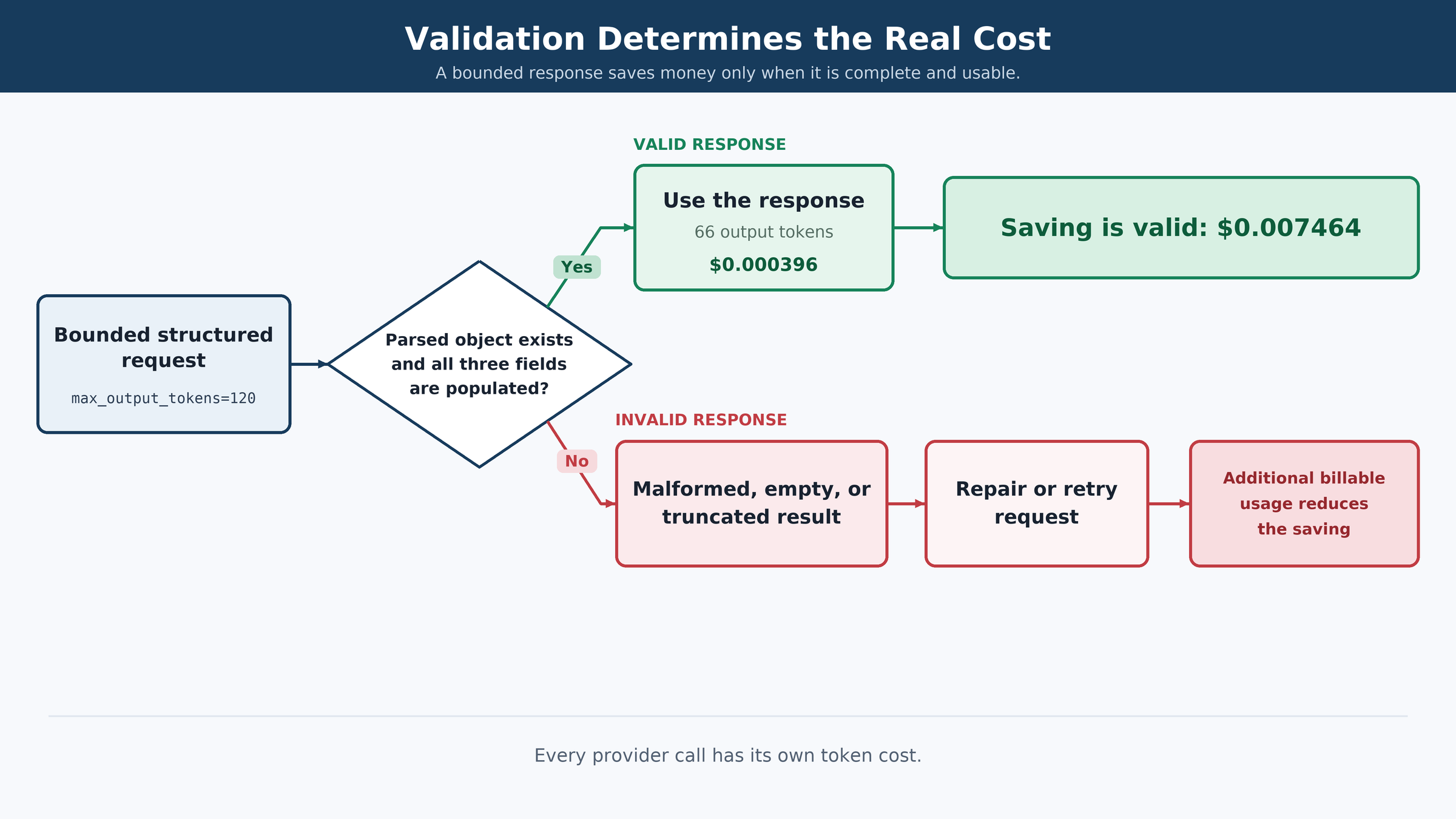
The diagram reinforces the central rule of this lesson: a lower token count is not automatically a lower application cost. The result must also be complete enough for the application to use. Once validation succeeds, the measured difference represents a real saving; when validation fails, the additional request must be included in the total cost.
Conclusion and Next Steps
Output control requires balance. An open-ended prompt can produce much more text than the application needs, but an aggressive limit can remove useful information or truncate a structured response. Concise instructions reduce unnecessary explanation, while a reasonable max_output_tokens value prevents unexpected growth without forcing the answer to use the entire budget.
We also introduced a response shape with Pydantic. The schema focuses the model on the three required fields, and output_parsed gives the application a structured result. Before claiming a saving, we check status for truncation, then confirm that the parsed object exists and that every field contains useful text. Finally, we compare provider-reported output usage rather than relying on an estimate.
In the practice section that follows, we will implement the baseline, structured call, truncation and validity checks, and savings calculation, then carry this habit into application-level response caching, where we will avoid repeated work altogether.
