Mastering List Comprehensions
Introduction
Welcome back to Practical Data Processing with Python Collections! Now that we know how to turn a flat list into a summary dictionary using tallies and groups, we can turn to a pattern that shows up even more often.
An enormous share of everyday data tasks boils down to two simple requests: change every item in a list or keep only the items that matter. We have the tools to do both with a for loop, but Python offers a shorter, more readable way to say exactly that: the list comprehension.
By the end of this lesson, we will be able to:
- Rewrite a "build a new list" loop as a one-line comprehension
- Filter items with an optional
ifclause - Combine cleaning, filtering, and reshaping in a single expression
The Loop We Are Replacing
Let us start with a small list of numbers and the classic three-step approach to building a new list from it.
The idea we care about is tiny: square every number. Yet look at how much of the code exists only to support the mechanism:
squares_loop = []creates an empty container that has nothing to do with squaringfor n in numbers:walks through the source list, one item at a timesquares_loop.append(n * n)performs the actual transformation, then hands the result to the container
Only that last expression, n * n, expresses our intent. The empty list and the append call are scaffolding we have to write every single time. A list comprehension keeps the intent and removes the scaffolding.
Same Result, One Line: The Comprehension
Here is the same transformation written as a comprehension, with the result printed so we can confirm that nothing changed.
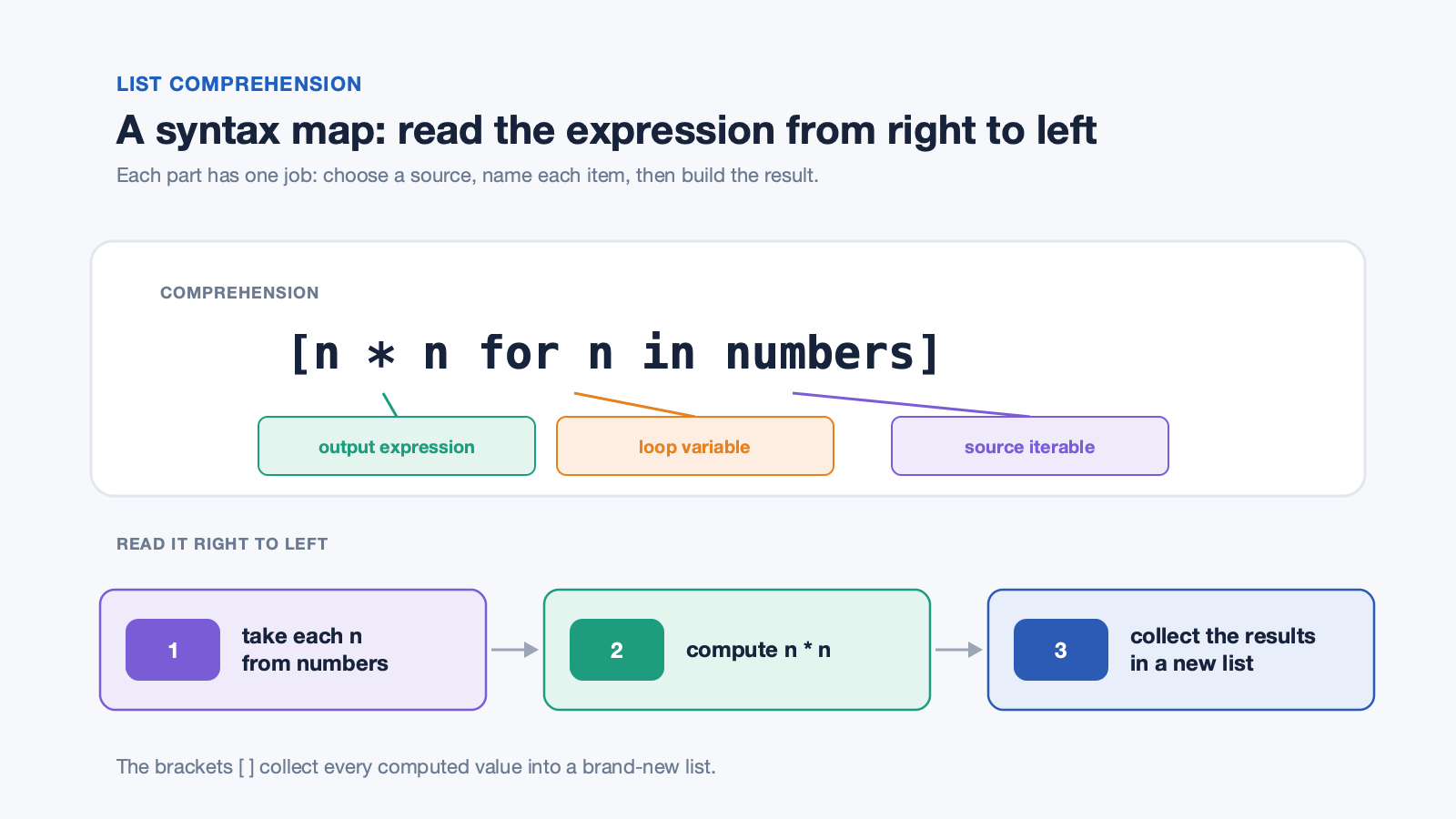
The square brackets tell us we are building a list, and inside them sit three parts: the output expression n * n, the loop variable n, and the source iterable numbers. A helpful way to read it is from right to left: for each n in numbers, compute n * n, and collect every result into a new list. The output matches the loop exactly:
This syntax map shows how those parts work together and how to read them.
Comparing the two versions piece by piece makes the mapping clear:
| Loop version | Comprehension version | Role |
|---|---|---|
squares_loop = [] | the [ ] brackets | Create the new list |
for n in numbers: | for n in numbers | Visit each item |
.append(n * n) | n * n | Transform and collect |
Note that numbers is untouched; a comprehension always produces a brand-new list.
Adding a Condition with an if Clause
Transformation is only half the story. A comprehension can also accept an optional if clause at the end, which decides which items make it into the result.
The if clause acts as a gatekeeper that is evaluated once per item: when n % 2 == 0 is True, the item passes through; when it is False, the item is skipped entirely. Notice that the output expression here is simply n, so nothing is being changed; we are only selecting. Because items can be rejected, the result is often shorter than the source list, which is exactly what happens with our eight numbers:
Four of the eight numbers satisfied the condition, and the four odd ones never reached the output list at all.
Transforming and Filtering Together
The real power appears when we use both features at once. Let us switch to a list of messy names, the kind of data that arrives from a form or a spreadsheet.
The order of execution matters here: for each name, the if clause runs first, and the output expression runs only for the survivors. The filter if name.strip() works because a string with nothing left after stripping is falsy, so blank or whitespace-only entries are dropped; all three of our names have real content, so all three pass. Each survivor then goes through the method chaining we encountered in the strings course: strip() removes the stray spaces, and title() normalizes the capitalization.
Full Program and Reading Guidelines
Putting every piece together gives us the complete program, with the original loop kept only as a point of comparison.
Each of the three comprehensions builds its own list and prints it, so the program produces three lines:
A comprehension is the right choice when a list needs one clear transformation, one filter, or both. A regular loop remains clearer when the body needs several statements or accumulates into a dictionary, as our tally and grouping patterns did. Two mistakes are worth watching for: writing the if before the for, which is invalid here, and forgetting to assign the result, which builds a list and throws it away.
Conclusion and Next Steps
We now have three comprehension shapes at our disposal: transform every item with [expression for item in source], keep only some items with a trailing if clause, and do both at once by combining a transforming expression with a filter. In every case, the source collection stays exactly as it was, and a fresh list comes back to us, which makes comprehensions safe to use on data we still need later.
The practices ahead will put all three shapes to work: converting a loop into an equivalent comprehension, filtering a list down to the items that match a condition, cleaning up a batch of messy strings, and computing new values from a source list. Whenever a loop's only job is to build a list, this is the syntax to reach for; go ahead and start writing comprehensions that say more with less.
