Introduction to Function Parameters
Introduction: Functions That Adapt
Welcome to the first unit of Passing Data into Python Functions! In the previous course, we learned how to package statements inside a def block and run them whenever we wanted with a simple call. Those functions were useful, but they had one quiet limitation: every call produced exactly the same result because everything the function needed was written directly into its body.
Compare these two headers for a moment:
- This hard-coded
greet()implementation always greets Ada, whilegreet(name)lets the caller choose the name explicitly. - With
def greet(name):, each call can pass a different argument — Ada, Grace, Linus, or anyone else we choose.
In this lesson, we will define a function with a single parameter, use that parameter inside the body, and pass different arguments to get different results. This is the first step toward functions that adapt to the data we hand them.
The Problem: Hard-Coded Values Lock a Function In
Let us start with a function that works perfectly well, yet is stuck in place:
This prints Hello, Ada! every single time, because the name is hard-coded in the body. If we now need to greet Grace, we have only two unpleasant options: edit the string inside the body (which breaks the greeting for Ada), or copy the whole function into a near-identical greet_grace().
That second option should feel familiar. In the previous course, we used functions to remove duplicated statements. Now we face a new flavor of duplication: duplicated definitions that differ by a single value. Parameters are the tool that removes it.
Adding a Parameter to the def Header
The fix is small: we write a name inside the parentheses that we have always left empty.
Reading this header piece by piece:
defstill starts the definition, exactly as before.greetis still the function name, in snake_case.- The parentheses are now not empty; this is where inputs are declared.
nameis the parameter: a placeholder label, not a value.- The colon still ends the header and opens the indented body.
The important idea is that name currently holds nothing at all. It is a promise that says: "Whoever calls me must hand me one value, and inside the body I will call that value name." Parameters follow the same naming rules as variables, so prefer descriptive snake_case names like name, price, or user_email.
Using the Parameter Inside the Body
Once declared in the header, a parameter behaves inside the body just like any ordinary variable:
The body builds one string out of three pieces: the literal text "Hello, ", the value stored in name, and the literal text "!". Notice that name is not wrapped in quotes. Quoted text means "use these exact characters"; an unquoted name means "look up whatever value is stored here." That single difference is what makes the line flexible.
Note: This course often joins text with
+concatenation,str(...), or comma-separatedprint()arguments because f-strings have not been introduced yet. In modern Python, f-strings are a common way to build the same kind of formatted text.
Also notice what is missing: no concrete person appears anywhere in the body. And, as we may recall from previous units, a definition only stores this code; nothing prints yet.
Passing Arguments: Calling the Function with a Value
The value arrives at the call site, inside the parentheses of the call:
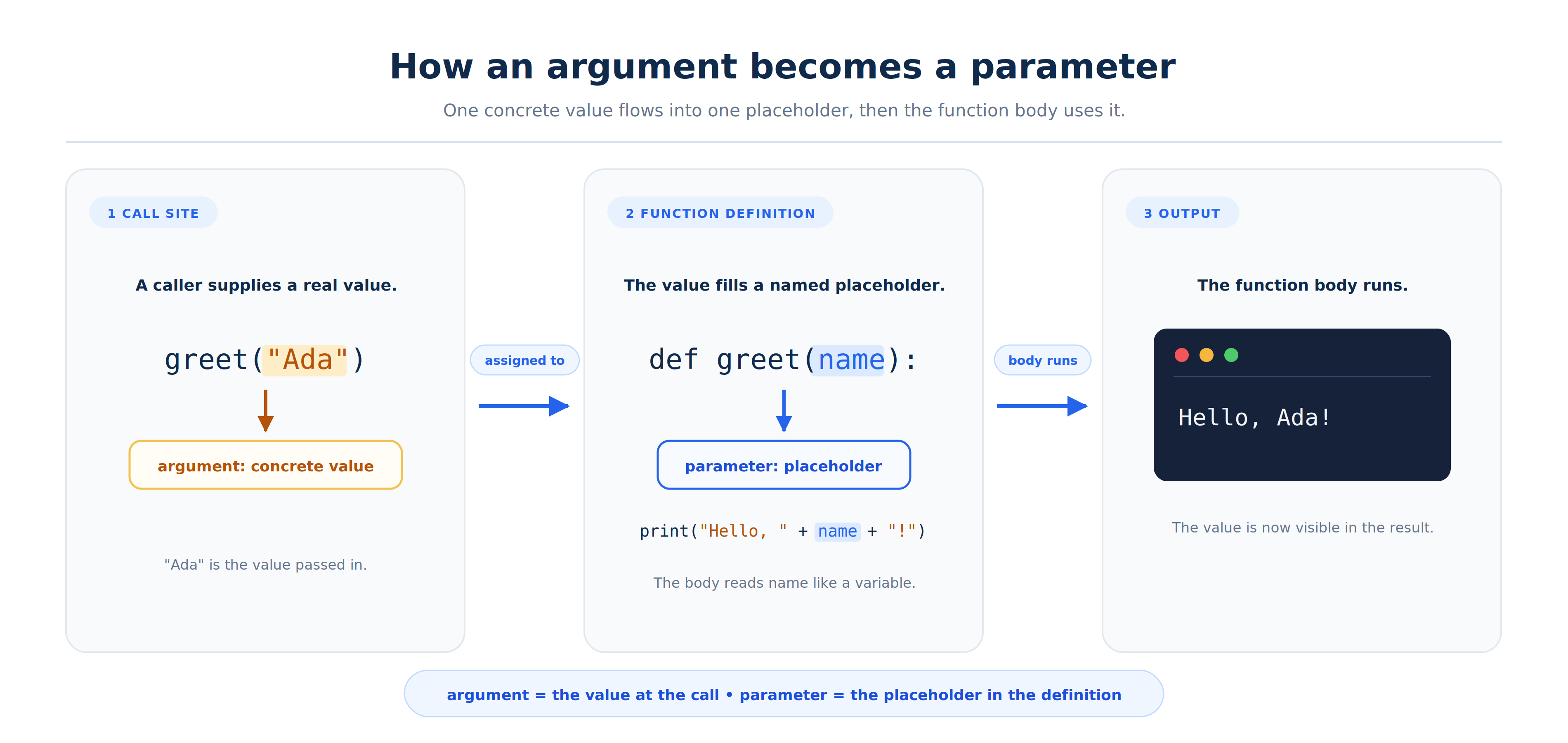
Python performs three steps here: it evaluates the value "Ada", assigns it to the parameter name, and then runs the body with that assignment in effect. So the print line becomes "Hello, " + "Ada" + "!", giving us:
Keep this distinction in mind, since we will use both words constantly: the parameter is the placeholder in the def header, while the argument is the concrete value handed over at the call. Because name is a required parameter with no default, greet must receive exactly one value, either positionally or by keyword. Writing greet() instead raises TypeError: greet() missing 1 required positional argument: 'name'.
One Definition, Many Results
Now we can see the real payoff. Here is the complete program: one definition, three calls, and three different arguments.
Python runs the file from top to bottom: it stores the definition and then executes each call in order. During the first call, name holds "Ada"; during the second, it holds "Grace"; and during the third, it holds "Linus". Thus, the same print line produces three different lines:
The body is written once but runs three times, and the output order follows the call order. Greeting a fourth person costs us one new call line, not one new function.
Note: These demos use a flat, unguarded script layout — bare module-level calls with no
main()orif __name__ == "__main__":guard. That is a lesson-specific simplification for tiny examples. Larger or importable programs commonly put execution inmain()behind a guard; you are not required to implement that pattern here.
Parameters Beyond Strings
Parameters are not limited to text; they can hold numbers, and the body can compute with them rather than just print them:
Here, number is used inside an arithmetic expression, number * number. One detail matters: + cannot join a number to a string, so we wrap each number in str(...) to convert it to text first. An easier alternative is to pass comma-separated values to print, which handles the conversion for us: print("The square of", number, "is", number * number). Both forms produce this output:
Conclusion and Next Steps
Let us gather the key points. A parameter is declared inside the parentheses of the def header; it acts like a regular variable inside the body, and its value is supplied by an argument at each call. One definition can therefore serve an unlimited number of inputs, whether those inputs are strings, numbers, or anything else. One last time: parameter is the placeholder in the header; argument is the value passed at the call.
In the exercises ahead, we will read a parameterized function and extend it with new calls, convert a hard-coded greeting into a flexible one, write a numeric single-parameter function from scratch, and build an announce function whose parameter drives several lines of output. After that, the next unit opens the parentheses wider to accept more than one input at a time. Time to put a value in those parentheses and see your functions come alive!
