Deleting Relationships Safely
Introduction
Welcome back to Understanding Graph Databases with Neo4j! You've now completed two units on modifying node properties, and you're making excellent progress in this course. In the previous lessons, you learned how to update and remove properties from nodes using the SET and REMOVE clauses.
Now we're shifting our focus from nodes to relationships. While properties describe individual nodes, relationships are what make graph databases truly powerful by connecting data in meaningful ways. Just as nodes require maintenance, relationships also need to be managed. Sometimes friendships end, collaborations are completed, or connections become outdated. In this lesson, we'll explore how to safely remove relationships from your graph while keeping the connected nodes intact.
The Nature of Relationships in Graphs
Relationships are the connective tissue of graph databases. They represent how entities interact, relate, or associate with each other. A user might be friends with another user, an actor might appear in a movie, or a customer might purchase a product. These connections are just as important as the nodes themselves.
Unlike relational databases, where connections exist implicitly through foreign keys, graph databases store relationships as first-class entities. This means relationships can be created, modified, and deleted independently of the nodes they connect. When you delete a relationship, the nodes on either end remain untouched; only the connection between them disappears. This is a crucial concept: removing a relationship doesn't affect the existence of the nodes themselves.
The DELETE Clause for Relationships
Neo4j uses the DELETE clause to remove both relationships and nodes from the graph. While DELETE can remove nodes as well (which we'll explore in a later lesson), in this lesson we're focusing on using it to eliminate relationships while preserving the nodes they connect. The process always starts with a MATCH clause to identify which relationship you want to delete, followed by DELETE to remove it.
The syntax is straightforward: you match a relationship pattern, assign a variable to the relationship itself (typically using square brackets with a variable name), and then delete that variable. This precision ensures you only remove what you intend to, without accidentally affecting nodes or other relationships in your graph.
Deleting a Specific Relationship
Let's start with the most precise operation: removing a single, specific relationship between two known nodes. Suppose Alice and Bob are friends, but they've decided to end their friendship:
This query demonstrates several important elements:
- We match both nodes explicitly by their names
- The relationship variable
ris assigned using square brackets in the pattern - The relationship type
FRIENDS_WITHis specified after the colon - The
DELETEclause targets only the relationship variabler
After this operation is complete, Alice and Bob still exist as nodes in the database with all their properties intact. Only the FRIENDS_WITH relationship between them has been removed. The arrow direction in the pattern matters; this query specifically looks for a relationship directed from Alice to Bob.
Understanding Relationship Variables
The variable we assign to a relationship (in our example, r) is essential for the deletion process. This variable acts as a handle that lets us reference the specific relationship instance we want to remove. Without assigning a variable, we would have no way to tell the DELETE clause which relationship to eliminate.
You can choose any valid variable name, though short names like r, rel, or descriptive names like friendship are common. The key is consistency: the variable you assign in the MATCH clause must be the same one you use in the DELETE clause. This pattern-matching approach gives you precise control over which relationships to remove, even when multiple similar relationships exist in your graph.
Deleting All Relationships of a Type
Sometimes you need to remove multiple relationships at once. Instead of deleting connections one by one, you can match a pattern that captures all relationships meeting certain criteria. Here's how to delete all of Alice's friendships, regardless of who the other person is:
This query uses a powerful pattern: the empty parentheses () on the right side mean "match any node." We're not concerned with whom Alice is friends; we just want to remove all her outgoing FRIENDS_WITH relationships. The relationship variable r now represents each friendship relationship in turn, and DELETE r removes all of them.
Notice that we only specified Alice by name, leaving the other end of the relationship unspecified. This flexibility allows us to delete groups of relationships without knowing every detail about the nodes they connect to. After this operation, Alice will have no outgoing FRIENDS_WITH relationships, though she remains in the database with all her properties.
Bidirectional Relationship Considerations
The direction specified in your pattern matters. In our previous example, we used -> to indicate outgoing relationships from Alice. If friendships in your graph are directional, this would only delete relationships where Alice is the starting point. To delete relationships regardless of direction, you can use a pattern without arrows:
This pattern, using a single dash without arrows, matches FRIENDS_WITH relationships in both directions. It removes relationships where Alice is either the source or the target. Understanding relationship direction is crucial for ensuring you delete exactly what you intend to remove from your graph.
Visualizing Relationship Direction
To better understand how relationship direction affects your queries, let's examine a simple graph visualization. The diagram below shows three users with two directed FRIENDS_WITH relationships: Alice points to Bob, and Carol points to Alice.
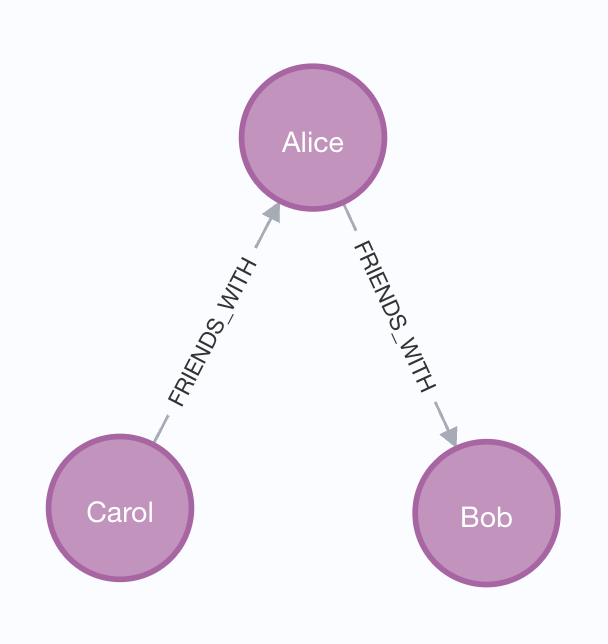
Notice the arrows in the visualization - they show the direction of each relationship. This visual representation directly corresponds to the arrow syntax in Cypher patterns.
Now consider how different patterns match these relationships:
Pattern with direction: (alice)-[r:FRIENDS_WITH]->()
- Matches: The relationship from Alice to Bob
- Doesn't match: The relationship from Carol to Alice (wrong direction)
Pattern without direction: (alice)-[r:FRIENDS_WITH]-()
- Matches: Both relationships - Alice to Bob AND Carol to Alice
- The absence of arrows means "match regardless of direction"
Looking at the graph visualization makes it clear why the arrow syntax matters. When you see the arrows in the diagram, you can predict which relationships your pattern will match. The pattern -> looks for relationships pointing outward from your starting node, while - matches relationships in either direction.
Data Safety and Best Practices
When deleting relationships, careful consideration ensures you maintain data integrity. First, always be specific in your MATCH patterns. Broad patterns without sufficient constraints can inadvertently delete more relationships than intended. Test your match pattern by running it with a RETURN statement before adding the DELETE clause.
Second, consider the impact on your graph's structure. Removing relationships might isolate nodes or break important connection paths. Before deleting relationships in a production environment, verify that their removal won't disrupt your application's logic or leave your data in an inconsistent state. It's often wise to test deletion operations in a staging environment first, ensuring they produce the expected results without unintended consequences.
Conclusion and Next Steps
In this lesson, we've explored how to safely remove relationships from your Neo4j graph database using the DELETE clause. We learned how to delete specific relationships between known nodes, remove all relationships of a certain type, and understand the importance of relationship direction during deletion operations. We also discussed best practices for maintaining data safety when removing relationships from your graph.
You now have a complete understanding of how to modify graph data: updating node properties, removing properties, and deleting relationships. These operations form the foundation of graph database maintenance, giving you the tools to keep your data accurate and relevant. It's time to put these concepts into action and practice deleting relationships with confidence!
