Searching and Splitting Strings
Introduction: From Reshaping Text to Searching It
Welcome to the final unit! Three units are behind us: reading single characters with indexing, pulling out ranges with slicing, and cleaning up messy values with string methods. Now we do something different. Instead of extracting or reshaping text, we will ask questions about it: Does this value contain an @? Where exactly is it? Does it end in .com?
Then we go one step further and break a string into pieces and stitch those pieces back together. Here are the two values we will work with:
Five tools cover all of it: the in operator, the find method, the startswith and endswith pair, split, and join.
Why Searching Deserves Its Own Tools
We could answer some of these questions with what we already know. Checking whether an email ends in .com is email[-4:] == ".com". Checking whether it starts with "ada" is email[:3] == "ada". Both work, but both require counting characters by hand, and a miscount silently produces a wrong answer rather than an error.
The tools in this lesson remove that counting. Each one is built for a specific kind of question, and knowing which answer you need is how you pick the right tool:
- Is it there? A yes-or-no question, answered by a Boolean:
in,startswith,endswith. - Where is it? A position question, answered by an integer:
find. - What are the pieces? A structure question, answered by a list:
split.
That last one is a real shift. Up to now, every operation has given us back a string. split hands us a list, which is a new kind of value, and join is how we get back to a string.
Membership Testing with In
Let's start with the simplest question: is a substring present? For that, Python gives us in, which is an operator rather than a method, so there is no dot and no parentheses. It returns True or False.
Read the expression left to right as needle in haystack: the thing we are looking for comes first, the string we search comes second. Since "ada@example.com" does contain an at sign, the result is True. A few details: in works with substrings of any length, so "example" in email is also True; it is case-sensitive, so "ADA" in email is False, and the fix is the lower() method from Unit 3; and not in is the negated form, which reads nicely as if "@" not in email.
Locating a Substring with Find
Knowing that the @ exists is often not enough; we may need to know where it sits so we can slice around it. The find() method answers that with an index.
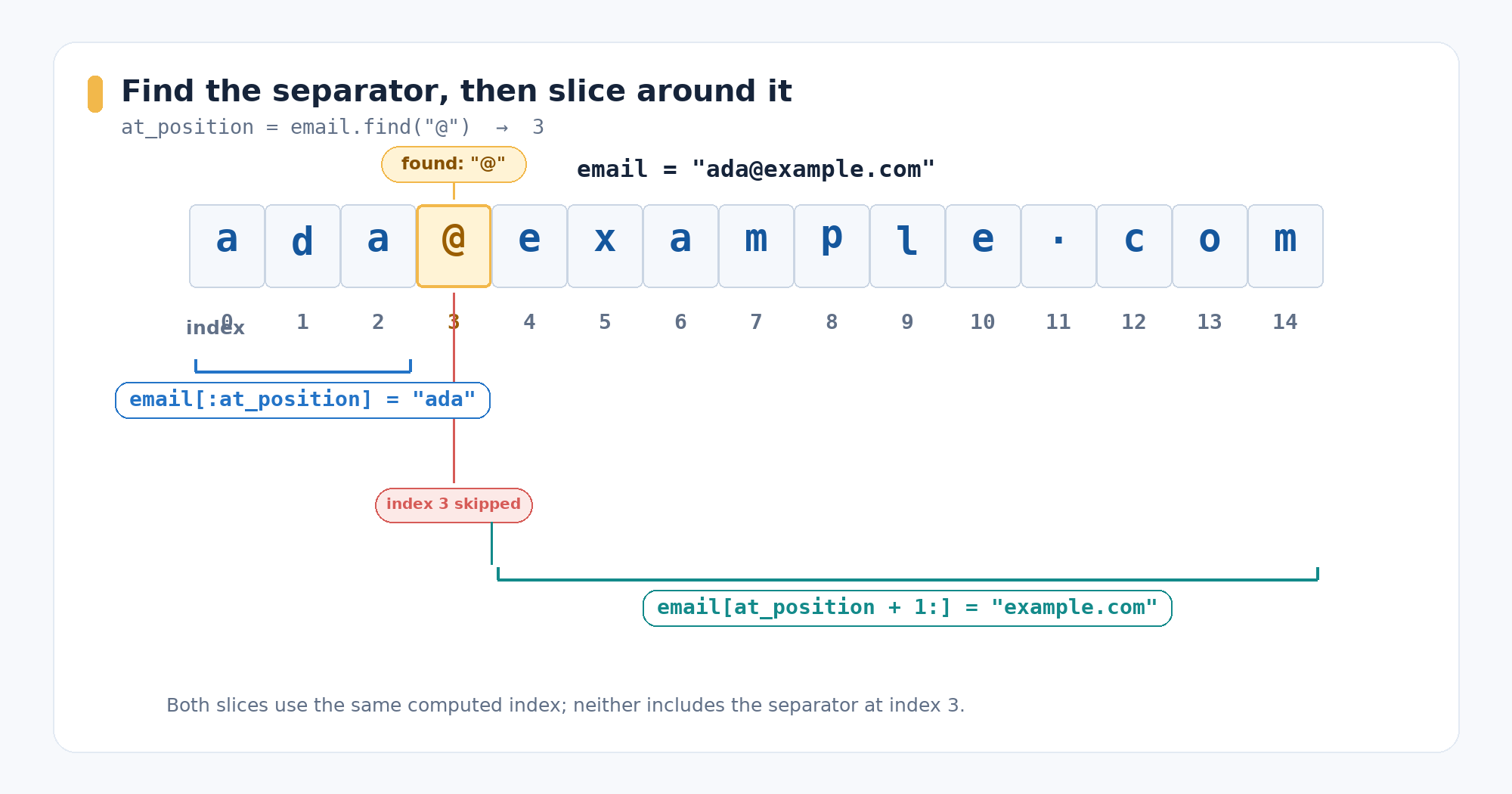
The answer is 3. Counting with the positive indices from Unit 1: a is at 0, d at 1, a at 2, @ at 3. Two behaviours matter. First, find() reports only the first match, scanning left to right. Second, when the substring is absent it does not raise an error; it returns the sentinel value -1, so email.find("#") gives -1. Its stricter sibling, index(), raises an error instead, which is useful when a missing value should stop the program.
Notice that we stored the result in at_position rather than only printing it. That is deliberate — the next section needs it.
Pairing Find with Slicing
The real payoff of getting an index is that we can feed it straight into a slice. This is the standard way to cut a string at a separator whose position we do not know in advance.
Both slices reuse the same computed index, so nothing is hardcoded: this code works for any email, whatever its length. Remember from Unit 2 that a slice stop is exclusive, which is why email[:3] stops right before the @ and gives "ada". To get the domain we add 1 to skip past the separator itself, producing "example.com".
This is also the general technique that the fixed-width [-3:] trick from Unit 2 could not handle: finding the last dot and slicing after it works for .py, .jpeg, and everything else.
One caution for real programs: if find() returned -1, these slices would still run but produce nonsense, so production code checks for -1 before slicing. Our value is a literal that definitely contains an @, so we can slice directly here.
Checking the Edges with Startswith and Endswith
Very often we do not care where a substring is, only that it sits at the beginning or the end: file extensions, URL prefixes, domain suffixes. Python has a dedicated method for each edge, and both return a Boolean.
Compare email.endswith(".com") with the slicing version email[-4:] == ".com": the method says what we mean and removes the chance of an off-by-one mistake. Like in, both methods are case-sensitive, so an address ending in ".COM" returns False unless we lowercase it first.
Breaking Text Apart with Split
Now let's switch to our second value and change the goal. Instead of inspecting one string, we want to break it into its parts. The split() method takes a separator and returns a list of the pieces between the separators.
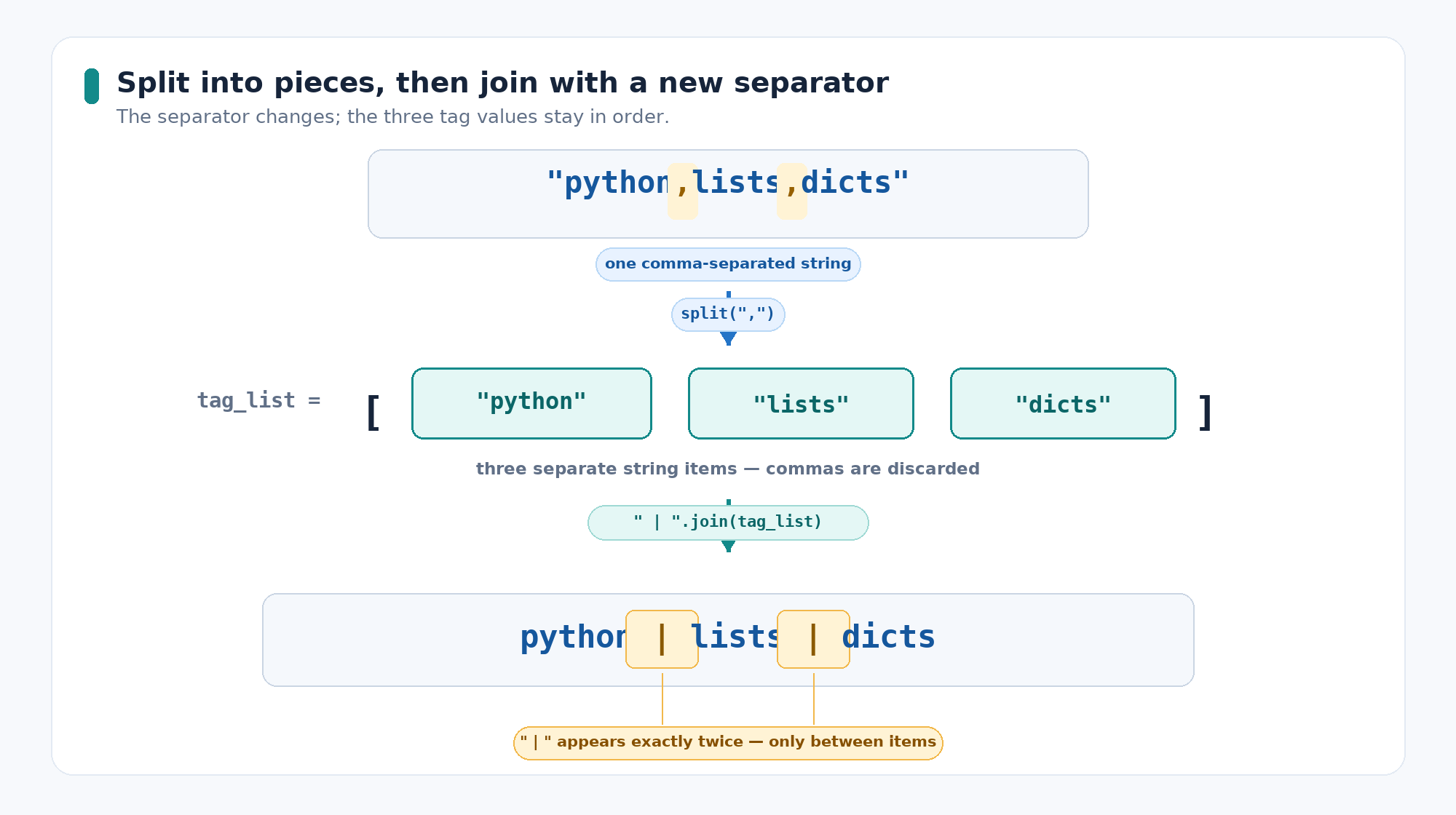
Notice the output shape: square brackets, and each item wrapped in quotation marks. That tells us we now hold three separate strings rather than one. The separators themselves are discarded, and the number of pieces is always one more than the number of separators found — two commas here, so three items. Calling split() with no argument is a special case that splits on any run of whitespace, perfect for breaking a sentence into words. Lists get an entire course of their own next, so for now it is enough to recognize this shape.
Reassembling with Join
join() is the exact inverse of split(): it takes a list of strings and glues them into one string. Its syntax surprises nearly everyone at first, so let's face it directly: the separator is the string that calls the method, and the list is the argument.
So " | ".join(tag_list) reads as "use this separator to join those items". The separator lands only between items, never at the ends, which is why three tags produce two | markers. Swapping the separator changes the format: ",".join(tag_list) rebuilds the original comma string, and "".join(tag_list) glues the tags with nothing between them. One common gotcha: every item in the list must already be a string, since join() will not convert numbers for us.
The Complete Program
All six tools, gathered into one file:
The last two lines are a full round trip: tags became a list and came back as a differently formatted string — while tags itself still holds "python,lists,dicts", since immutability from Unit 3 has not gone anywhere.
Search and Split Cheat Sheet
The fastest way to choose a tool is to ask what kind of answer we need:
| Tool | Returns | Example | Result |
|---|---|---|---|
in | Boolean | "@" in email | True |
not in | Boolean | "#" not in email | True |
.find(sub) | Integer, or -1 | email.find("@") | 3 |
.startswith(p) | Boolean | email.startswith("ada") | True |
.endswith(s) | Boolean | email.endswith(".com") | True |
.split(sep) | List of strings | tags.split(",") | ['python', 'lists', 'dicts'] |
sep.join(items) | String | ",".join(tag_list) | "python,lists,dicts" |
Only split gives us a list of multiple string values; the other tools return a Boolean, an integer, or a string.
Conclusion and Next Steps
Two themes carried this lesson: asking questions about text, and restructuring it. The most useful habit to take away is combining tools — find locates a separator, and slicing from Unit 2 turns that position into the pieces you actually want.
With that, the course is complete: indexing single characters, slicing ranges, transforming messy values, and now searching and splitting. That is a full working string toolkit. Next, the lists that split keeps handing us step into the spotlight. Let's finish strong!
