Filtering Data with For Loops
Introduction: Not Every Item Deserves a Reaction
Welcome to the final unit of Iterating with For Loops in Python!
Unit 3 gave our loops memory through counters and accumulators. Those loops treated every element the same way: every score joined the total, and every element increased the count.
Most real questions are more selective. Consider a list of recorded temperatures:
We might want to know:
- How many days were hot?
- What is the total of only the comfortable temperatures?
- Which temperatures were below the comfortable range?
- How can we track two categories during one pass?
By the end of this lesson, we will combine the loops from earlier units with the if statements you already know.
The Shape of a Filtered Loop: Two Levels of Indentation
An if inside a for creates a loop that visits every item but reacts only to matching items:
Read the indentation carefully:
for temp in temperatures:is the loop header.if temp >= 80:is inside the loop, so the condition is tested once per temperature.print(temp)is inside theif, so it runs only when the condition isTrue.
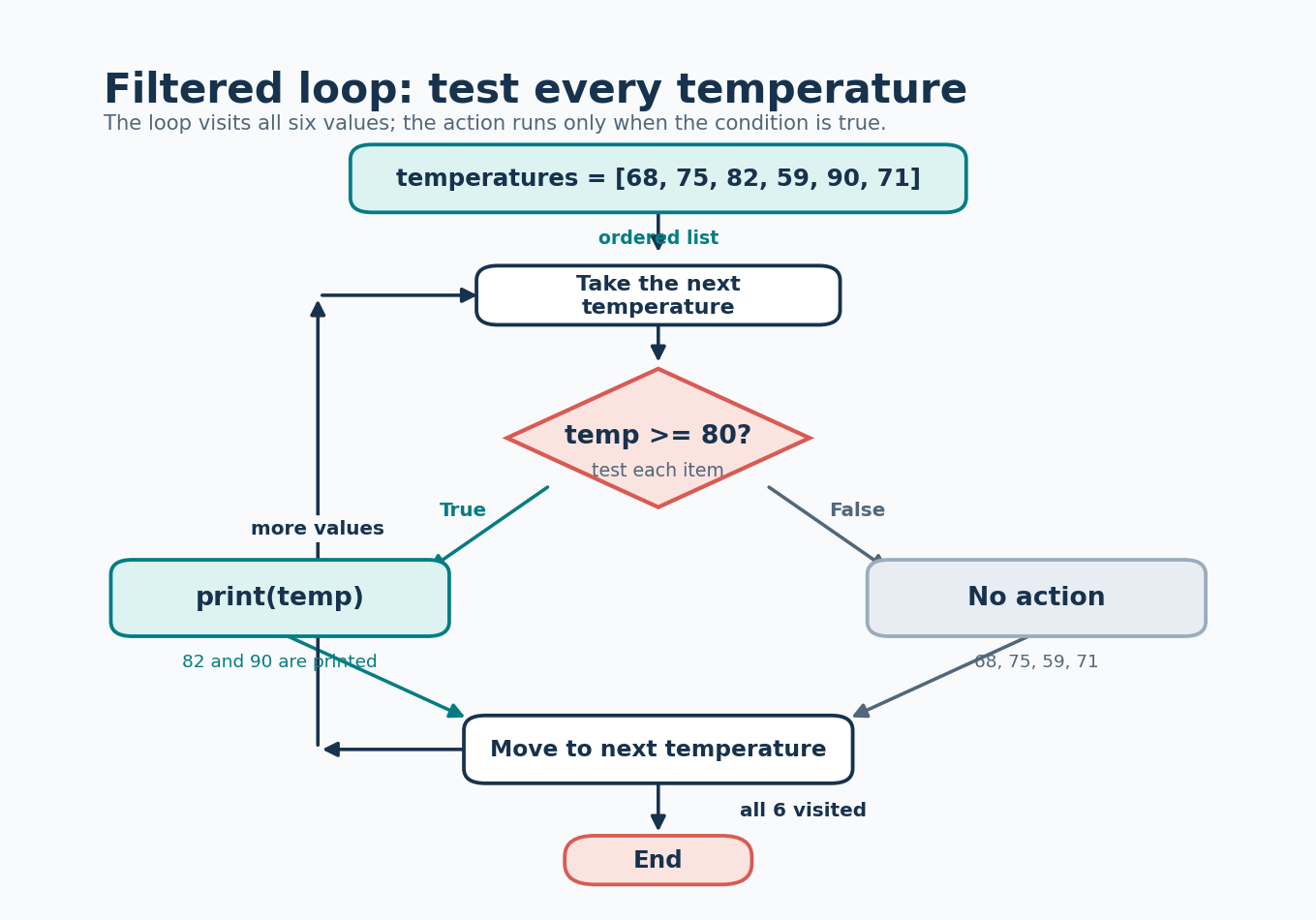
The loop visits 68, 75, 82, 59, 90, and 71. Only 82 and 90 pass the test, so only those two values are printed.
Counting Matches: The Filtered Counter
Counting hot days combines the counter pattern from Unit 3 with a condition:
The counter begins before the loop. During each iteration, the if acts as a gate:
- If
temp >= 80isTrue, the counter increases. - If the condition is
False, the counter stays unchanged.
The loop still visits every value. Only matching values contribute to the result.
Tracing the Filter Iteration by Iteration
Here is the actual counter state after each iteration:
| Iteration | temp | temp >= 80 | hot_days after |
|---|---|---|---|
| 1 | 68 | False | 0 |
| 2 | 75 | False | 0 |
| 3 | 82 | True | 1 |
| 4 | 59 | False | 1 |
| 5 | 90 | True | 2 |
| 6 | 71 | False | 2 |
A failed condition does not reset the counter. It simply leaves the existing value unchanged. That is why hot_days remains 1 during the fourth iteration.
After the loop, its final value is 2.
Summing Only What Passes: The Filtered Accumulator
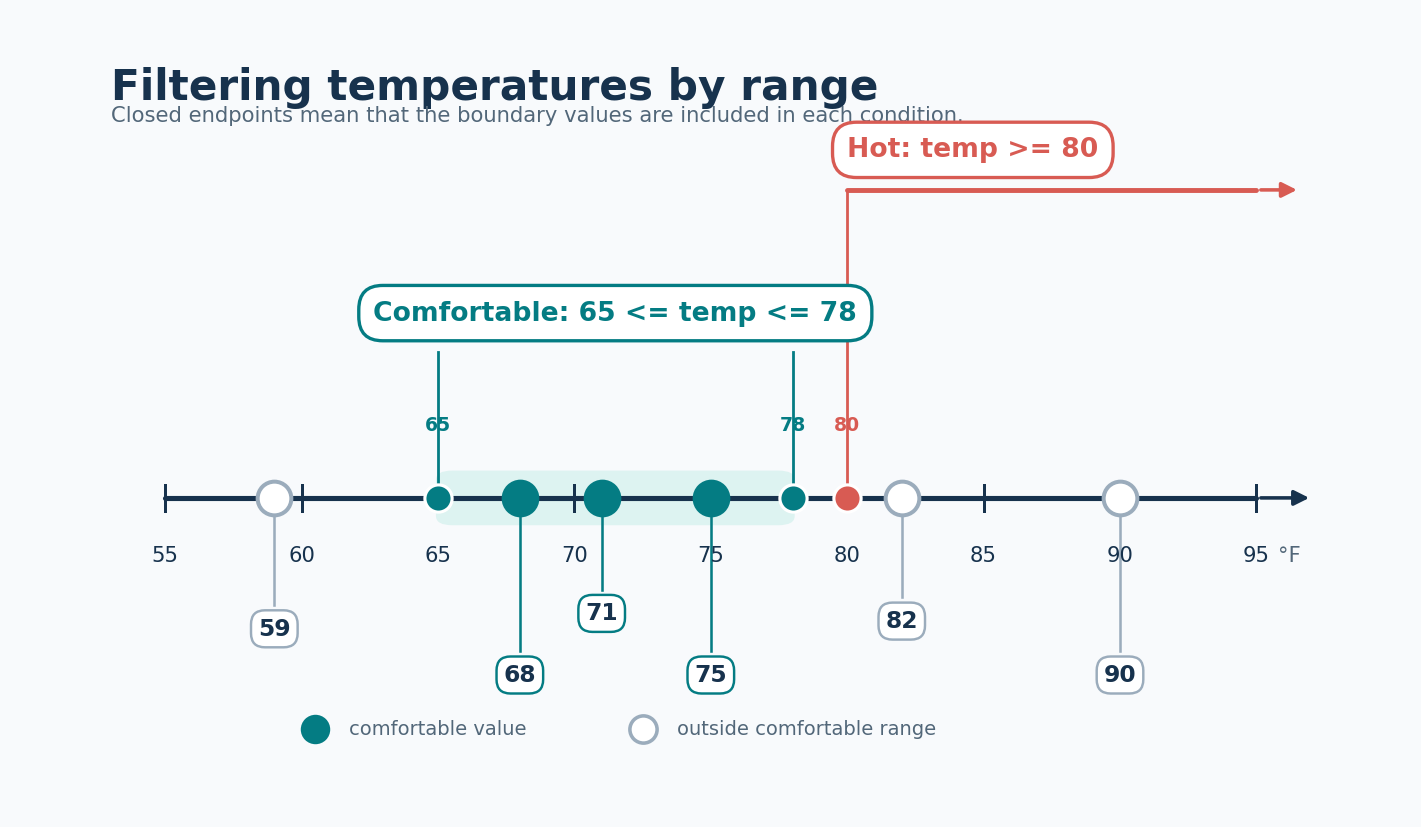
The same gate works with an accumulator. Suppose comfortable temperatures range from 65 through 78, including both boundaries:
The condition:
is a chained comparison. It means the same thing as:
The qualifying temperatures are 68, 75, and 71. Therefore:
The only difference from a filtered counter is the update:
+= 1counts matching items;+= tempsums the values of matching items.
Both boundaries are inclusive because the condition uses <=.
Printing Each Matching Item
Sometimes we do not need a final count or total. We simply want to print each item that matches a condition:
Only 59 passes the test, so the output is:
Here, the print() belongs inside the if because we want one output line for each match.
Compare the two patterns:
The correct location of print() depends on whether we want each matching value or one final summary.
Maintaining Two Counters in One Loop
A single loop can maintain multiple filtered counters:
Both counters are initialized before the loop. During each iteration, Python checks both conditions.
The two if statements are independent:
An independent pair of if statements means, “Check the first condition, and also check the second condition.”
This differs from if/elif:
With if/elif, Python checks the elif only when the first condition is false. That structure is appropriate when selecting one mutually exclusive branch.
For comfortable and hot temperatures, both versions happen to produce the same counts because one temperature cannot be in both ranges. However, two independent if statements communicate that we are tracking two separate measurements. They also continue to work if categories are allowed to overlap.
For example:
The number 2 is both positive and even, so both counters should increase. Using if/elif would incorrectly prevent the second update after the first condition succeeded.
Full Program and Output
Here is the basic hot-day and comfortable-total program:
Both print() calls are after the loops because the answers are final only after every temperature has been checked.
The two calculations could also be performed in one pass:
Both forms are valid. The one-loop version avoids visiting the same list twice and keeps related measurements together.
Common Pitfalls When Filtering Inside Loops
Filtered loops fail in a handful of predictable ways:
- Incorrect indentation: if the update is aligned with the
ifinstead of nested inside it, every item contributes. - Putting the
ifafter the loop: only the last value held by the loop variable is tested. - Using
=instead of==: equality tests require==. - Choosing the wrong boundary:
temp > 80excludes exactly80, whiletemp >= 80includes it. - Resetting inside the loop: placing
hot_days = 0in the loop erases previous matches. - Printing a summary inside the loop: this displays partial results rather than one final answer.
- Using
eliffor overlapping categories: only the first matching branch runs, even when both counters should increase.
A result of 0 is not automatically an error. It may correctly mean that no item satisfied the condition.
When a filtered result looks wrong, check the condition and the indentation of the update first.
Conclusion and Next Steps
The filtered-loop pattern fits into four steps:
- Initialize a variable before the loop.
- Visit every item.
- Test each item with an
if. - Update only when the condition matches.
Everything else comes from the earlier units. The if simply controls which items are allowed to contribute.
Congratulations on reaching the end of Iterating with For Loops in Python! We started by visiting items one at a time, generated integer progressions with range(), gave loops memory with counters and accumulators, and taught them to be selective with conditions.
The final practices will count values above a threshold, sum values inside a range, print matching elements, and track two conditions during one loop.
