Understanding Generative AI Methods
Welcome to the Course 🚀
Welcome to Introduction to Generative AI. If your work involves writing job postings, drafting offer letters, building onboarding materials, researching policies, or answering employee questions, generative AI is already becoming part of your HR workflow. In this first unit, you’ll build a plain-language mental model for what generative AI does, how it works, and where it can go wrong.
You’ll cover:
- The five major AI capabilities: text generation, image generation, image description, web search, and automation
- The three main model families: large language models, diffusion-style image models, and multimodal models
- Key limitations like context windows and hallucinations, plus why human verification matters
Before any AI-assisted HR task, run the HR AI Safety Checkpoint: approved tools only, data minimization (never paste real candidate, employee, medical, accommodation, or personnel data — use synthetic or de-identified inputs), source verification, human review, escalation of legal/EEO/compliance-sensitive matters, and recordkeeping (AI chats are not a system of record).
Five Capabilities, Not One Tool ⚒️
When people say "AI," they may be talking about five different capabilities, and mixing them up can lead you to use the wrong tool for the job.
| Capability | What it does | Useful for in HR |
|---|---|---|
| Text generation | Drafts written content | Job postings, offer letters, onboarding emails, internal FAQs |
| Image generation | Creates pictures from a description | Onboarding-deck visuals, careers-page heroes, internal-comms graphics |
| Image description / vision AI | Reads a picture and describes what’s in it | Intranet alt text, reading a de-identified photo attached to an accommodation request |
| Web search | Retrieves current information from the internet | Current benefits-provider details, labor-law and compliance checks |
| Automation | Chains AI capabilities together with your other tools | Multi-step onboarding workflows, routing and reminders |
The practical move: before you open a tool, name which capability you actually need. "I need a job-post draft" is text generation. "I need an onboarding-deck visual" is image generation. "What's in this photo?" is image description. Asking the wrong tool the right question is a top reason people decide AI "doesn't work."
A scope note for this course: web search and automation are covered as capability awareness only, not hands-on skills. Treat AI "current-info" research as a starting point that still requires source verification against an authoritative reference, and keep a firm line between drafting support (a human ships the output) and automation that changes records or triggers actions (which requires approval, auditability, and is out of scope here).
The Three Model Families Behind AI Tools 🧑🧑🧒
Three model families sit underneath those capabilities, and a rough mental picture of each will save you a lot of guesswork.
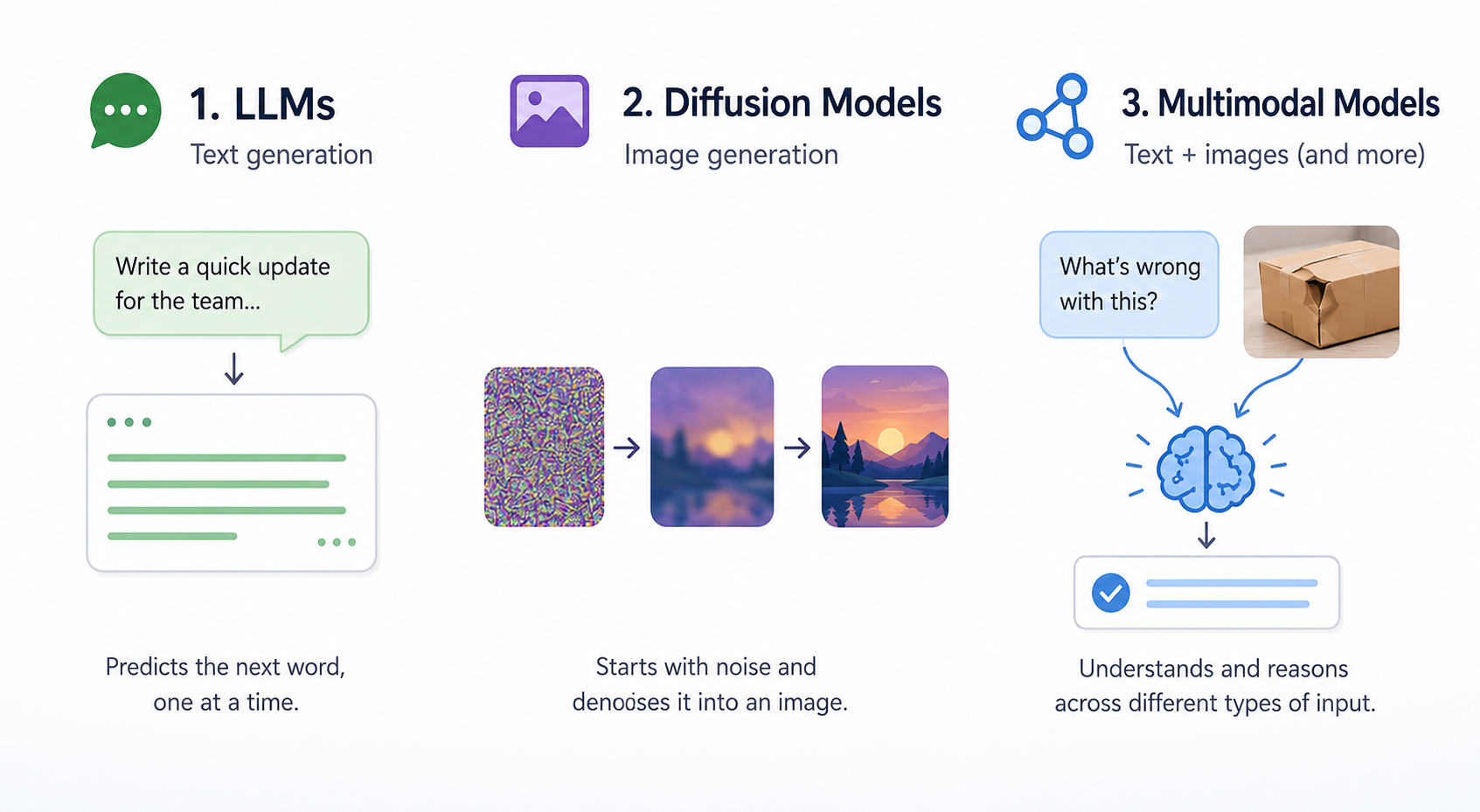
Large language models (LLMs) power text generation. Picture an extremely well-read autocomplete: given everything you've typed so far, the model predicts the most likely next word, then the next, then the next, all the way to the end of the response. It learned these patterns from massive amounts of human-written text. It doesn't "understand" your policies the way you do; it pattern-matches at a scale that feels like understanding. That's what's drafting your job postings and offer letters.
Diffusion-style image models power image generation. Think of them as starting with a screen of static (random noise) and gradually "uncrumpling" it into a coherent picture that matches your description, one denoising pass at a time. They learned what a "warm, candid workplace photo" looks like by training on millions of captioned images. That's what's producing your onboarding-deck visuals and careers-page heroes.
Multimodal models can take in more than one type of input, like text plus an image, and reason across them. That's what lets a single tool answer "what's in this photo attached to a request?" or "turn these interview notes and a screenshot into a summary." Capabilities like image description and most modern chat tools live here.
What the Model Doesn't Know About Your Organization 🎯
Here's the part that trips up HR specifically. A general-purpose model has read a huge slice of the public internet, but it has never seen your actual policies, your real personnel records, or what your Legal and Compliance teams have approved. So it fills those gaps with the average of everything it has seen — and "average" is exactly what your organization is not. There are three things you almost always have to supply, then verify:
- Your actual policies. Left alone, the model writes a generic, plausible-sounding parental-leave or return-to-office policy that may contradict yours. Any policy detail in an employee-facing message has to come from your approved, current policy — not the model's best guess.
- Your real people facts. Asked for a bio or candidate summary, the model will invent a plausible credential, degree, award, or start date rather than admit it doesn't know. Any fact about a real person must trace back to an authoritative record (HRIS, the hiring file, or the person directly).
- What you can compliantly say. The model doesn't know your EEO obligations, confidentiality rules, or what's been legally cleared. It will cheerfully write an eligibility promise or a comparative claim with nothing behind it. Compliance is your responsibility, never the model's.
Keep these three gaps in mind — they're the reason the next section matters so much for HR work.
Prediction, Context Windows, and Hallucinations ⚠️
Because LLMs predict the next likely word, they will happily produce a confident, well-formed sentence even when the underlying claim is false. That’s called a hallucination: an output that sounds factual but is unsupported, inaccurate, or invented.
A hallucination might be a fake credential ("Certified People Analytics Professional"), a made-up award, a degree the person never earned, or a confident answer to something the model was never given enough information to know. The model is not "lying" on purpose; it is generating a plausible pattern. That’s why hallucinations are not a bug you can fully prompt your way out of; they’re a property of how the model works.
Another term worth noting is a context window: the information available to the model for the current response, including your prompt, any pasted notes, and prior conversation context. Information outside that window is not automatically available to the model unless it is brought back into context. And because the model is optimizing for plausible-sounding output, the most dangerous hallucinations are the polished ones: credentials, dates, tenure, and awards that look exactly right in a spotlight bio, an offer letter, or a hiring file.
Here’s what that looks like in a normal HR task. Jake used an AI tool to draft a short employee spotlight bio from a few bullet points for the intranet, but the draft included a specific award he didn’t recognize. He asks Nina, a teammate with more experience reviewing AI output, what to do with it.
- Jake: I asked it for a spotlight bio and it gave me this clean line about a 2021 HR Excellence Award. Looked totally real.
- Nina: Did the bullet points you fed it mention any award?
- Jake: No, I just gave it the name, the title, and a start date.
- Nina: Then the model filled the gap with whatever sounded plausible. That's a hallucination, not a fact.
- Jake: So I need to verify anything it added that I didn't give it?
- Nina: Exactly. If you didn't put it in, treat it as a claim to check, not a fact to publish.
Notice the move: Nina didn't argue with the output, she traced it back to what was in the prompt versus what the model invented.
In most jobs, a hallucination is an embarrassing mistake. In HR, a polished one can become a recorded, legally exposed claim about a real person. A fabricated credential, an invented degree, a made-up award, or an unearned title isn't just wrong — it can create EEO and accuracy problems in a hiring file and chip away at the trust employees place in your team. That's why the verification bar is higher here than in general office work: anything about a real person gets checked against an authoritative record before it’s shared, recorded, or sent.
The single most important takeaway from this unit: generative AI doesn't retrieve truth, it generates plausible patterns, so your value as the HR professional in the loop is to pick the right capability, supply what the model can't know (your real policies, your real people facts, your compliance guardrails), and verify what came out before anything is recorded or shared.
Everything above is theory until you have to explain it to someone else in plain English. Your next step is a live roleplay where a curious teammate asks you how this stuff actually works: your job is to make the three model families stick using everyday analogies, no jargon allowed.
