Writing Effective Prompts
Writing Effective Prompts ✍️
Now that you’ve picked a task for AI, the next move is harder and more useful: asking for the output in a way the model can actually deliver. A vague prompt produces a vague draft, which will then waste twenty minutes editing—the exact time you were trying to save. A strong prompt brings the important details upfront so the first output is much closer to usable. This unit gives you a framework for writing strong prompts, a method for turning fuzzy product requests into specific deliverables, and a habit for improving prompts after a weak first try.
By the end, you’ll be able to:
- Use the RACE framework to structure clear, complete prompts.
- Translate vague product requests into specific AI-ready deliverables.
- Refine weak outputs by tightening the prompt instead of simply asking the model to “try again.”
The RACE Framework 🏁
Treat every prompt like a brief you'd hand to a sharp contractor who's never met your product or your company. To ensure consistency and high-quality responses, use the RACE framework—a four-step model designed to eliminate guesswork.
- R - Role (Who is the AI?): Assign a persona or expertise level. By telling the AI it is an "expert product manager" or a "senior UX researcher," you set the tone and the knowledge base it should pull from.
- A - Action (What do you want?): State the exact task using clear, directive verbs. Instead of "look at this," use "summarize," "draft," "critique," or "rewrite."
- C - Context (Why does it matter?): Provide the background, target audience, and constraints. This is where you mention what has already happened, who will read the output (an exec skimming a roadmap, an engineer reading a PRD, the whole company at an all-hands), and any "guardrails" (what to avoid).
- E - Execute (How should it look?): Specify the formatting, length, and style. Do you want bullet points, a 150-word release note, a one-page PRD section, or a table? Providing an example of the desired style here is the most effective way to get a perfect match.
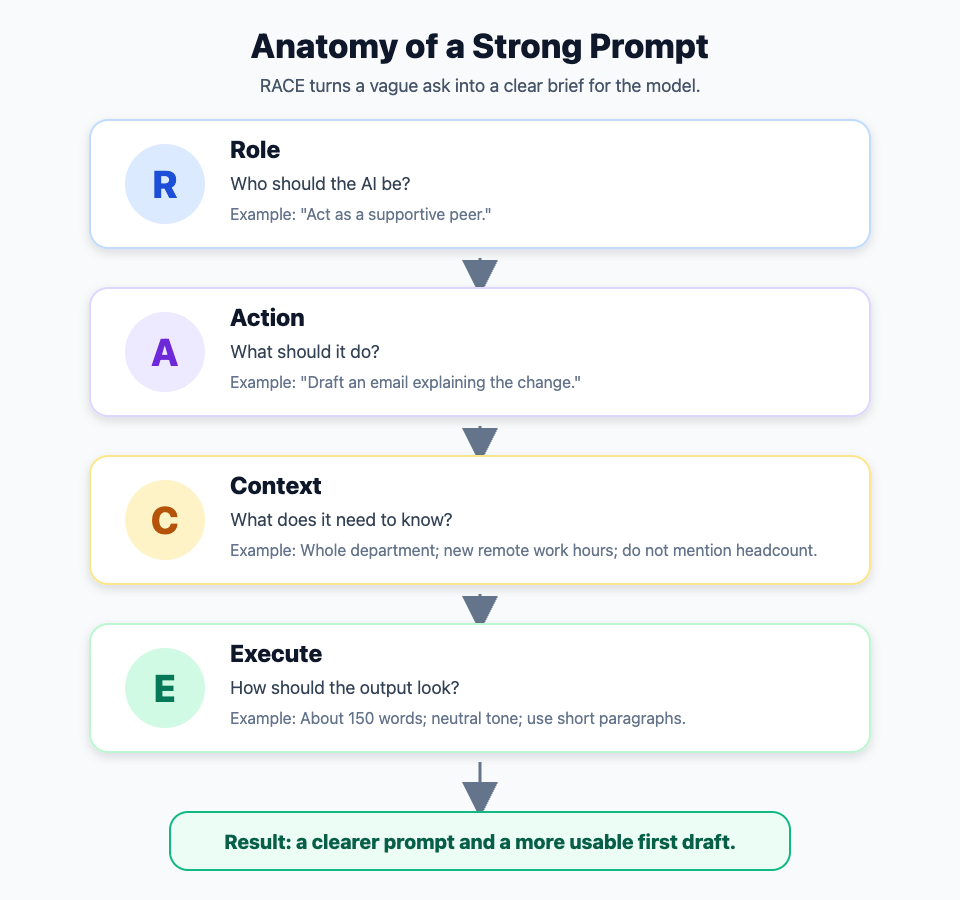
The reason this works ties back to how language models operate: they predict based on the context you give them. Sparse context leads to generic predictions. A structured RACE prompt leads to sharper, professional results.
Turning Vague Requests Into Specific Deliverables 🎯
Most product requests show up vague. Your manager forwards a one-liner, or a stakeholder drops "can you draft something" in Slack. The instinct is to type that vague phrase straight into the AI.
Don't.
Translate the vague request into the RACE components before you write the prompt. Let's look at an example:
- Natalie: Can you draft something for the squad about the roadmap change?
- Chris: Happy to. Quick check so I get it right the first time: what’s the goal here (Action), and who exactly is reading it (Context)?
- Natalie: It’s an update for the whole squad, about 150 words (Execute). We need to explain that the V2 launch is slipping a quarter without committing to a new date yet (Context/Constraints).
- Chris: Got it. Should I sound like a supportive peer or a formal product lead (Role)?
- Natalie: Supportive peer, keep it calm and clear.
Notice Chris didn't open the AI tool yet. He pulled the missing Role, Context, and Execution details out of Natalie in thirty seconds. Because he has the RACE elements ready, his first draft will be significantly more accurate.
From Vague to RACE-Ready 🧭
Here is the same release-note request before and after it is structured with RACE:
Weak prompt:
Write a release note about our delayed V2 launch.
RACE-ready prompt:
Role: Act as a product manager writing for our internal product-and-engineering squad.
Action: Draft a calm, transparent release note about the V2 launch moving by one quarter.
Context: The audience needs the reason at a high level, the work that continues during the delay, and a clear statement that there is no new launch date yet. Do not invent commitments or dates.
Execute: Use a supportive peer tone, keep it to about 150 words, and format it as a short headline followed by two concise paragraphs.
The second version gives the model a job, a specific deliverable, the facts and guardrails it must honor, and a usable format. Save strong versions like this in your prompt library so future drafts start from a reliable baseline.
Refining The Prompt After The First Output 🔧
Even a strong RACE prompt rarely lands perfectly. The first output is diagnostic data, not a verdict. Read it and ask which part of the framework was thin:
- If the tone is too robotic: Your Role was too broad.
- If the model missed the point: Your Action wasn't specific enough.
- If it included information it shouldn't have: Your Context lacked constraints.
- If the structure is messy: Your Execute instructions were too loose.
Don't argue with the model in chat or ask it to "try again, better." Rewrite the prompt itself, tightening the RACE elements that failed, and re-run. This gives you a reusable prompt for the future. Save the strong version in a personal prompt library. Future-you will thank present-you.
The takeaway: prompts are briefs, not questions. Structure your request using RACE, then refine based on what the first output reveals. Next, you'll move into a live practice session where you'll apply RACE to a sensitive product scenario.
