Validating Structured Outputs
Introduction
In previous lessons, evaluating an output came down to comparing strings: checking whether a model's response matched an expected text or contained specific words. But as you ask models to handle more complex tasks—filling out a form, producing a shipping label, or returning an answer split across several named fields—a single pass/fail score stops being enough. A score can say "fail" without telling you what broke, and more dangerously, it can say "pass" while missing a critical error.
This lesson starts by looking at what a structured output actually is and at JSON, the format most teams use for it. Then it explains why the string metrics you've used so far struggle with this kind of data. To evaluate structured outputs effectively, you have to look past the single score and understand which properties of the output your evaluator is actually checking. Three useful layers help you reason about this: Format, Structure, and Semantics.
What Is a Structured Output?
Most outputs you've evaluated so far have been free text: a sentence, a short answer, a paragraph. A structured output is different. It's an answer that has to arrive in a shape agreed on in advance, with specific pieces of information in specific places.
The familiar version of this is a table. Imagine you ask a colleague to log every incoming order in a spreadsheet with three columns fixed ahead of time:
| order_id | delivery_date | priority |
|---|---|---|
| A-4471 | 2024-05-03 | urgent |
The columns are the named pieces of information you expect every time. The row is one filled-in answer. Reviewing this row is not the same as reviewing a paragraph: you check each cell separately. Is every column filled in? Is the date written the agreed way? Is urgent actually the right priority for this order?
That's the whole idea of a structured output—and the reason one overall score is a poor fit for it.
A Quick Look at JSON
A model can't hand you a spreadsheet; it produces text. So when systems need structured answers from a model, they ask for that text in a format both the model and the receiving software understand. The most common one is JSON.
JSON is just the table above written out as text:
A few things to notice:
- The curly braces
{and}mark where the object starts and ends. - Each line holds a key and a value, separated by a colon. The key (
"order_id") is the name of the piece of information—it plays the role of a column header. The value ("A-4471") is the actual data—the cell. - Pairs are separated by commas.
- Text values go in quotes. Numbers don't:
"weight_oz": 32.
A value can also be a list of items, written in square brackets:
Here items is one key whose value holds three entries.
One more term you'll meet: when a program reads JSON text and turns it into data it can actually use, we say it parses it. Parsing depends entirely on the punctuation being right. A single missing brace, quote, or comma and the whole thing fails to parse—even if every word inside it is correct. That's the first thing an evaluator can check, and it's separate from whether the content is any good.
Beyond JSON: Other Structured Formats
While JSON is the industry standard for APIs and web applications, structured outputs come in other formats as well, such as YAML and XML.
A familiar, real-world example is Microsoft Excel. Modern Excel workbooks (.xlsx files) are not monolithic binary blobs; under the hood, they are actually zipped packages of structured XML files. If you ask an LLM to generate the XML representing rows and cells, you can assemble a fully functioning Excel sheet directly from the model's text output.
However, just like JSON, XML relies on strict syntactic rules. If the model forgets to close an XML tag or introduces a misplaced bracket, Excel will report that the workbook is corrupted and refuse to open it. Whether your model is outputting JSON for a backend database or XML for a spreadsheet, validating the integrity of the format is the necessary first gate before anything downstream can use the data.
The Blindness of a Single Score
A structured output is a reply made of multiple named parts—keys—each with its own constraint. Consider a prompt like: "Given the order details below, reply with a JSON order confirmation containing order_id, delivery_date, and priority."
Because this output has multiple moving parts, an evaluator might fail it for three entirely different reasons:
- Format — The output follows the required shape rules. This applies at two scales: the whole output (does the reply parse as JSON at all, or is a brace missing?) and each individual value (is the date written as
2024-05-03rather than2024/05/03?). - Structure — Every required piece is present and correctly named. For example, the
prioritykey is missing from the JSON. - Semantics — The content is present and correctly shaped, but it is factually wrong for this input. For example, the reply says
"priority": "standard"when the input clearly called for"urgent".
Note: These three layers are a mental model, not an exhaustive classification. Real projects add constraints that sit on the boundary between them—a number that must fall in a valid range, a value restricted to an approved list (
standard/urgentand nothing else), or two fields that must agree with each other (adelivery_datethat can't precede theorder_date). Depending on the case, you may need extra checks of your own. The layers are there to make you ask "what is this score actually testing?", not to file every rule into exactly one box.
The problem is that the metrics you already know—Exact Match, Contains, or string similarity—were built to compare text as a whole, not to reason about these layers. They give you a single verdict that often hides the truth.
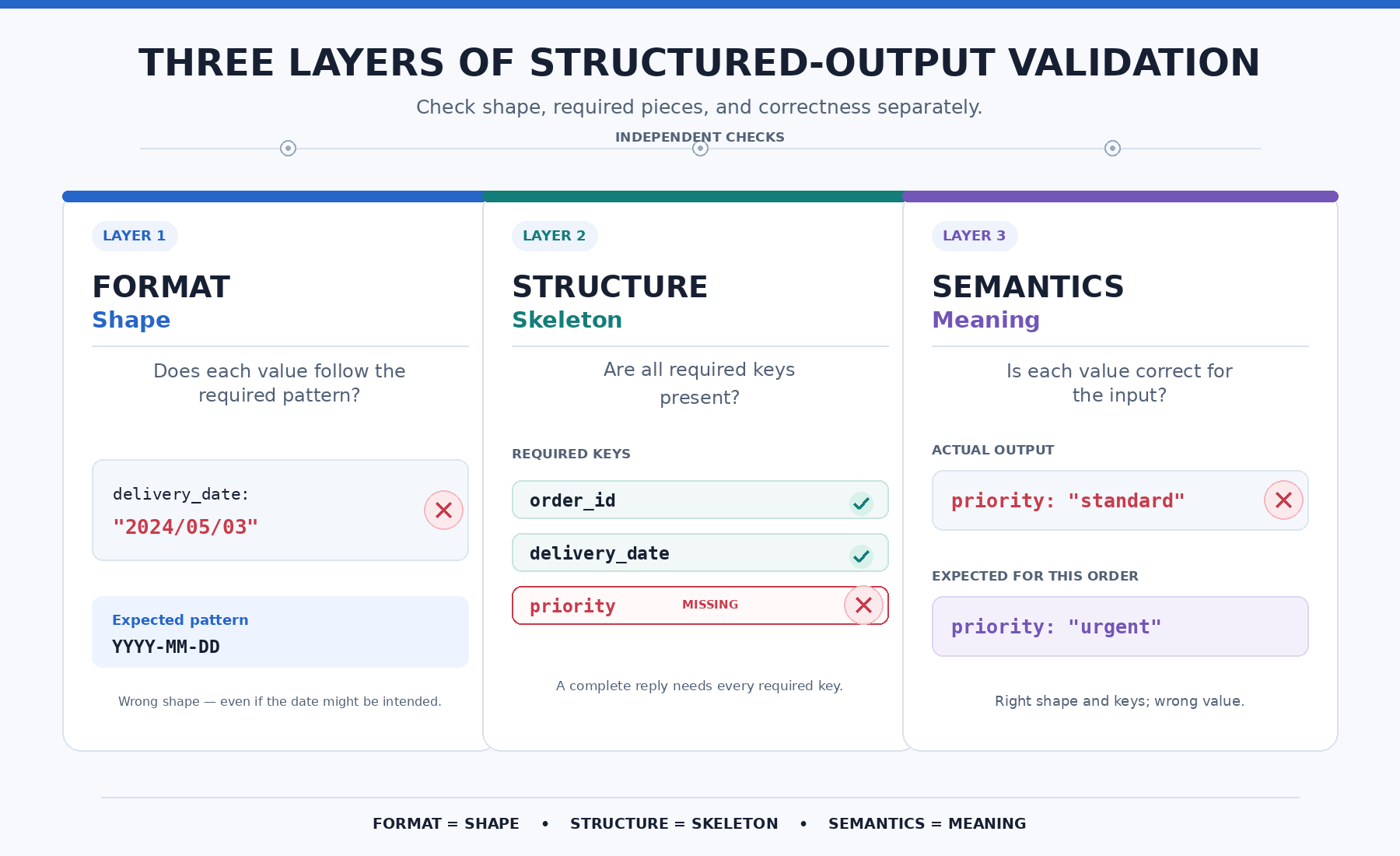
Format covers both the whole document and each individual value inside it.
What Isn't a Layer Failure
Not every text difference is a failure. Key order, extra spaces, indentation, and line breaks are writing differences (the technical name is serialization differences—differences in how the data was written down, not in what it says). Two JSON objects can be typed out differently and still parse the same way, carry the same keys, and hold the same values. {"a":1,"b":2} and {"b": 2, "a": 1} are identical at all three layers.
They matter for exactly one reason: a text-comparison metric like Exact Match will still report a mismatch. When that happens, the score is telling you the strings differ—not that the output is wrong. Keep "the evaluator failed this case" separate from "the output is bad."
Why Exact Match and Contains Can Mislead on Structured Data
Different evaluators are blind to different kinds of failure. If you don't know what a metric is actually checking, you can't trust the score it gives you.
Suppose the expected output for a shipping-label case is:
{"tracking_number":"1Z999AA10123456784","carrier":"UPS","weight_oz":32,"priority":"standard"}
- Exact Match is too brittle. Imagine the model produces the correct data, but reorders the keys or adds a single space:
{"priority": "standard", "carrier": "UPS", "weight_oz": 32, "tracking_number": "1Z999AA10123456784"}. Exact Match scores this 0. But the difference here is purely in how the data was written out—format, structure, and semantics are all intact. The score is evidence about the text, not about the quality of the output. - Contains is too permissive. Now imagine the model drops the
carrierkey entirely:{"tracking_number":"1Z999AA10123456784","weight_oz":32,"priority":"standard"}. If the evaluator only checks for the substring"priority":"standard", this case scores a 1. Contains successfully verifies the specific criterion you gave it, but it is blind to the fact that the structure of the reply is broken. It "passes" an incomplete response.
Evaluating by Hand
Because a single score can be misleading, you cannot infer one layer's status from another. An output can be format-correct and structure-correct but semantically wrong—the most deceptive kind of failure, since it "looks" perfect at a glance.
Currently, the simulator has no dedicated button that tells you "this failed at the structure layer." To know if a case failed on a date format, a missing key, or a wrong value, you have to open Case details and inspect the output yourself. The habit you'll leave with: before trusting any score on a structured output, ask which of these three layers you're actually looking at, and check the individual text to confirm.
Note: Manual checking is a limitation of this simulator, not industry practice. Production teams automate structure validation with schema tools such as JSON Schema or Pydantic, which declare the required keys and value types once and then check every output automatically. Checking by hand here is a way to build the judgment; in a real system you'd expect that judgment to be encoded in a schema.
Conclusion
The shift here is away from thinking of a structured output as "one string, one verdict" and toward understanding what an evaluator is actually capable of measuring. A tight way to hold onto the three layers: shape, skeleton, meaning—format is the shape, both of the whole document and of each value inside it; structure is the skeleton of required pieces; and semantics is whether the meaning is correct. Differences in how the same data was written out, like key order, sit outside all three.
Later units give you tools for two of these layers: Regex Match for the format of an individual value, Valid JSON for the format of the whole document, and an LLM Judge for semantics. Structure—whether every required key is present—stays something you confirm by hand in Case details. For now, your job is simply to recognize these three layers and reason about them by hand.
You'll put this directly into practice next: interpreting what a score does and doesn't prove for an order-confirmation reply, matching specific broken outputs to the layer that failed, and writing out why Exact Match and Contains can't be trusted to validate a structured shipping-label response.
