Handling Data Issues
Introduction
Welcome back to Evaluating and Improving Data Quality! You have reached Lesson 3 of 5 in this course, which means you are well past the halfway mark. In Lesson 1, we learned to recognize common data quality issues in records and tables. In Lesson 2, we sharpened those skills by systematically checking validity and consistency using defined rules and rates. Now it is time to take the next step: learning how to handle three of the most frequent problems you will encounter before any analysis begins — missing data, duplicate data, and outdated data.
By the end of this lesson, you will be able to identify each of these issues in a dataset and, more importantly, select the right course of action so that your analysis stays trustworthy.
From Spotting to Deciding
Over the first two lessons, we built up a solid toolkit for finding problems in data. We can scan records for blanks, flag invalid values, and catch inconsistent formats. But finding a problem is only half the job. The other half is deciding what to do about it before we move forward with analysis.
Think of it this way: a mechanic who can diagnose a faulty brake line but never fixes it is not very helpful. Similarly, once we spot missing, duplicate, or outdated values, we need a clear plan for each one. The rest of this lesson walks through these three issues one at a time, building toward a practical decision framework you can apply to real datasets.
Understanding Missing Data
Evaluating Whether Missing Data Matters
Not every missing value is equally harmful. The impact depends on which field is missing and what question we are trying to answer. Consider this small sales table:
| Order ID | Customer Name | Region | Revenue |
|---|---|---|---|
| 1001 | Amir Patel | West | 250.00 |
| 1002 | Li Wei | — | 410.00 |
| 1003 | Sara Kim | East | — |
| 1004 | Jon Muller | West | 180.00 |
If our analysis goal is to calculate total revenue by region, two missing values stand out. The missing Region in row 1002 means we cannot assign that order's revenue to any region. The missing Revenue in row 1003 means we lose that row's contribution entirely. Meanwhile, if a middle name column were missing for some rows, it would have no effect on a revenue analysis at all.
The key question to ask is: Does this missing value block or distort the specific analysis we need to run? When the answer is yes, we must address it before moving on.
Spotting Duplicate Data
Recognizing Outdated Data
Outdated data refers to values that were once correct but no longer reflect reality. Unlike missing or duplicate data, outdated records often look perfectly valid. They pass format checks, range checks, and domain checks without a single flag — and that is exactly what makes them tricky.
Common examples include:
- A customer's phone number that changed six months ago
- A product price from last year that has since been updated
- An employee's job title recorded before a recent promotion
To evaluate freshness, we look at when a record was last updated relative to how quickly that type of information changes. A mailing address might stay accurate for years, while an inventory count could become outdated within hours. If a dataset lacks a "last updated" timestamp, that itself is a warning sign: without it, we have no reliable way to judge whether the data is still current.
Choosing the Right Next Step
Once we have identified missing, duplicate, or outdated values, the next question is: What should we do? The answer depends on the issue type, the severity, and the analysis at hand. The flowchart below offers a quick decision map to guide those choices.
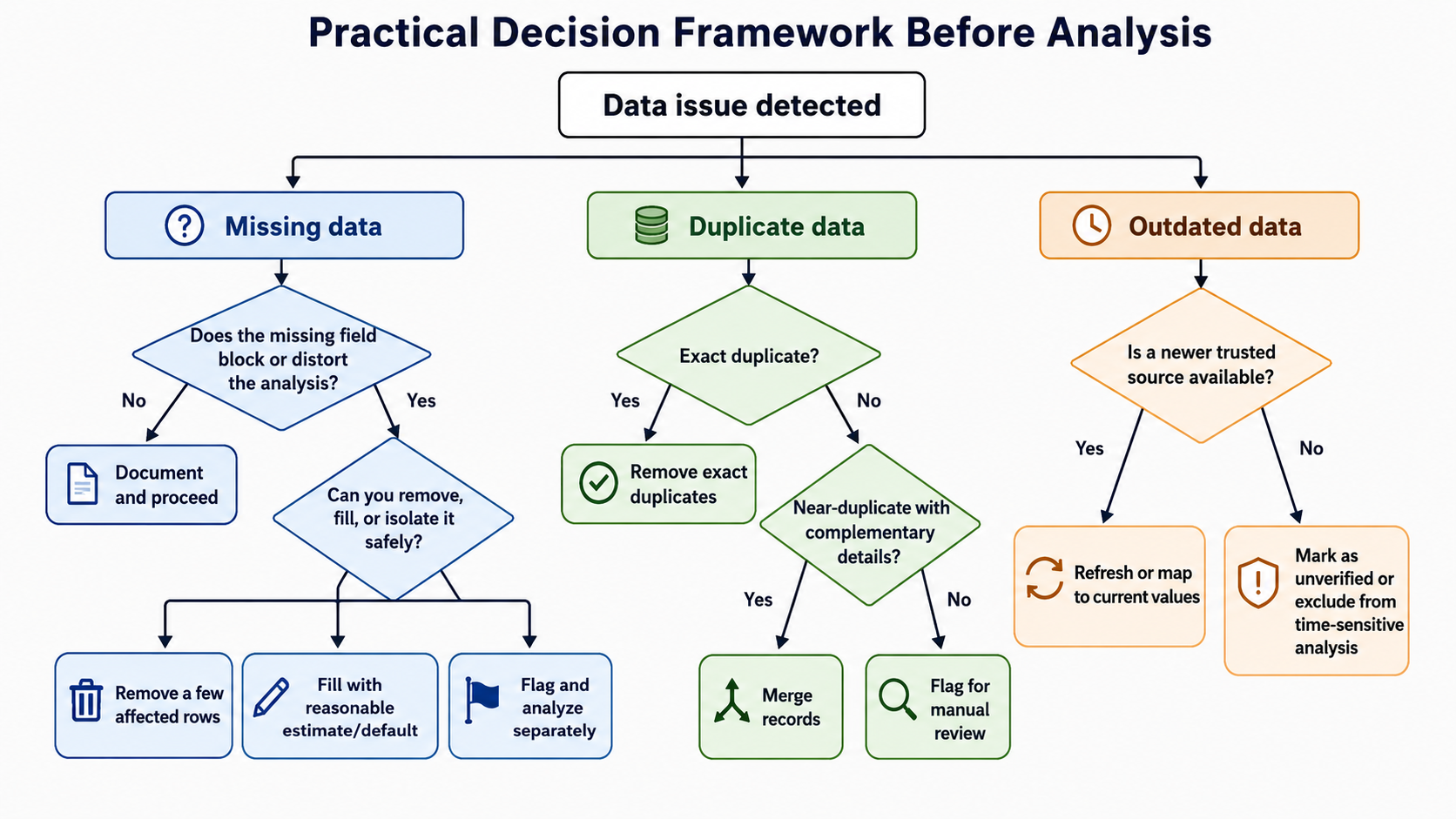
The table below summarizes common actions for each problem along with guidance on when each action fits best.
| Issue | Possible Actions | When to Choose |
|---|---|---|
| Missing data | Remove the row, fill with a default or estimate, flag and analyze separately | Remove when few rows are affected; fill when a reasonable estimate exists; flag when the gap matters but removal would lose too much data |
| Duplicate data | Remove exact duplicates, merge near-duplicates, flag for manual review | Remove when duplicates are clearly identical; merge when records carry complementary details; flag when you are unsure which record is authoritative |
| Outdated data | Refresh from an updated source, mark as unverified, exclude from time-sensitive analysis | Refresh when a reliable source is available; mark when refresh is not possible yet; exclude when using stale values would mislead results |
Notice that removing data is not always the best choice. Dropping too many rows can shrink our dataset to the point where results become unreliable. Similarly, blindly filling in missing values with guesses can introduce new inaccuracies. The goal is to pick the action that preserves the most trustworthy data for the specific question we are trying to answer.
Cleaning a Support Ticket Dataset
Conclusion and Next Steps
In this lesson, we tackled three of the most common data quality problems — missing, duplicate, and outdated data — and learned how to measure each one using simple rates. More importantly, we practiced choosing the right next step for each issue based on the analysis goal and the severity of the problem. These decisions are what separate a raw dataset from one that is truly ready for reliable analysis.
Now it is time to put these skills to the test! In the upcoming practice exercises, you will examine real-looking datasets, pinpoint the issues that matter most, and choose the best action to take. Let's see how confidently you can clean the path to trustworthy results!
