Creating Relationships in Neo4j
Introduction
Welcome back to Creating Data in Neo4j! You've successfully completed the first unit, where you learned to create nodes, the fundamental building blocks of any graph database. Now, in this second unit, we'll take the next essential step: connecting those nodes through relationships.
This is where graph databases truly shine. While nodes represent entities like artists and albums, it's the relationships between them that capture the real story of your data. Connecting a Miles Davis node to a "Kind of Blue" album node tells us something meaningful: this artist created this work. In this lesson, you'll discover how to establish these connections and bring your graph to life.
Understanding Relationships in Graph Databases
Relationships are the connections that link nodes together in Neo4j. Unlike traditional databases, where connections are implicit through foreign keys, graph databases make relationships first-class citizens: they're explicit, named, and directional.
Each relationship has three key characteristics:
- A type that describes the connection (like
CREATEDorPERFORMED_ON) - A direction from one node to another (shown with an arrow)
- Optional properties that provide additional context about the connection
Think of relationships as the verbs in your data story. If nodes are the nouns (artist, album, song), then relationships express the actions or associations between them. An artist creates an album, a song appears on an album, or a musician collaborates with another musician.
Relationship Syntax and Direction
Before we start creating relationships, we need to understand how they're written in Cypher. The syntax uses a visual pattern that mirrors how you'd draw it on paper:
This pattern reads naturally from left to right. The arrow -> shows that the relationship flows from node1 to node2. The relationship type sits in square brackets with a colon, similar to how labels work for nodes.
Direction matters in graph databases. When we write (artist)-[:CREATED]->(album), we're saying the artist created the album, not the other way around. Let's visualize what this looks like:
Correct relationship direction:
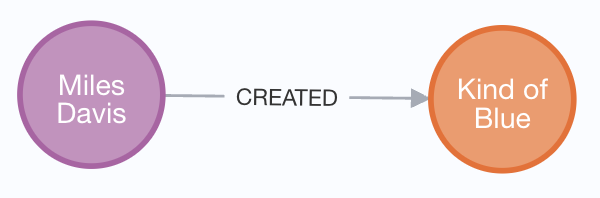
This makes semantic sense: an artist creates an album. The direction flows naturally from the creator to the created work.
Incorrect relationship direction:
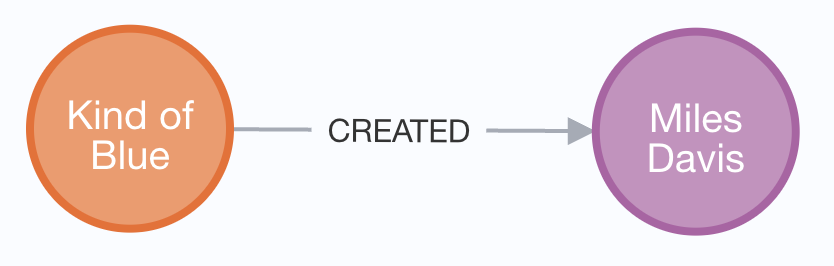
This direction would incorrectly suggest that an album created an artist, which doesn't reflect the real-world relationship.
This direction affects how we query our data later. While Neo4j allows you to traverse relationships in either direction during queries, establishing the correct direction from the start makes your queries more intuitive and your data model clearer.
Finding Existing Nodes with MATCH
To create relationships, we first need to find the nodes we want to connect. This is where the MATCH statement comes in. Unlike CREATE, which makes new data, MATCH finds existing data in your graph:
The MATCH statement searches your graph for nodes that meet specific criteria:
- It looks for a node labeled
Artistwith the name property "Miles Davis" - It also looks for a node labeled
Albumwith the title "Kind of Blue" - Both nodes must exist for the match to succeed
Notice how we use variables (artist and album) to reference these found nodes. These variables will be crucial in the next step when we create the relationship between them.
Creating a Single Relationship
Now that we know how to find existing nodes, we can connect them. Here's how to create a relationship between an artist and their album:
This statement combines MATCH and CREATE to establish a connection. The MATCH finds both nodes, and then CREATE adds a new relationship between them. The relationship type CREATED clearly expresses that the artist created the album.
Breaking Down the Relationship Creation
Let's examine what happens when this statement executes. The process follows a clear sequence:
- Neo4j searches for the artist node matching "Miles Davis."
- It searches for the album node matching "Kind of Blue."
- Once both nodes are found, it creates a new
CREATEDrelationship connecting them. - The relationship is stored with its direction pointing from artist to album.
If either node doesn't exist in your database, the MATCH will fail, and no relationship will be created. The query simply returns no results—no error is thrown. This is a safety feature: Neo4j won't create relationships to nodes that don't exist, preventing data inconsistencies in your graph.
Creating Multiple Relationships
Just as you can create multiple nodes in one statement, you can also create multiple relationships simultaneously. This is particularly useful when one node connects to several others:
This statement finds one artist and two albums, then creates two separate relationships. Notice how the MATCH clauses are structured: the first finds the artist, while the second finds both albums together.
Understanding the Multiple Relationships Pattern
The multiple relationships approach offers several advantages. By separating the MATCH clauses, we make the query more readable: it's clear that we're finding one artist and two albums. Then, in the CREATE clause, we establish both relationships in one operation.
Each relationship is independent and separate:
- The first relationship connects Miles Davis to "Kind of Blue."
- The second connects the same artist to "Sketches of Spain."
- Both relationships share the same type (
CREATED) and direction.
This pattern is common when working with artists who have multiple albums, products with multiple categories, or any scenario where one entity relates to many others. It's efficient because Neo4j processes all relationships in a single transaction.
Conclusion and Next Steps
In this lesson, you've learned how to connect existing nodes through relationships. You discovered that relationships have types and directions, and you practiced using MATCH to find nodes before connecting them with CREATE. You also explored how to establish multiple relationships efficiently in a single statement.
These connections are what make graph databases powerful. By explicitly defining relationships like CREATED, you're building a rich, interconnected data model that naturally represents how entities relate in the real world. The direction you choose for each relationship makes your data model intuitive and your queries straightforward.
Now you're ready to practice these skills hands-on! In the upcoming exercises, you'll connect artists to albums, songs to albums, and build out a meaningful music graph. Let's transform those isolated nodes into a connected network of data!
