Skipping Iterations with Continue
Introduction: Skipping One Item Instead of Leaving the Loop
Welcome back to Controlling Python Loops with While, Break, and Continue! We are now two units in: Unit 1 gave us condition-driven repetition, and Unit 2 gave us break, the emergency exit that abandons a loop the moment we are done with it. That exit is powerful, but it is also final. Many everyday tasks call for something gentler: We meet one item we do not care about, ignore it, and carry on with everything that follows.
Picture a list of sensor readings collected overnight. Most values are sensible measurements, but a few are zeros and negatives caused by a faulty cable. We want a total of only the trustworthy readings. Leaving the loop at the first bad value would throw away all the good data behind it, so break is the wrong tool here.
In this lesson, we will learn the syntax and behavior of continue, apply it to that readings total, trace it pass by pass, compare it with both break and a plain if filter, and name the pitfalls that trip people up.
The Continue Statement: Syntax and Behavior
Like break, continue is a single-word statement that lives inside a loop body and is almost always guarded by an if. The shape will look familiar because only the keyword has changed:
The rule is precise: when Python runs continue, it abandons the rest of the current pass only, then hands control back to the loop, which moves on to the next item (in a for loop) or rechecks the header condition (in a while loop).
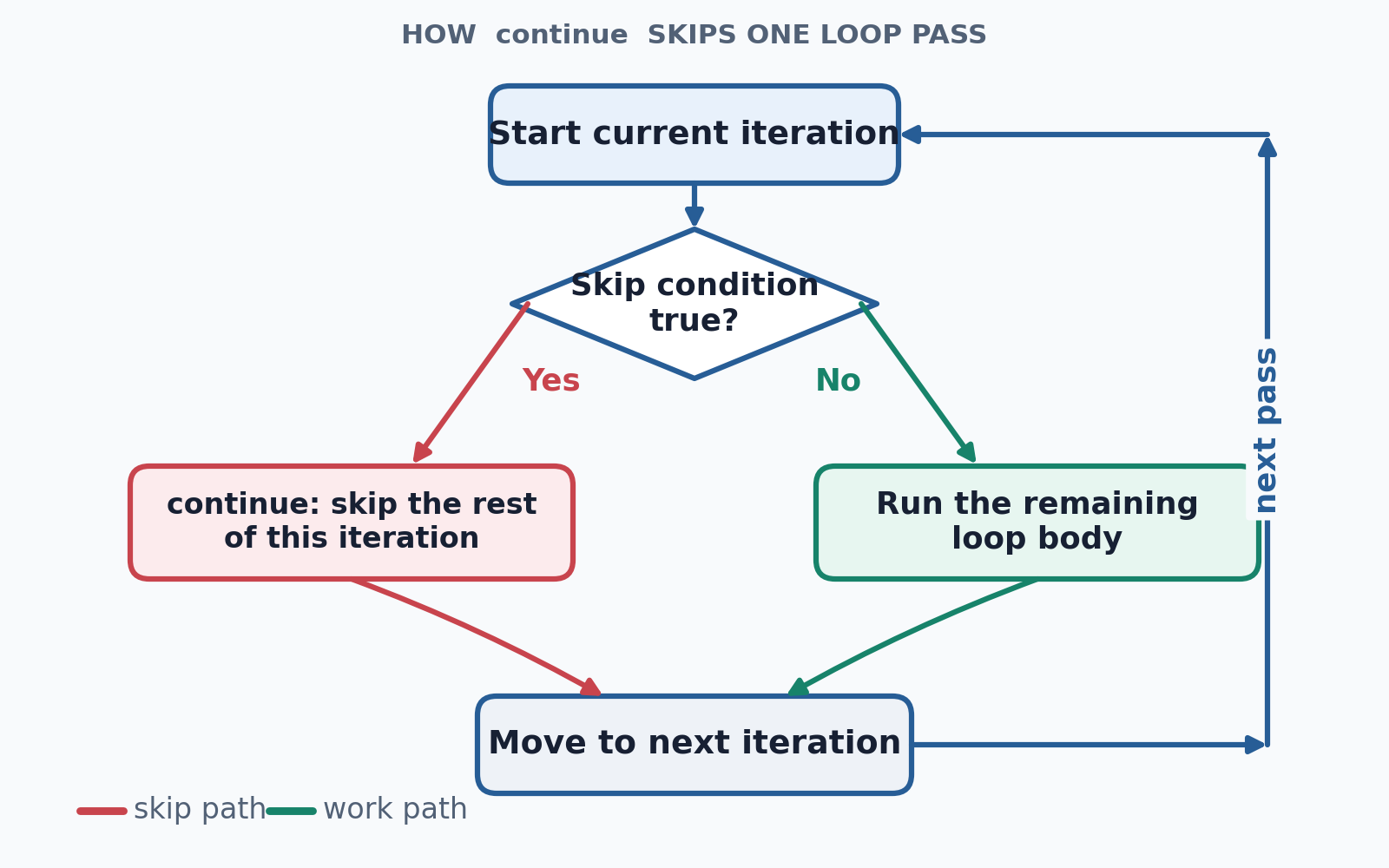
Three facts prevent most confusion:
- The loop is still alive; only this one pass ended early.
- Any code written below
continuein that same pass never executes. - The loop type does not matter:
forandwhiletreatcontinueidentically.
Skipping Unwanted Readings While Summing the Rest
Let's turn the sensor scenario into code. We start with the data and an accumulator, following exactly the pattern we used for totals in the previous course: a variable initialized before the loop so it can survive across passes.
The guard value <= 0 is doing double duty: It catches negative readings and zero in one comparison, since neither belongs in a total of positive measurements. When the guard is true, continue fires, and positive_total += value is never reached during that pass, so the bad reading contributes nothing. When the guard is false, the pass continues normally, and the value is added.
Notice that nothing here stops the loop; all six elements are still visited.
Reading the Result
With the accumulation finished, we report the total after the loop, at the outer indentation level:
Running the complete program gives us:
That single line is the sum of 12, 20, and 8. The three unwanted readings, -3, 0, and -7, were each examined by the loop and then discarded before they could affect the accumulator. This is the key idea behind continue: skipped items are not errors, and they do not end anything; they simply contribute nothing to the result.
Tracing the Loop Pass by Pass
Continue vs. Break: Two Different Exits
Seeing both statements on the same data makes the difference unmistakable. Here are two loops that differ by exactly one word:
Version A visits all six readings and adds the three positive ones, reaching 40. Version B adds 12, encounters -3, and leaves the loop immediately, so 20 and 8 are never seen. In one line each: continue means "not this item, but keep going," while break means "stop the whole loop now."
The choice comes down to a single question: Does the data after the unwanted item still matter? If yes, use continue; if the rest is irrelevant or invalid, use break.
Continue vs. an If That Wraps the Work
You may recall filtering with conditions from the earlier for loops course, and a fair question follows: Why not simply wrap the work in a positive test? That version works perfectly well:
Both produce 40, and for a one-line body, the wrap style is arguably the clearer of the two. The skip style earns its keep when the body grows: With ten lines of work, or with three separate skip rules stacked one after another, early continue guards keep the main work at a shallow indentation level instead of pushing it deeper with every new condition. Think of the guards as a doorway policy: Reject the items that do not qualify, then treat everything past the door as valid.
Common Pitfalls with Continue
A few mistakes account for nearly every continue bug, and naming them makes them easy to spot:
- Code after
continuenever runs in that pass. An accumulation or update line placed below it is silently skipped for the skipped items. - In a
whileloop,continuecan freeze the program. In the broken snippet below,i += 1sits aftercontinue, so a skipped item leavesiunchanged, and the same element is tested forever. Moving the update above the skip fixes it. - Inverting the guard. Writing
if value > 0: continuediscards exactly the data we wanted to keep. - Reaching for
continuewhen nothing follows it. If the guard is the last decision in the body, a plainifaround one line reads better.
Conclusion and Next Steps
In this lesson, we added a gentler control tool to our loops. We learned that continue ends only the current pass and lets the loop proceed; that guarding it with an if creates a clean skip rule; that skipped items contribute nothing while everything else is still processed normally; and that this is precisely what separates continue from break, since with continue, the loop survives. We also traced the readings loop through all six passes and identified the pitfalls, including the while loop freeze caused by an update placed after the skip.
The practice ahead puts all of this to work: We will skip non-positive readings while summing, skip one specific unwanted value while printing the rest, count only the even numbers in a list, and repair a while loop whose continue skips its own index update while filtering out blank notes from a batch of text. After that, Unit 4 brings everything together, combining while, conditions, continue, and break to validate data and hunt down acceptable values.
Time to practice the art of politely ignoring the wrong items: Let's dive in!
