Introduction: From "It Works" to "It Can Be Trusted"
Welcome to the final unit of Automating Tasks with zsh Scripts! Five units in, tidy.zsh refuses incomplete calls, reads a folder and a label from the command line, builds a label-specific archive, and loops over a glob to handle a whole folder in one call. It behaves beautifully as long as the world cooperates.
Two comfortable assumptions are still baked in:
that every command we run succeeds, so a success message is safe to print;
that the glob always matches at least one file, so the loop always has work.
This unit removes both. We will branch on command exit statuses instead of assuming success, tame unmatched globs with setopt NULL_GLOB, and summarize partial failures honestly at the end. Diagnostics will go to standard error, while ordinary work reports remain on standard output. The payoff arrives in the last two sections: the finished script moves into ~/bin as archive-text, where we call it by bare name from an unrelated directory, joining Course 3's environment work to automation we wrote ourselves.
Preparing a Sandbox That Can Fail on Purpose
Testing failure requires inputs designed to fail. Our workspace therefore grows to four folders, each representing a different story.
filled mixes two non-empty text files with a zero-byte empty.txt, so a successful run still has something to skip.
partial holds two good files, one of which we will block so its copy fails.
no-text contains only app.log, so *.txt matches nothing.
away stays empty; it is the unrelated directory we will run the installed command from.
As in earlier units, the rm -R line clears leftover destinations for a known baseline.
Every Command Reports an Exit Status
Here is the idea that turns a working script into a dependable one. As you may recall from Course 1, every command hands the shell a number when it finishes: zero means success, and any non-zero value means failure. Unit 4 already used the sending half of this contract with exit 1; now we start listening.
The important detail: if does not require a [ ... ] test. It can take a command directly and branch on that command's status.
Shell
mkdir -p "$archive_dir"echo "created $archive_dir" # printed even if mkdir failed
versus
Shell
if mkdir -p "$archive_dir"; then echo "created $archive_dir"else echo "error: could not create $archive_dir" >&2 exit 1fi
The first version prints created unconditionally: if mkdir encounters a permission problem, the script cheerfully reports a folder that does not exist. In the second version, the message is earned. mkdir runs first, and only a zero status reaches the then branch; anything else lands in else, where we report the problem on standard error and stop with exit 1.
Join the 1M+ learners on CodeSignal
Be a part of our community of 1M+ users who develop and demonstrate their skills on CodeSignal
Guarding the Copy Inside the Loop
Unmatched Globs and setopt NULL_GLOB
Now for the second assumption. If "$source_dir"/*.txt matches nothing, zsh does not quietly hand the loop an empty list; it prints no matches found and refuses to run the loop at all. That is a hard stop before any of our careful reporting logic, and it happens in no-text, where only app.log lives.
# Under zsh, an unmatched glob now becomes an empty list instead of aborting.setopt NULL_GLOBmatched="no"failed="no"
setopt NULL_GLOB changes that behavior for this script: an unmatched pattern expands to nothing, so the loop simply runs zero times and execution continues.
matched="no" is our witness. An empty loop leaves no trace of itself, so the first pass sets matched="yes"; if that assignment never runs, we know the match set was empty.
failed="no" starts the failure marker in a clean state, ready for any copy that goes wrong.
Both markers are ordinary variables holding plain text, checked later with the string comparison =.
Reporting the Verdict at the End
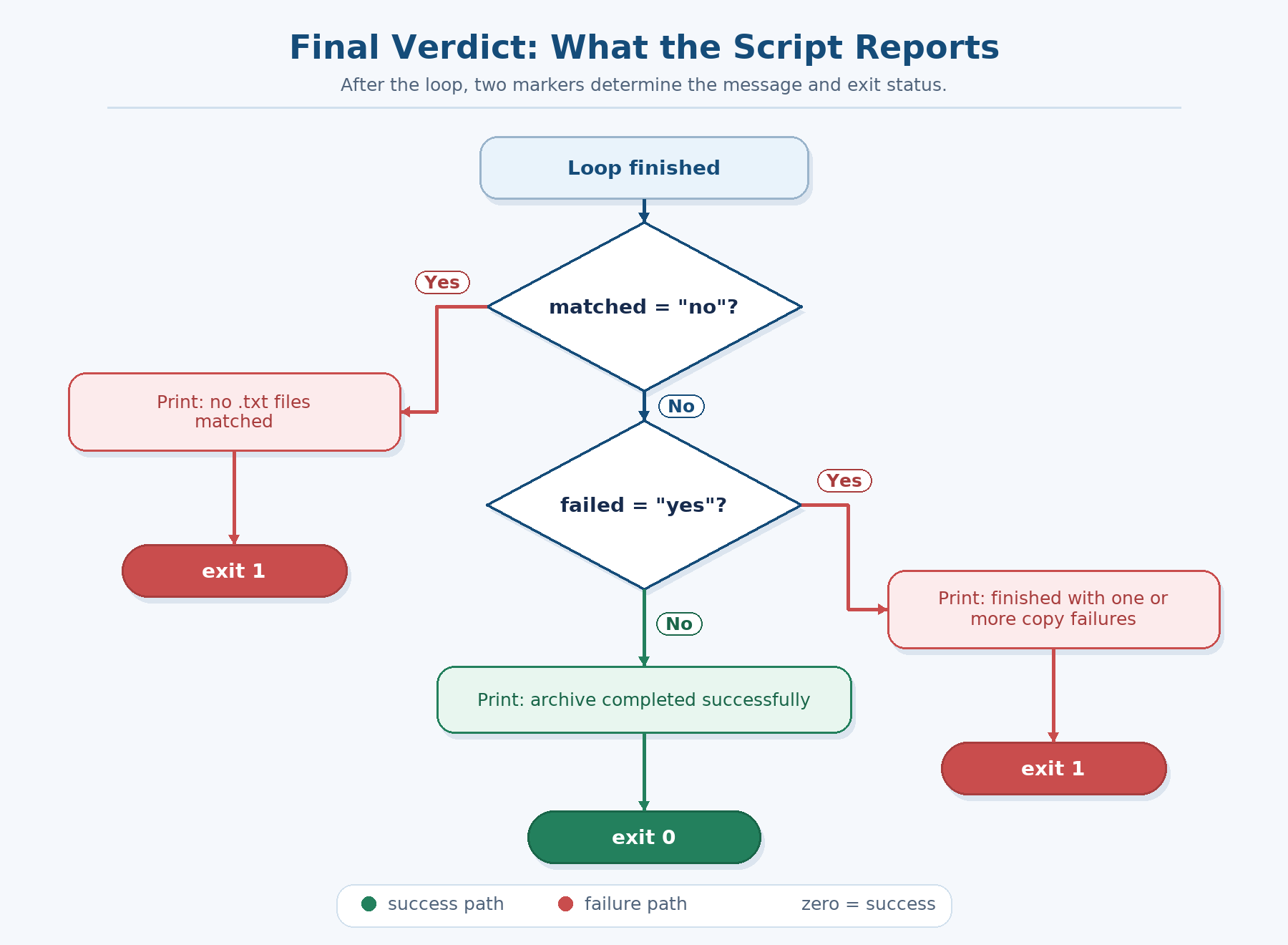
Once the loop finishes, the script owes the caller a verdict. Three lines cover every case.
if [ "$matched" = "no" ]; then echo "no .txt files matched in $source_dir" >&2 exit 1fiif [ "$failed" = "yes" ]; then echo "finished with one or more copy failures" >&2 exit 1fiecho "archive completed successfully"
The order matters: "nothing to do" is a different story from "some copies broke," so we report the empty match set first and never reach the second guard in that case. Both guards end in exit 1 for the same reason: a script that prints an error but exits zero lies to whatever called it, whether that is a person or another script. The final success line is reachable only when the loop matched files and every copy returned zero.
Keeping Diagnostics Out of the Results
Every message our script prints could be sent to the same place, but callers often need to separate a work record from a problem report. Usage messages, errors, no-match messages, and failure summaries go to standard error with >&2. What stays on standard output is the record of work: created, archived, skipped, and the final success line.
For example:
./tidy.zsh partial partial > run.logcat run.log
The error lines still appear on the terminal because they use standard error, while run.log contains the ordinary work record. This separation makes the script easier to use with redirection and pipelines.
The Complete Hardened Script
A Clean Run and an Empty File
Provoking a Real Failure
Next, the interesting case. We block one target name by creating a directory called blocked.txt inside the archive, which makes cp fail for that one file.
source found: partialreusing archive/partialerror: failed to archive partial/blocked.txtarchived partial/good.txtfinished with one or more copy failuresblocked.txt good.txt
The error and failure-summary lines are diagnostics on standard error; the archived line and the listing are ordinary output.
Three things went right here, in a run that "went wrong":
the failing cp produced our own error line instead of a silent archived;
the loop kept going, so good.txt still reached the archive;
the closing guard summarized the run and exited non-zero, so nobody downstream mistakes this for a success.
No Matching Files at All
Now for the case that used to stop the script dead: a source folder with no .txt files in it.
./tidy.zsh no-text none
source found: no-textcreated archive/noneno .txt files matched in no-text
The no-match line is written to standard error. NULL_GLOB turned the unmatched pattern into an empty list, so the loop ran zero times, matched stayed "no", and the script explained itself in one clear sentence before exiting non-zero. Compare that with the default behavior: no matches found from zsh itself, with no idea which folder or which script raised it.
Installing archive-text in ~/bin
One clean run to confirm that the tool is healthy:
Installation is a single checked step, because a lesson about not assuming success should not assume its own installer worked. The installation error is a diagnostic, so it goes to standard error. install -m 755 copies the file under a new, command-like name with no .zsh extension — real tools are called grep and find, not grep.c — and sets the permission bits on the copy in the same operation, since permissions belong to each file individually. Wrapping it in if means the "installed" message is earned, and ls -l proves the file landed with rwxr-xr-x. The #!/bin/zsh shebang from Unit 1 is what lets the file run under any shell that invokes it, which matters now that the caller may not be zsh at all.
Running It by Bare Name from Anywhere
Conclusion and Next Steps
tidy.zsh is now archive-text, and it tells the truth about its own work. The habits worth keeping:
Put a command directly inside if and branch on its exit status instead of assuming success.
Collect problems in a marker like failed so a batch finishes its work and still reports honestly.
Pair setopt NULL_GLOB with a matched marker to turn an empty match set into a message rather than a crash.
Always exit 1 when something went wrong, so callers and future scripts can trust the number.
Send diagnostics to standard error with >&2 so successful results stay usable with redirection and pipelines.
Look at the arc of this course: Unit 1 ran a handful of hard-coded commands, and Unit 6 installs a validated, parameterized, batch-processing personal command that survives failure. Congratulations on completing Automating Tasks with zsh Scripts! Now to the practices, where you will guard commands with if, break a copy on purpose, meet an empty match set without flinching, and install a tool of your own in ~/bin.
The same pattern protects the real work, cp, inside the loop body. Note one deliberate difference from mkdir, though.
Shell
for file in "$source_dir"/*.txt; do matched="yes" if [ -s "$file" ]; then if cp "$file" "$archive_dir"; then echo "archived $file" else echo "error: failed to archive $file" >&2 failed="yes" fi elif [ -f "$file" ]; then echo "skipped $file: empty" else echo "skipped $file: not a regular file" fidone
The outer if still asks a question about a file with -s, while the inner if runs a command and reads its status. When a copy fails, we do not exit right away; we set failed="yes" and let the loop continue, so the caller sees the outcome of every file rather than only the first casualty.
Also notice that the -f test from Unit 3 is back as an elif, separating "this file exists but is empty" from the rarer "this path is not a regular file," such as a subdirectory named notes.txt.
Shell
# Under zsh, an unmatched glob now becomes an empty list instead of aborting.setopt NULL_GLOBmatched="no"failed="no"
Shell
if [ "$matched" = "no" ]; then echo "no .txt files matched in $source_dir" >&2 exit 1fiif [ "$failed" = "yes" ]; then echo "finished with one or more copy failures" >&2 exit 1fiecho "archive completed successfully"
Shell
./tidy.zsh partial partial > run.logcat run.log
The file below is the shape we have built all along, now with a checkpoint at every risky step. Read it in three stages, then save the whole thing as tidy.zsh.
Guards and setup.
Shell
#!/bin/zsh# archive-text - archive every non-empty .txt file in a source folder.if [ "$#" -ne 2 ]; then echo "usage: $0 <source-folder> <label>" >&2 exit 1fisource_dir="$1"label="$2"archive_dir="archive/$label"if [ -d "$source_dir" ]; then echo "source found: $source_dir"else echo "error: source directory not found: $source_dir" >&2 exit 1fiif [ -d "$archive_dir" ]; then echo "reusing $archive_dir"else if mkdir -p "$archive_dir"; then echo "created $archive_dir" else echo "error: could not create $archive_dir" >&2 exit 1 fifi
Markers and the loop.
Shell
setopt NULL_GLOBmatched="no"failed="no"for file in "$source_dir"/*.txt; do matched="yes" if [ -s "$file" ]; then if cp "$file" "$archive_dir"; then echo "archived $file" else echo "error: failed to archive $file" >&2 failed="yes" fi elif [ -f "$file" ]; then echo "skipped $file: empty" else echo "skipped $file: not a regular file" fidone
The verdict.
Shell
if [ "$matched" = "no" ]; then echo "no .txt files matched in $source_dir" >&2 exit 1fiif [ "$failed" = "yes" ]; then echo "finished with one or more copy failures" >&2 exit 1fiecho "archive completed successfully"
Save all three stages into tidy.zsh and mark it executable with chmod u+x tidy.zsh, as in previous units.
Time to watch all three outcomes. First, the friendly case: filled, which contains two real notes and one empty file. Every message below is earned by a zero exit status from the command that came before it.
empty.txt sorts first alphabetically, and because printf '' > filled/empty.txt created it with zero bytes, [ -s "$file" ] is false; the elif [ -f "$file" ] branch catches it and reports the skip. Notice that the run still ends in archive completed successfully: skipping an empty file is a decision our script made on purpose, not a command that failed, so failed never changes from "no". Only a non-zero exit status from cp sets that marker. And ls archive/complete confirms the two files that actually landed on disk, checking our output against reality rather than against our assumptions.
source found: partialreusing archive/partialerror: failed to archive partial/blocked.txtarchived partial/good.txtfinished with one or more copy failuresblocked.txt good.txt
Shell
./tidy.zsh no-text none
text
source found: no-textcreated archive/noneno .txt files matched in no-text
The last step reconnects to Course 3: a command in ~/bin is only reachable by bare name once ~/bin is on the search path.
Shell
export PATH="$HOME/bin:$PATH"if command -v archive-text; then echo "archive-text resolves on PATH"else echo "error: archive-text is not on PATH" >&2fi
Shell
cd "$workspace/away"archive-text "$workspace/filled" installedls archive/installed
export PATH="$HOME/bin:$PATH" prepends our personal directory while preserving everything already there, and the checked command -v archive-text both prints the resolved path and confirms — via its own exit status — that the shell really found ~/bin/archive-text. If the command cannot be found, that diagnostic goes to standard error. Then we cd into the unrelated away folder and call the tool with no./ and no path at all. Note the absolute source path: the script builds archive/$label relative to wherever it runs, so away gets its own archive while the source keeps pointing home. Adding that export line to ~/.zshrc would make the tool available in every future shell.