Reading Images with AI
Welcome to the Course 🚀
Welcome to AI Images for Workplace Communication. As a product manager, images are everywhere in your day: a user-submitted screenshot of a glitchy screen attached to a bug report, a UI mockup in a PRD, a hero visual on an all-hands slide, headshots on the About page. Generative AI now lets you describe, create, and edit those images in seconds, which means the bottleneck has shifted from "can I make this?" to "should I ship this, and does it say what I think it says?" This course gives you the moves to handle both ends responsibly.
By the end of this lesson, you'll be able to:
- Request structured image descriptions from vision AI for specific product purposes like alt text, issue triage, or analytics-chart reading.
- Separate what an image actually shows from what AI (or you) is guessing about it.
- Turn a clean description into a usable product manager deliverable like alt text, issue-tracker notes, or a stakeholder update.
Asking Vision AI for the Right Kind of Description 🔍
Vision AI is the family of models that can "look at" an image you upload and describe it in words. The trap is treating it like a one-size-fits-all tool. A generic prompt like "what's in this image?" gives you a generic answer: a wall of details, half of which you don't need, with no structure you can paste into a ticket or a stakeholder note.
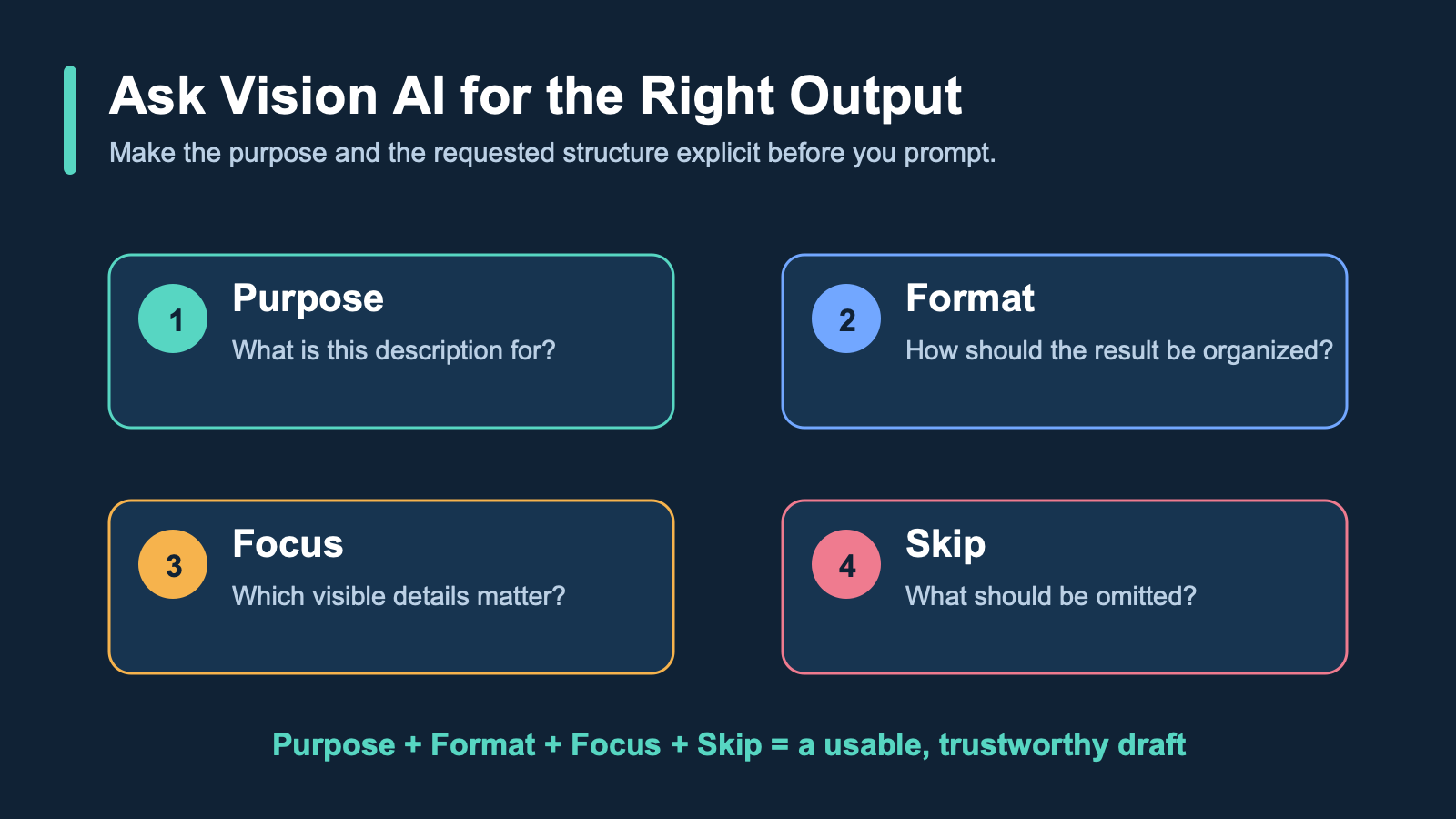
The fix is to name the purpose upfront. Different parts of the product manager job need different shapes of description:
- For alt text (the text description screen readers announce to people who can't see the image), you want a tight, neutral sentence focused on content.
- For bug triage on a customer's screenshot, you want labeled UI elements and the visible error states.
- For release-note visuals, you want the screen's key elements named so the caption matches what's actually shown.
- For analytics-chart interpretation, you want axes, units, the trend line, and the highest/lowest values called out.
A reliable prompt pattern looks like this: Describe this image for [purpose]. Use [format]. Focus on [what matters]. Skip [what doesn't].
For a user-submitted screenshot of a broken product screen headed into an issue-triage update for engineering leadership, you might write: Describe this image for issue triage. Use a bulleted list of visible UI problems by location. Focus on what's broken, missing, or rendering incorrectly on screen. Skip styling and color choices. You've now turned a vague request into something you can drop straight into the ticket.
Telling Observation Apart from Interpretation ⚖️
Here is the single most important habit in this unit: vision AI will hand you observations and interpretations mixed together, in the same confident tone, and it's your job to separate them before you act.
An observation is something visible in the pixels: "The conversion-rate card displays 'NaN%' instead of a number." An interpretation is a guess about cause or meaning: "The pricing service crashed." An inferred intent goes further: "The last release shipped without testing." Only the first kind belongs in an issue-triage update to engineering leadership. The other two are stories the model wrote based on patterns from its training data, not evidence from this specific screenshot.
Watch for tell-tale verbs: "appears to," "looks like it was," "seems to have been," "suggests that." Those are interpretation flags, as is any sentence that names a cause, an actor, or a sequence of events the screenshot can't actually prove.
Here's how that filtering sounds in practice when a peer reviewer catches it:
- Jake: The AI says the dashboard "crashed because the latest deploy broke the API." That's useful for the triage update, right?
- Dan: What does the screenshot actually show?
- Jake: A red error banner and a NaN in the conversion-rate card.
- Dan: Then write "error banner, NaN in conversion card." The "latest deploy broke the API" part is a story. The screenshot can't tell you what caused it.
- Jake: Fair. I'll cut anything that sounds like a cause and just list what's visible.
Notice Dan isn't rejecting AI; he's rejecting AI-shaped fiction dressed up as fact. Your job as the product manager is to be the human filter between the description and whatever leadership does with it.
Turning a Clean Description Into Something Useful 🛠️
Once you've stripped a description down to observations, you can shape it into the deliverable you actually need. The same observation set can become several different artifacts: alt text for the bug ticket and team wiki, a stakeholder update for engineering leadership, issue-tracker notes for the backlog, or accessibility documentation.
Alt text should be short (aim for under 125 characters), neutral, and focused on providing a concise summary of the visual information. Issue-tracker notes are structured and consistent so they're searchable later. A stakeholder update names what's visible, explicitly names what isn't determinable from the image (cause, timing, responsible party), and recommends a next step that gathers the missing information rather than assuming it. The discipline is the same in every format: say what you can see, name the gaps out loud, and don't let a confident sentence sneak past you just because it sounds good.
The throughline of this unit is simple: vision AI gives you a draft, not a verdict, and the value you add as a product manager is sorting signal from story before anything leaves your hands. With that in mind, the next step is a live conversation: you'll walk a peer reviewer through an AI description of a user-submitted screenshot of a broken product screen and defend, line by line, which sentences are observations you can act on and which are interpretations you need to strip.
Summary
This lesson taught you how to use Vision AI to describe product images such as bug screenshots or analytics charts. You practiced requesting structured descriptions for specific tasks, separating objective visible facts from inferred guesses, and refining outputs into professional deliverables such as alt text or stakeholder updates.
