Selecting Scattered Array Elements
Introduction
Welcome back to Accessing Elements the NumPy Way. We’re now in Lesson 3, the final lesson in this course. We’ve used slices to reach neighboring values and update ranges; now we’ll handle positions that are spread across an array. We’ll learn to gather values in the order we choose, use a negative position in an index list, and update several scattered positions with one assignment. By the end, we’ll be able to do all of this without a loop.
When a Slice Can't Reach: Selecting Scattered Elements with an Index List
A slice is a good fit when the values we want sit in a range or follow a regular step. But what if we need positions 0, 2, and 6? A slice would also include positions we may not want. NumPy lets us pass a list of integer positions inside the array’s indexing brackets. This technique is called fancy indexing. Think of the list as a custom set of directions: it tells NumPy exactly which positions to visit.
Building a New Array from Listed Positions
Let’s use the sales array to gather its first, third, and last values. The list [0, 2, -1] contains the positions to select, in the order in which we want them returned.
The outer brackets index sales, while the inner brackets hold the list of positions. As you may recall from the first lesson, a negative index counts backward from the end, and that works inside an index list too: -1 means the final element. So NumPy selects position 0, then position 2, then the last position, and returns them as a new array in exactly that order. The second printed line shows that sales itself is unchanged. Each listed position must be valid for the array, just as with a single index.
Storing the Positions in Their Own Array
The positions do not have to be typed inside the brackets. We can keep them in a separate NumPy array, give it a meaningful name, and use that array as the index. This is handy when the same positions are used more than once.
Because every value in positions is a whole number, its dtype is an integer type, and indexing with it gives the same result as the list:
The positions must be integers. An array such as np.array([0.0, 2.0]) has a float dtype, and NumPy rejects it with IndexError: arrays used as indices must be of integer (or boolean) type.
Reordering Elements with a Custom Index Order
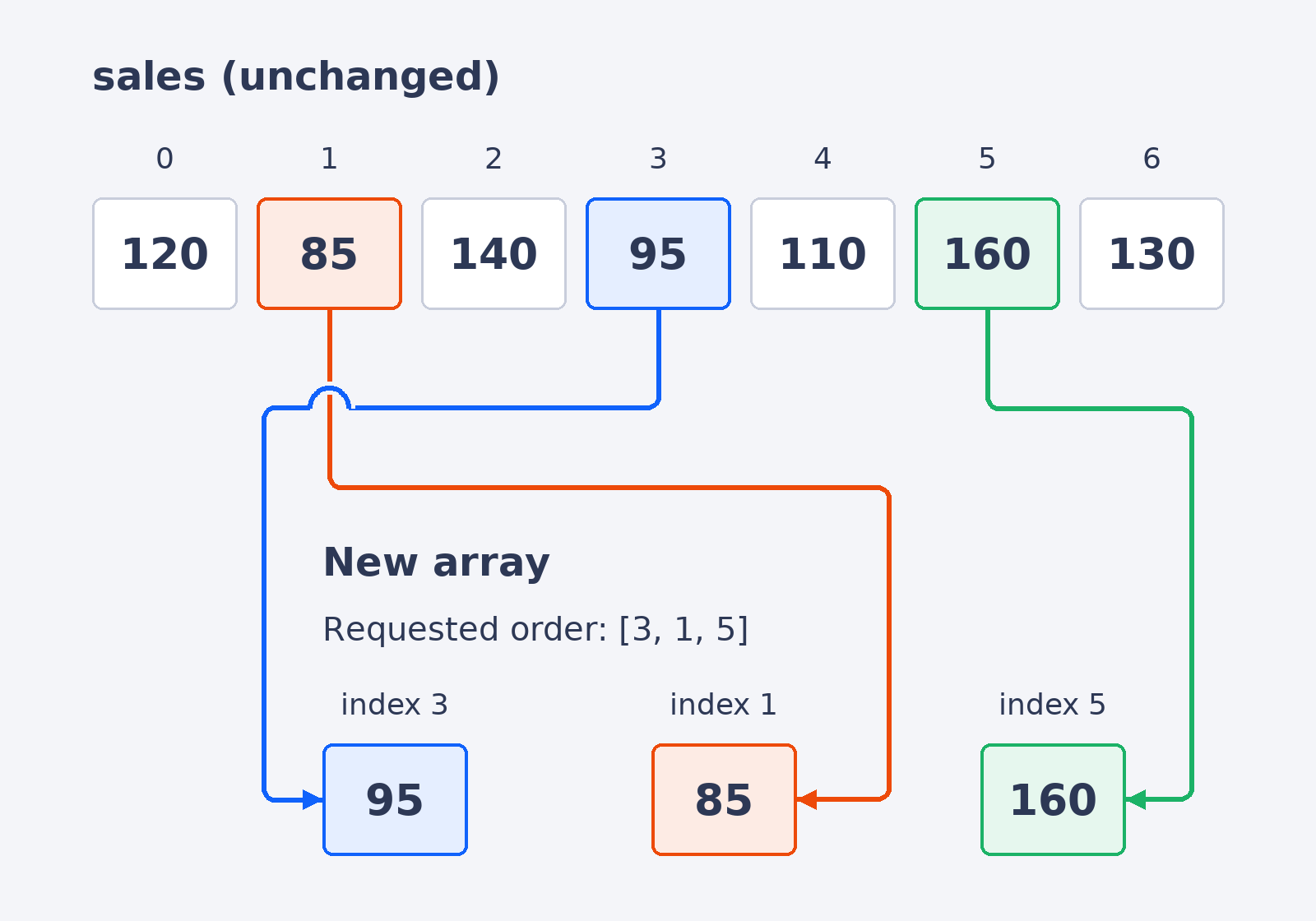
An index list can also put selected values in a different order. Here, the positions [3, 1, 5] are not increasing. NumPy follows that exact order when gathering values:
The values at positions 3, 1, and 5 are returned as a new array. Notice that the result follows the index list rather than the original left-to-right order of the array:
This is useful when we need a particular sequence of values without rearranging the original array.
The arrows below trace each selected value to its place in the new array.
Updating Scattered Positions in Place
So far, we’ve used an index list to read selected values. We can also put the indexed expression on the left side of = to update those positions, using the pattern a[[i, j]] = value. This is similar to slice assignment from the previous lesson, but the index list can point to positions that are far apart. Assigning one value fills every selected position; the original array is modified in place.
Here, NumPy sets the values at positions 1 and 3 to 100. The other positions are left alone. This single assignment updates both locations, with no Python loop.
Watching the Array Change: One Assignment, Several Positions
Let’s bring together the selections and assignment we’ve explored. The code prints two gathered arrays, then updates positions 1 and 3 before printing sales. The output shows the values in the requested orders, followed by the changed original array.
The final line confirms that only the two assigned positions changed. The complete output is:
Conclusion and Next Steps
An index list, or an integer array of positions, lets us select scattered positions, including negative indices, and NumPy returns the values in the order we listed. We can also use an index list on the left side of an assignment to update those positions in place with one statement. In the upcoming practice, we’ll use these skills to gather sales and song data, then change selected parking levels with confidence.
