How Arrays Differ from Lists
Introduction
Welcome back to From Lists to Arrays! Here we’ll compare how Python lists and NumPy arrays handle adding a new value, and look at why they behave differently. We’ll also learn how an array describes its own structure with ndim, shape, and size. By the end, we’ll know what changes, and what stays the same, when we add a value to a list versus an array.
A List Grows in Place
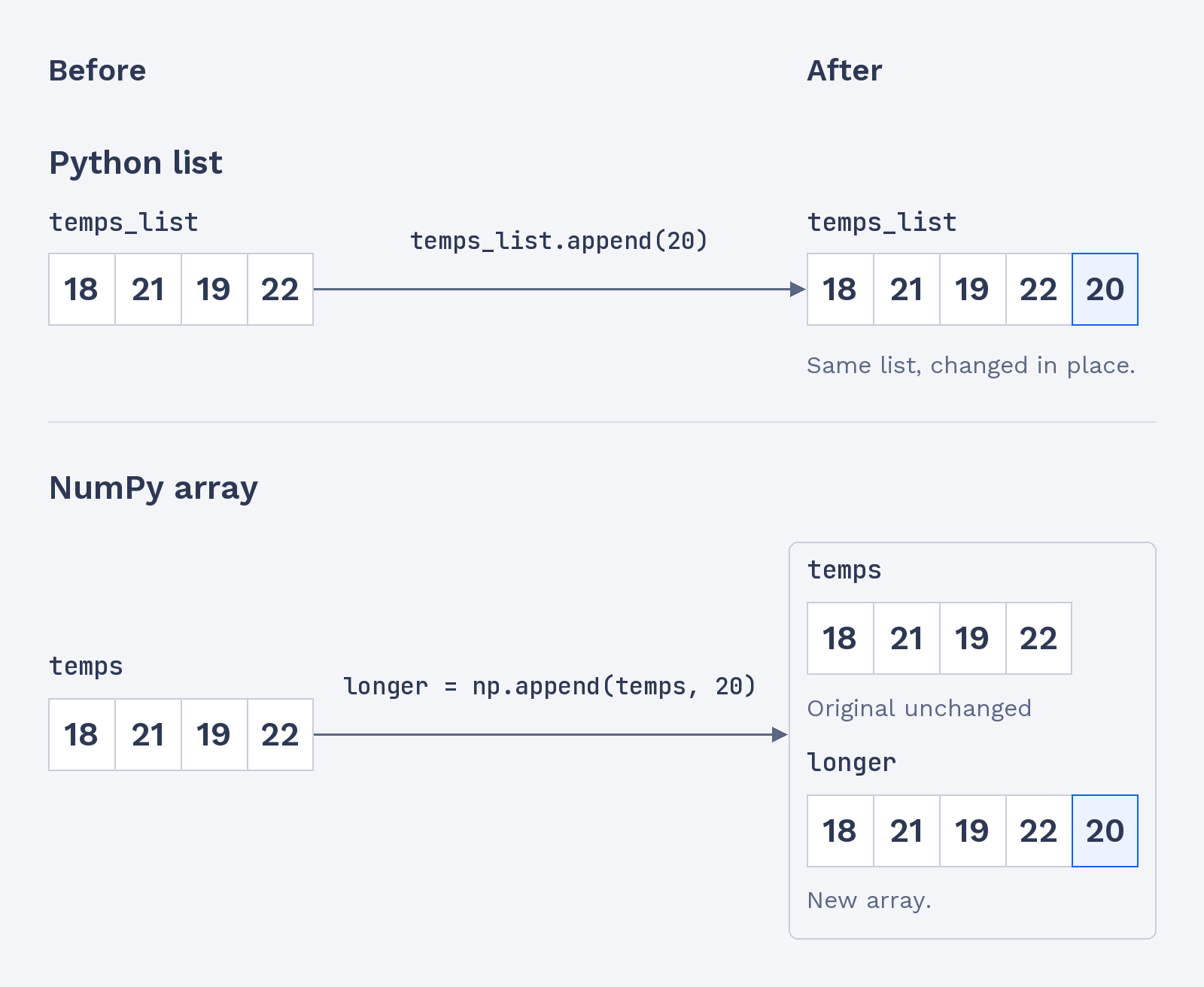
We can add a new element to a Python list with its append() method. The list itself changes, so we don’t need to assign the result to a new variable. This is called changing the list in place. Here, we add 20 to a list of four temperature readings.
The call append(20) adds 20 as the last item. Printing temps_list shows that the original list now has five values.
How Arrays Store Their Values
A list is flexible: it keeps its items as separate objects and leaves itself some spare room, so adding one more is cheap. A NumPy array is built for speed instead. It stores all of its values side by side in one block of memory, and every value has the same type and takes up the same amount of space. NumPy sets the size of that block when the array is created, so there is no spare room at the end. This layout is what makes arrays fast to work with, but it also means an array cannot simply grow where it sits.
Arrays Have No append Method
Because an array’s block of memory has a fixed size, a NumPy array does not have the list’s append() method. If we try to call it, Python raises an AttributeError. (NumPy does have specialized tools for resizing, but they are outside the scope of this course.)
The attempted call is included to show what not to use. Instead, we can use NumPy’s np.append() function, which returns a new array.
np.append Returns a Brand-New Array
To add an item to an array, NumPy has to create a new, larger block of memory and copy the old values into it together with the new one. This is what np.append() does. We pass the original array and the new value, and the function returns a longer array, which we store in longer. The original array is not resized: temps remains unchanged, so we print both variables to see the difference.
The first line prints the original four readings. The second prints the five readings in the new array. We save the returned array because np.append() does not modify temps.
np.append() can also add several values at once if we pass them as a list. Here, two new parcel weights are added to five existing ones:
Every call to np.append() creates a new block and copies all existing values into it. Adding values one at a time in a long loop would repeat that copying again and again, so it is a poor fit. For many additions, collect the values in a Python list first and convert the list to an array once.